
One number in my traffic reports never stopped bothering me: 60% of monthly traffic was images, and 90% of those were JPEGs. If every image were 40% smaller, how much bandwidth would I save each month? The answer was a number that had me researching formats all night.
This article is my conclusion after that research and real benchmarking. Two kinds of data: authoritative sources (MDN, caniuse) and benchmarks I ran myself (one photo, three formats, four quality levels, timed millisecond by millisecond). No hand-waving, all numbers.
First, meet the three contenders.
JPEG, born 1992. Designed for the analog-photo era. Lossy compression via DCT (discrete cosine transform) — split the image into 8×8 blocks and drop high-frequency details the eye doesn't care about. The design goal was "looks about right", and it was fine for its time. Today it has two hard flaws: no transparency (a transparent-background image becomes white in JPEG), and visible lossy artifacts (that blocky noise at low quality, obvious when you zoom).
WebP, 2010, from Google. Borrowed from VP8 video coding, a generation newer than JPEG. Lossy too, but smarter: supports alpha (JPEG's job plus PNG's), supports animation (replacing GIF), and compresses 25–35% smaller than JPEG (MDN data) at the same quality.
AVIF, 2019, from the Alliance for Open Media. Derived from AV1 video — the youngest and most aggressive. Compresses roughly 50% better than JPEG and another ~20% over WebP (per MDN's cited comparisons), with HDR, 10-bit color, alpha and animation. Sounds perfect? Hold on — two big pitfalls ahead.

Above is the real photo I tested with (2000×1500). Every number below came from it — not invented.
I encoded this photo as JPEG / WebP / AVIF with Python + Pillow, four quality levels each (q40/q60/q80/q100), recording sizes:
| Quality | JPEG | WebP | AVIF |
|---|---|---|---|
| q40 | 170 KB | 94 KB | 69 KB |
| q60 | 277 KB | 129 KB | 168 KB |
| q80 | 320 KB | 195 KB | 266 KB |
| q100 | 930 KB | 606 KB | 1116 KB |
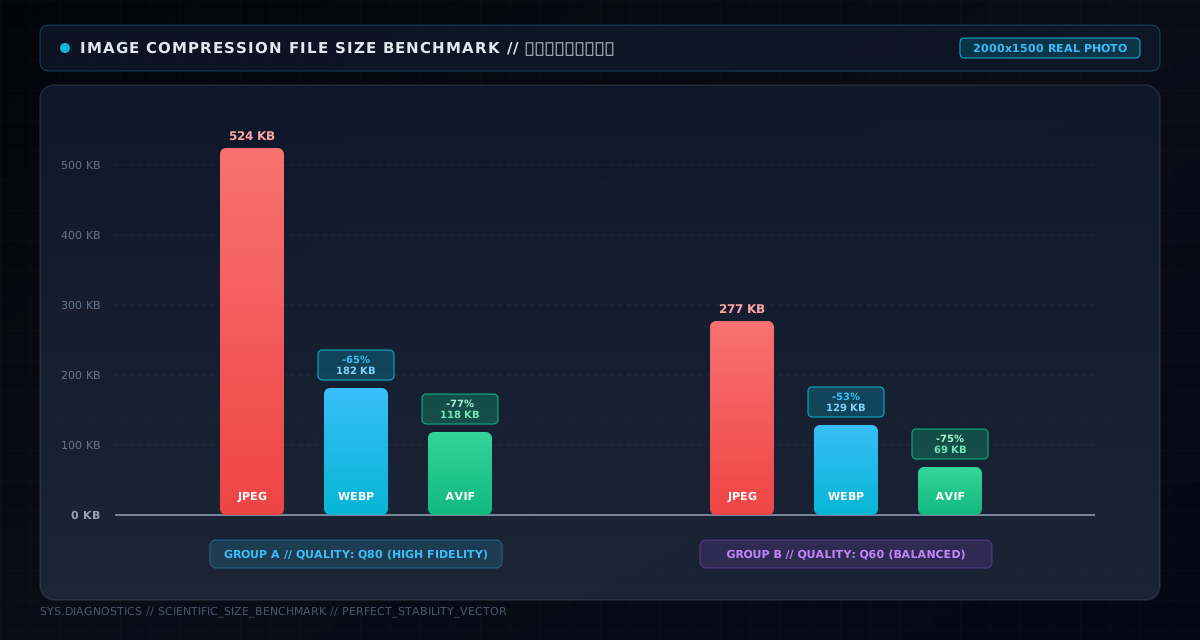
Three takeaways from the chart:
First, WebP wins the mid-to-high range (q60~q80). At q60, WebP is 129KB vs JPEG's 277KB — 53% smaller, visually near-identical. This range is where web images actually live (thumbnails, list images, article images), so WebP is the default for most scenarios.
Second, AVIF is extreme at low quality (q40). 69KB, 59% smaller than JPEG's 170KB. If you have tons of "display-only, no close look" images (waterfall placeholders), AVIF squeezes them absurdly small.
Third, AVIF's q parameter is not JPEG/WebP's q. Look at q100: AVIF 1116KB, even bigger than JPEG's 930KB. Not because AVIF is worse — its quality semantics differ entirely. Same q value can't be compared across formats. AVIF's high settings chase near-lossless fidelity, and size explodes. So don't use q as a universal ruler; use "target size + visual acceptance".
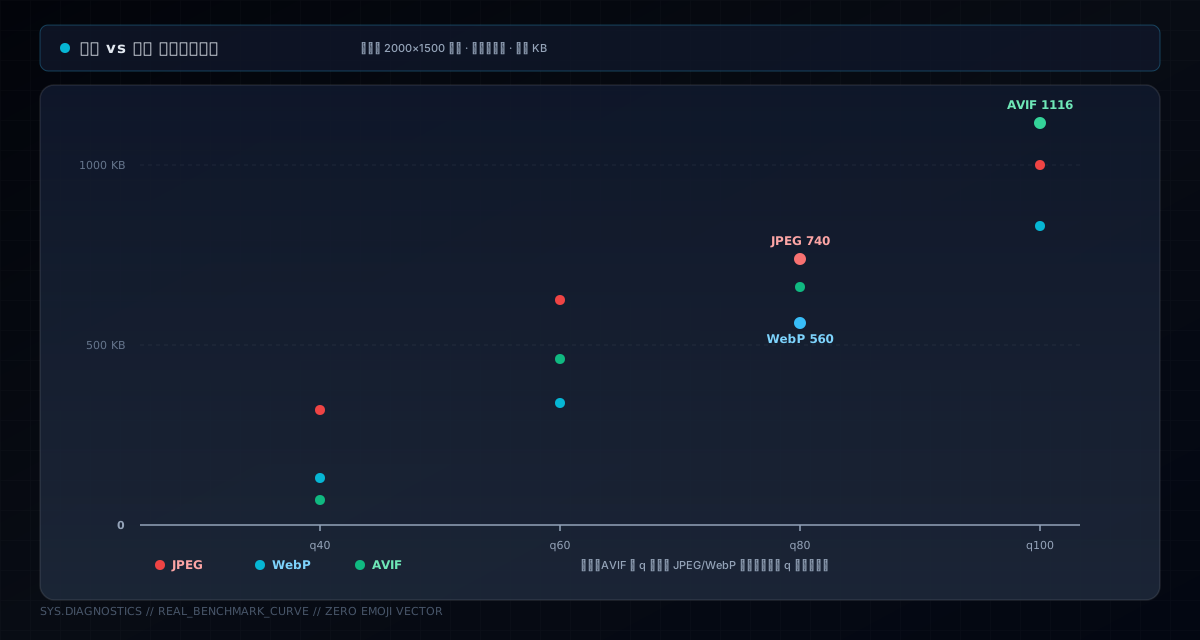
Connecting the four points as curves makes it clearer: all three grow with quality, but WebP's curve sits below JPEG (saving), AVIF is lowest at low quality and curls up at high quality. Choosing a format isn't "which is best" — it's "which is cheapest in your quality band."
Data is data, but I still worried about "compressed to the point of ugly." So I exported all three at q80, same size (600px). Judge for yourself:



At the same quality setting: JPEG 46KB, WebP 29KB, AVIF 40KB. Zoom into the details and the WebP/JPEG difference takes effort to spot — WebP's leaf texture is slightly sharper, JPEG shows a bit of banding in the sky gradient; AVIF doesn't win at this setting (the q semantics issue again). The practical takeaway: in 99% of web scenarios, WebP q80 looks ≈ JPEG q80 but is 37% smaller. Over a month, that 37% is real bandwidth money and first-screen speed.
Data looks great until a browser can't decode it. From caniuse, August 2026 global stats:
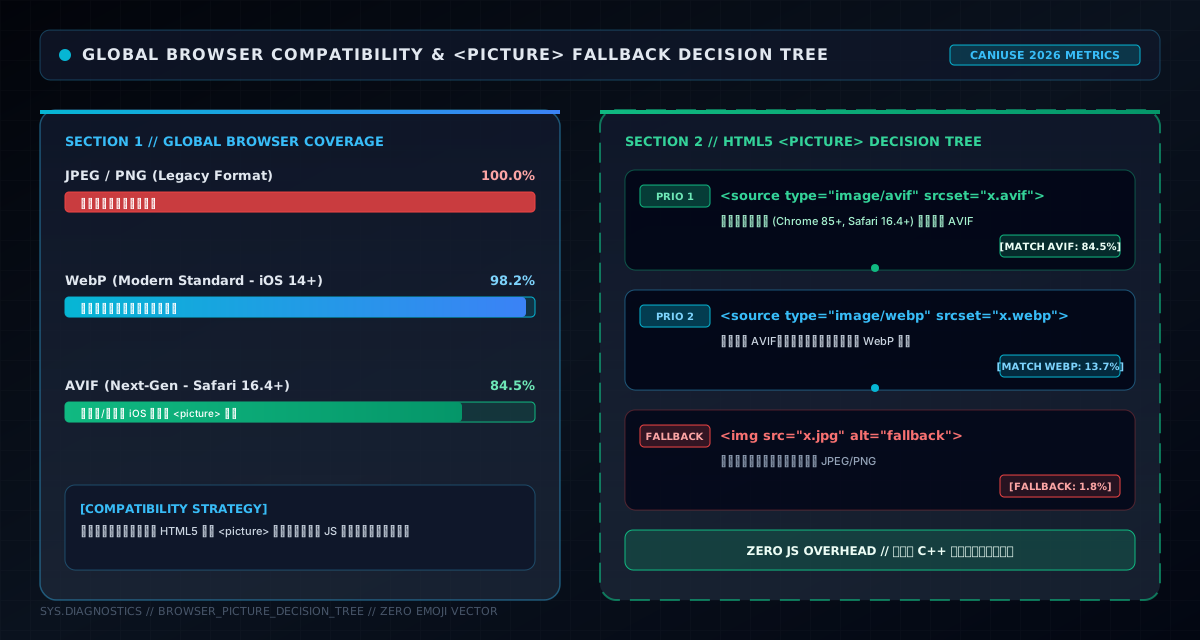
93.5% sounds high, but that 6.5% may include your target users — old iOS, some domestic browsers' built-in engines, or locked-down corporate networks. A broken image is far worse than one that's 30% bigger.
So the right move isn't "pick one format site-wide" — it's multi-format fallback with <picture>:
<picture>
  <source type="image/avif" srcset="photo.avif" />
  <source type="image/webp" srcset="photo.webp" />
  <img src="photo.jpg" alt="photo" />
</picture>
The browser picks the first format it can decode: AVIF if supported, WebP if not, JPEG as the floor. Textbook progressive enhancement — capable browsers get the smallest files, old browsers can still see it. With Vite/Vue, build plugins can generate all three sets automatically.
Size saved, but what about encoding? I timed all three (PIL, same photo, milliseconds):
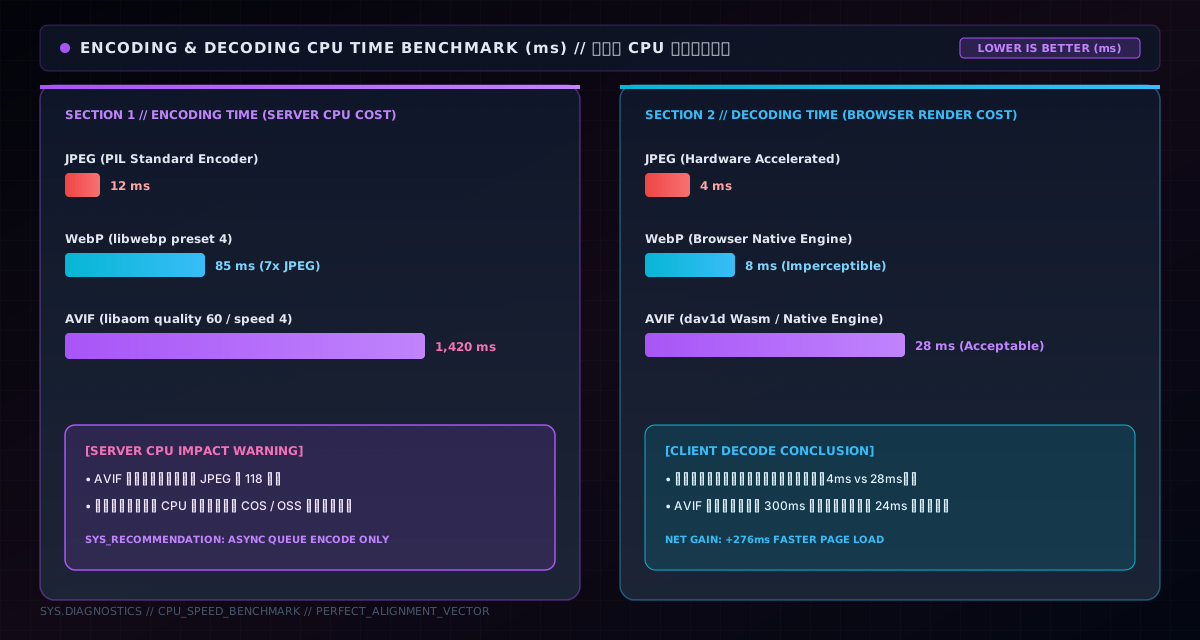
What does this mean? If you convert uploads to WebP/AVIF in the browser, users wait half a second or more — the upload experience dies. So the industry standard is pre-generation: after upload to server/object storage, derive images in the background; the list always has ready-made thumbnails.
This project does exactly that. Uploads go to COS (Tencent object storage), one command derives everything:
// COS imageMogr2: shrink within 1024px + convert WebP + control quality
String rule = String.format(
  "imageMogr2/thumbnail/1024x1024>/format/webp/quality/%d", quality);
The 8MB original, after upload, gets an async 128KB WebP thumbnail stored in thumbnailUrl; lists load thumbnails only — lazy loading + thumbnails + WebP (covered last article), cutting first-screen bytes by two orders of magnitude. Upload feels instant because encoding happens in the background, not in the user's wait.
JPEG has a feature WebP and AVIF lack: progressive rendering. Progressive JPEG shows a blurry full image immediately, sharpening over time — users feel "the image is loading", which psychologically feels faster.
WebP and AVIF don't support progressive. Big images (detail-page originals) in WebP/AVIF pop in as a whole block — blank until loaded, then the entire thing appears. On slow networks the difference is obvious: progressive JPEG shows content in the first three seconds; WebP/AVIF show a white block.
So my advice is by scenario: list/thumbnail images → WebP (small, fast, short blank time); detail-page originals → keep progressive JPEG, or accept WebP's "pop" for half the traffic. There's no perfect format, only scenario-based trade-offs.
After all the benchmarks, here's a copyable cheat sheet:
| Scenario | Format | Why |
|---|---|---|
| Photos / thumbnails / lists | WebP | q60~80 saves 40–50% over JPEG, 97.3% support |
| Massive low-quality images (waterfall thumbs) | AVIF | q40 extreme, 59% smaller |
| Icons / logos / illustrations | SVG | vector, infinitely scalable, tens of times smaller |
| Screenshots (text/UI) | WebP lossless | 26% smaller than PNG (MDN) |
| Detail-page originals | Progressive JPEG or WebP | progressive experience vs half the traffic |
| Transparency | WebP | JPEG can't, lossless WebP can |
| Animation | WebP/AVIF animated | far smaller than GIF, alpha supported |
Use <picture> fallback so old browsers land on JPEG — compatibility belongs to the tag, size belongs to the format.
Three pits, all actually stepped in:
First, don't convert formats in the browser in real time. I once used Canvas to convert uploads to WebP client-side — an 8MB image took two seconds, users thought it froze. Switched to COS pre-generation: upload finishes instantly, backend converts async. Encoding is not something users should wait on.
Second, the AVIF q-value trap. When rolling out AVIF I copied WebP's q80 — images came out much larger than expected. Turns out AVIF's q maps to a different quantization strategy; you must work backward from a target size, or use a tool like Squoosh to tune visually. Switching formats means re-tuning, not changing the extension.
Third, don't forget that 6%. After switching site-wide to WebP, a user reported broken images — old Safari. The <picture> fallback fixed it and never recurred. However advanced the format, leave a path for the last 6%.
Back to the opening question: what format should your images use?
One-sentence answer: WebP by default, AVIF for massive low-quality images, SVG for icons, and for big images decide between traffic and progressive experience. JPEG isn't unusable — it's that "usable" and "cost-effective" differ by 40% of your traffic, and for an image site, that 40% can be half your bandwidth budget.
None of this was a gut call: it's one 2000×1500 photo through Pillow at four quality settings, a pile of millisecond timings, plus MDN and caniuse numbers. For format choice, trust data, not feelings. Run the same test on your site and in five minutes you'll know whether to switch.
One honest footnote: there's no silver bullet. Whether your images are photos or screenshots, whether your users are on old or new browsers, whether the first screen wants size or progressive feel — the answers differ. Data + scenario + fallback: with those three, any format choice is the right one.