
I still remember the day the site went live.
The frontend ran beautifully locally — routing, pages, animations, not a single complaint. I pushed dist/ up, opened my phone, typed /zh/about into the address bar — white screen, one line: 404 Not Found.
I thought the deploy had failed. Re-pushed it, refreshed, still 404. My first reaction was to curse the server: did this stupid Nginx even get configured? After the cursing subsided, I remembered: an SPA has only one index.html, routing is a frontend concern, and the server has no idea what /zh/about even is. It can't find the file, so it follows the rules and returns 404. Not a single thing wrong with it.

Everyone knows the fix — try_files $uri /index.html. I added it, tested locally, it worked. Day two in production, a user reports: refreshing the profile page still 404s.
I was genuinely confused — I configured it! I stared at the config for ages before it clicked: the path is /zh/about, so $uri is the whole /zh/about, and my fallback was /index.html. The match worked fine, but /zh/about is neither a file nor a directory, so Nginx walks the chain and lands on the root /index.html — the entry for the default language.
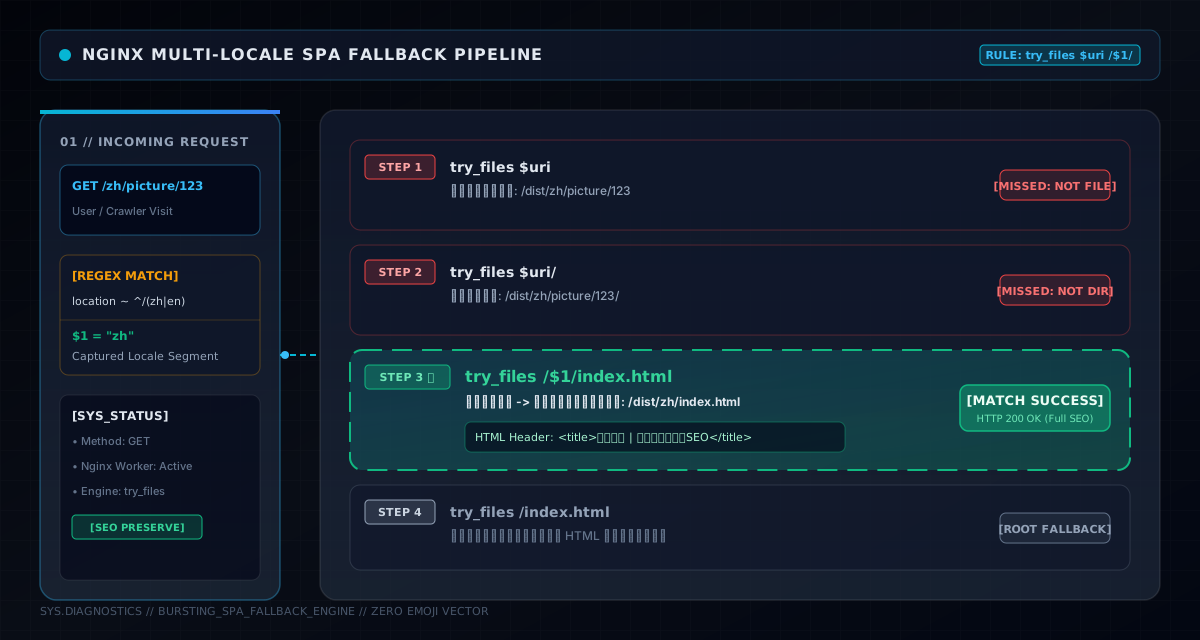
The real fix was adding one more level to the chain:
# /zh/xxx or /en/xxx
location ~ ^/(zh|en)(/.*)?$ {
    try_files $uri $uri/ /$1/index.html /index.html;
}
$1 is the zh or en captured by the regex. Meaning: if /zh/about is neither file nor directory, go look at /zh/index.html — the Chinese prerendered home generated at build time, with Chinese title, description and H1. Only if that's missing too, fall back to the root index.html.
I stared at that /$1/index.html for a long time, and the more I looked, the more I felt it was the most valuable line in the whole config. It's not "can't find it, go home" — it's "can't find it, go to the right language's home." When Baidu's spider fetches /zh/picture/123, it sees a complete Chinese site description, not a default-language shell.
404s solved, I started chasing performance. Added caching for static assets — a year for /assets/, thirty days for images — all fine. Then one day I shipped a new version and the tester said: still the old one.
I was dumbfounded. The deploy logs said success! Then I opened DevTools and saw it: the HTML was cached. For "performance" I'd given HTML expires 1d too. The result: users holding the old HTML, referencing old hashed JS, and the new version could never load.
That day I wrote this snippet and never touched it again:
location / {
    try_files $uri $uri/ /index.html;
    add_header Cache-Control "no-store, no-cache, must-revalidate";
}
HTML must not be cached. Vite emits JS/CSS with content hashes — SnakeGamePage-DR39kSHf.js — hash changes, filename changes. So /assets/ can be cached to death for a year: browsers keep the old cache until the new deploy changes the URL and naturally loads new files. But HTML is the entry; it must fetch the latest every request, so it can reference the latest hashed assets.
When I finally understood this, I drew myself a diagram:
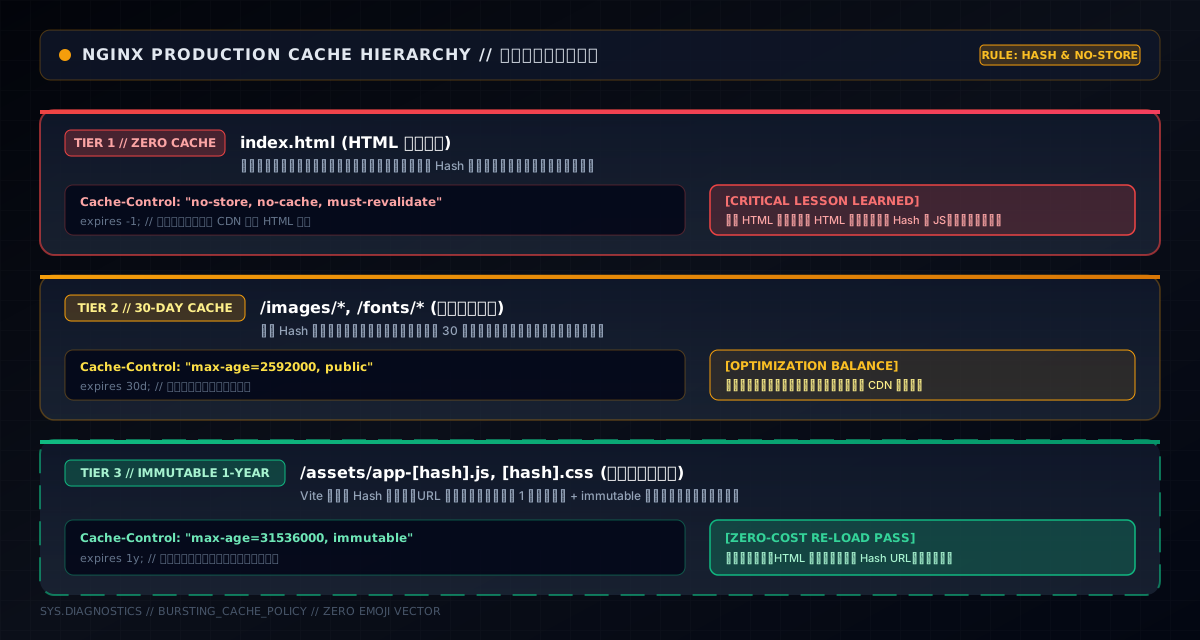
Versioned assets a year, plain static thirty days, HTML never. Cache what never changes to death; don't cache a single byte of what changes. That simple — but it cost me a day's tuition.
Domain canonicalization is old hat: yuemutuku.com and www.yuemutuku.com are two sites, splitting weight. I added the 301:
server {
    listen 80 default_server;
    server_name yuemutuku.com _;
    return 301 https://www.yuemutuku.com$request_uri;
}
Tested on my phone — typed yuemutuku.com, it jumped to https://www.yuemutuku.com, all good. I moved on.
Until one day I was flipping through CDN logs and saw something weird: the whole site is https, yet a bunch of requests were coming in over http, with 301s pointing to http addresses. I traced it and figured it out: this Nginx only receives HTTP origin pulls from the CDN (port 80), and Nginx defaults to absolute_redirect on — when generating an absolute redirect address, it uses the protocol of the request it received, which is http. A browser sitting on an https page receives an http 301, and downgrades.
The fix was one line:
absolute_redirect off;
port_in_redirect off;
With relative redirects, a browser following a 301 from an https page stays on https. One line, and I wrote TH01 in the comment — "avoid downgrades entirely." It's for me three months from now, so I don't forget why I wrote it.
The site has i18n. At first I switched language via ?lang=en — the lazy way. Later I moved to path-style /en/. When I made the change, I thought: whatever, the frontend still supports the old params, no harm done.
Three months later I opened Search Console and found both ?lang=en and /en/ in the index — the same content at two addresses, weight split in half. That's when it hit me: search engines have memory. URLs they've indexed don't vanish just because you stopped using them.
The fix was, again, a 301:
location = / {
    if ($arg_lang ~* ^(zh|en)$) {
        return 301 /$arg_lang/;
    }
}
?lang=en permanently redirects to /en/, weight follows. Small detail here: location = / matches the home page exactly — because business pages carry other query params (?id=123 and such), a blanket redirect would hurt them. After about a month, the ?lang URLs faded out of the index.
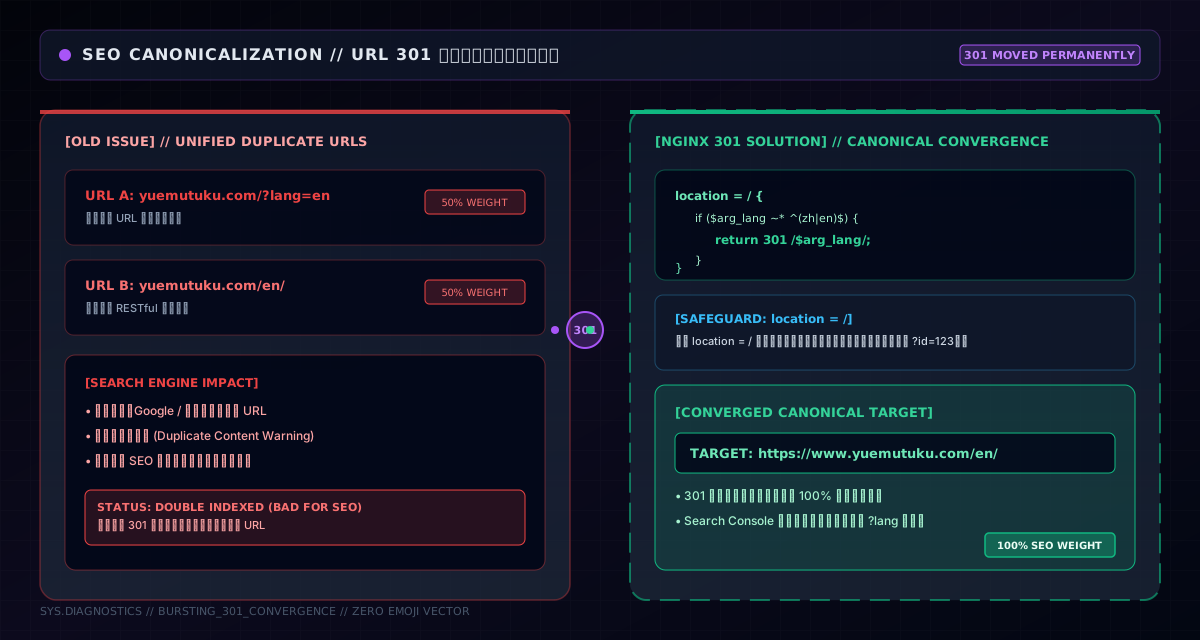
I also kept the frontend compatible — resolvePreferredLocale() reads ?lang= first, then localStorage — so legacy links show the right language even without Nginx. Plug both ends, and it's actually clean.
404 fixed, cache fixed, redirects sorted — I thought I was done. Then one day, on a whim, I used Baidu's fetch tool on my own site: the pages contained only <div id="app"></div>, no title, no description, a hundred URLs and a hundred identical shells.
That moment's frustration was about equal to day one's 404.
The problem with SPAs: all content is rendered by JS in the browser, and crawlers don't execute JS at fetch time. What you deliver to search engines is a shell plus a default title. Can't blame Baidu — the architecture is born this way.
My solution was build-time prerendering: a script that runs after npm run build, reads the locale files, and writes each page's title, description, canonical, hreflang, JSON-LD — even the full guide article text — straight into static HTML.
// scripts/prerender.mjs — runs after build
// reads locale files → generates full <title>/<meta>/<link> + article HTML
// no JS execution; Baidu/Google get complete content on first fetch
const md = new MarkdownIt({ html: false, linkify: true })
Together with generate-locale-html.mjs, it produces dist/zh/index.html and dist/en/index.html — the level-three fallback files, no JS needed. Production dist/ became:
dist/
├── index.html              # SPA entry (root fallback)
├── zh/
│   ├── index.html          # Chinese prerendered home (title/desc/H1)
│   ├── about/index.html    # Chinese about page
│   └── guides/a27/index.html  # full guide body injected
├── en/                     # English mirror
└── assets/                 # versioned assets (1y cache)
A few extra seconds per build, and crawlers, JS-less environments and weak-network users all read the complete content. For a content site this is the highest-ROI path I know — prerendering is taking "content crawlers would need JS to see" and writing it as static HTML at build time.
Chat went live, and users reported: it keeps disconnecting, then reconnects a few seconds later, on a loop.
My first instinct was that the frontend reconnect logic was badly written. I debugged for ages — the frontend was fine. Then packet capture revealed the real culprit: Nginx's WebSocket proxy. The default proxy_read_timeout is 60 seconds; a WebSocket connection with no messages for 60 seconds gets killed by Nginx. The client is forced to reconnect, reconnect means handshake, and the experience is stutter after stutter.
The fix:
location /api/ws/ {
    proxy_pass http://yuemu-picture-backend:8080/ws/;
    proxy_http_version 1.1;
    proxy_set_header Upgrade    $http_upgrade;
    proxy_set_header Connection $connection_upgrade;
    proxy_read_timeout 86400s;  # long-lived, a day
    proxy_send_timeout 86400s;
}
Three essentials: proxy_http_version 1.1 (WebSocket needs HTTP/1.1), Upgrade and Connection header passthrough (protocol upgrade), and timeout stretched to a day (a long-lived connection shouldn't be strangled by a 60-second timeout). This works together with a map:
map $http_upgrade $connection_upgrade {
    default upgrade;
    ''      close;
}
Normal requests get Connection: close; only WebSocket requests get upgrade — set upgrade for everything and ordinary requests try to upgrade the protocol, adding pointless overhead.
After launch, I spotted a string of weird requests in the logs: /SDK/xxx, /admin, /.env. One after another — someone scanning your server for admin panels, config files and unprotected endpoints. Cold sweat for a while: if those paths existed and were unprotected, I didn't want to think about the consequences.
Luckily I'd tossed in a block of rules, which later proved to be a lifesaver:
# sensitive path blocking
location ~ ^/SDK/  { return 404; }
location ~ ^/admin  { return 404; }
# dotfiles rejected outright (.env/.git etc.)
location ~ /\. { deny all; access_log off; log_not_found off; }
/SDK/ and /admin return 404 (not 403 — 403 tells a scanner "this exists"; 404 makes it think it doesn't), dotfiles are denied outright (.env, .git, .htaccess are the top info-leak targets). After adding these, the scanner log quieted down. Security isn't something you do after the incident; it's laying mines in your logs every day.
Later in the performance push, I turned on Gzip. Looking at the long gzip_types list, I thought: static assets all compressed, lovely. Then I checked the traffic report — images hadn't shrunk by a single byte.
Turns out Gzip is huge for text content (HTML, CSS, JS, JSON, SVG) and basically useless for images (PNG, JPG, WebP) — images are already highly compressed binaries; compressing them again yields nothing and burns CPU. I'd put image types into gzip_types, making Nginx do a pointless compression attempt on every image.
gzip on;
gzip_comp_level 5;      # balance of ratio and CPU
gzip_min_length 512;    # skip under 512 bytes (compressing makes it bigger)
gzip_types
    text/css
    text/javascript
    application/json
    image/svg+xml       # SVG is text, worth compressing
    ...;
SVG is an image format, but its content is XML text — great compression, so it stays. Real bitmaps (PNG/JPG/WebP) don't belong here at all. Compression understands content type, not file extension — another tuition bill.
An image community, inevitably, sees people hotlinking images and others wanting to call our API from their own sites. One partner told me: your API won't respond from our end — CORS error.
I started off confident: isn't CORS something your backend configures? Then I realized: our API is meant for external use (open API), so CORS is ours to open up. I added it to the main site:
set $cors_origin  "*";
set $cors_methods "GET, POST, PUT, DELETE, OPTIONS";
set $cors_headers "Origin, X-Requested-With, Content-Type, Accept, Authorization";

# preflight passes straight through
if ($request_method = OPTIONS) {
    return 204;
}
add_header Access-Control-Allow-Origin  $cors_origin always;
add_header Access-Control-Allow-Methods $cors_methods always;
add_header Access-Control-Allow-Headers $cors_headers always;
add_header Access-Control-Allow-Credentials "true" always;
add_header Access-Control-Max-Age "86400" always;
Note the OPTIONS preflight needs its own handling — browsers send a preflight first for cross-origin complex requests (custom headers, non-simple methods); if Nginx doesn't answer it, the browser reports a CORS error. Access-Control-Max-Age caches the preflight result for a day, cutting preflight counts. Access-Control-Allow-Credentials: true serves requests with cookies (our login state rides cookies; cross-subdomain sharing depends on it). After those headers, the partner's calls worked, and I learned "open platform isn't a slogan — it's header lines configured one by one."
Prerendering covers every static route, but /picture/123 — dynamic routes with IDs — can't all be pre-generated. In the production config I left one trick: detect by User-Agent; if it's a Baidu/Google spider, proxy to a rendering service (headless browser executing JS live); normal users get the SPA. It's more thorough, for sites heavy on dynamic content. For now prerendering + locale fallback is enough for me; that trick is for the future.
Writing this out, I realize the project actually has four sites: main, official, games, tools. They share one nginx.conf, each a server block with the same skeleton — static regex, SPA fallback, /api/ reverse proxy, WebSocket, robots/sitemap/health. The games site adds a "same-origin backend proxy" because it reuses the main site's account system and leaderboards; the tools site is the cheapest, GET only.
How do the sub-sites share login state? Via the satoken cookie across subdomains (cookie.domain=yuemutuku.com). Users log in on the main site, play leaderboards on the games site — same session, no second login. That whole "multi sub-site + shared account" shape, done in one config.
Looking back now, every corner of this config has a story underneath: /$1/index.html is the night of 404s, no-store is the day the cache locked itself, absolute_redirect off is the https-downgrade confusion, the location = / 301 is the three months of split URLs. The directives are still just directives, but under every line there's a pit I fell into.
If you're deploying an SPA, this config is directly copyable. When you copy it, don't complain that it's "roundabout" — every layer was bought with a real problem: cache versioned assets forever, never cache HTML, leave a locale level in the fallback chain, keep regex ordering straight, guard against https downgrades. Configs look tidy for other people to read; every bit of the mess is the ass I wiped myself.