
To most users, login means "type in your account and password, you're in." But for a real product, login is a whole system: how sessions are established, renewed, and coexist across devices, and how the login event itself is recorded and used — like the "new device login" notification on your phone, which has a whole login-audit system behind it.
This article takes login apart from "checking the password" to "the audit loop." The protagonists are Sa-Token (a lightweight auth framework) and a complete login-record system: one login records the IP, device, city and risk level, and asynchronously pushes a tiered notification. You'll find the craft of login doesn't live in that one "verify password" moment, but in everything after it.
A basic question first: after a user logs in, how does the system know "he is he"? The traditional approach is session + cookie: the server stores a session, stuffs the session ID into a cookie, and the browser carries it on every request. That approach itself is fine — the problem is "distribution." With multiple servers, which machine does the session live on? That's why this project uses Sa-Token with Redis: session state doesn't live on a single machine, it lives in shared storage.
// in the user service, the core of login is one line
StpUtil.login(user.getId());
// anywhere after, you can get the current user
Long userId = StpUtil.getLoginIdAsLong();
boolean isLogin = StpUtil.isLogin();
StpUtil is Sa-Token's facade — login, logout, get the current user, check whether logged in, all on it. Behind it, it maintains a "token ↔ user ID" mapping; the token lives in Redis (via the sa-token-redis-jackson integration) and is passed to the frontend by default through a response header or cookie. The frontend's request.ts sets withCredentials: true precisely so the cookie's token rides along on every request.
Why Sa-Token instead of Spring Security? It's a very practical choice. Spring Security has full features, but complex configuration — filter chains, SecurityContext, method-level security, all concepts, and overkill for a small site. Sa-Token's selling point is "lightweight and easy": one StpUtil.login is login, one @SaCheckLogin annotation is authorization, @SaCheckRole("admin") is role checking. It pushes "authorization" — a high-frequency need — down to its lowest cost.
More importantly, Sa-Token's sessions are naturally bound to Redis — the token lives in Redis, so it natively supports sharing across instances. That's a dimension above "storing the session in single-machine memory," and the reason it can survive clustered deployment. Choosing an auth framework isn't about picking the most feature-complete one — it's about picking the one that fits "the login scenario" most smoothly.
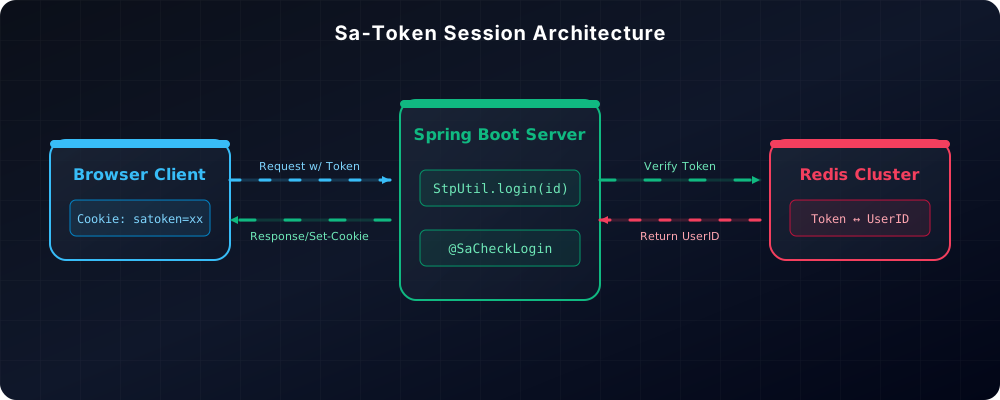
Dig one layer deeper into Sa-Token's session model. What happens behind StpUtil.login: generate a token, write "token ↔ user ID" into Redis, and return the token to the frontend in the response. On every subsequent request, the frontend carries the token and the backend looks up "who does this token correspond to" in Redis. The benefit of this "stateless token + Redis mapping": any server can validate any request — look up the token in Redis and get the user, no dependence on which machine the request lands on. That's the root reason sessions can survive a cluster.
There are also annotations like @SaCheckLogin. Hang one on a controller method and Sa-Token's interceptor validates "is logged in" before the method executes; if not, it throws an exception and returns 401. That's an order of magnitude cleaner than handwriting if (!StpUtil.isLogin()) return ... in every method. Declarative authorization is the key that lifts "authorization" out of the business code — business methods just do their own logic; authorization is a framework concern.
This project uses @SaCheckRole and @SaCheckPermission widely — @SaCheckRole("admin") is role-level (admin endpoints), @SaCheckPermission("picture:upload") is permission-point-level (specific to one operation). Roles and permissions differ in granularity: a role is "who you are," a permission is "what you can do." Managing admin endpoints with roles (coarse, few people) and user operations with permissions (fine, many people) is the most common division of these two annotation sets. There's also an HttpRequestWrapperFilter that wraps sensitive requests — processing sensitive fields in the request body (like passwords) before they reach business code, so sensitive info doesn't leak into logs or audit. Authorization only solves "can you enter"; sensitive-data handling solves "if you're in, leave no trace" — you need both layers.
One last note on Sa-Token's ecosystem: it's not just login — it also handles online statistics, session banning and account banning. StpUtil.disable(id) can make an account unable to log in at all; an admin calls one line to ban a violating account, and paired with multi-device kick-out, "can log in, where they can log in, whether they can log in" all sit in the framework's hands. These abilities turn "banning" from an ops action into a framework call — a must-have for community products, and the hidden payoff of choosing a mature auth framework: you thought you were just picking login, but you got the whole session-management toolbox along with it.
What really sets this login system apart from "good enough" is the recordLogin method — one successful login records six things:
public Long recordLogin(User user, String loginMethod, HttpServletRequest request) {
    // 1. client IP
    String loginIp = ServletUtils.getClientIP(request);
    // 2. device info (parsed from the User-Agent)
    DeviceInfoUtil.DeviceInfo deviceInfo = DeviceInfoUtil.parseDeviceInfo(request);
    // 3. location (ip2region offline lookup)
    String loginLocation = RegionUtils.getCityInfo(loginIp);

    UserLoginRecord loginRecord = new UserLoginRecord();
    loginRecord.setUserId(user.getId());
    loginRecord.setLoginTime(new Date());
    loginRecord.setLoginIp(loginIp);
    loginRecord.setLoginLocation(loginLocation);
    loginRecord.setDeviceType(deviceInfo.getDeviceType());
    loginRecord.setDeviceName(deviceInfo.getDeviceName());
    loginRecord.setOsType(deviceInfo.getOsType());
    loginRecord.setOsVersion(deviceInfo.getOsVersion());
    loginRecord.setBrowserType(deviceInfo.getBrowserType());
    loginRecord.setBrowserVersion(deviceInfo.getBrowserVersion());
    loginRecord.setUserAgent(deviceInfo.getUserAgent());
    loginRecord.setLoginStatus(1); // success
    loginRecord.setLoginMethod(loginMethod);
    loginRecord.setSessionId(request.getSession().getId());

    // 4. risk level
    int riskLevel = detectLoginRisk(user.getId(), loginIp, deviceInfo.getDeviceType());
    loginRecord.setRiskLevel(riskLevel);
    if (riskLevel > 0) {
        loginRecord.setRiskReason(getRiskReason(riskLevel, loginIp, loginLocation));
    }

    // 5. save
    this.save(loginRecord);
    // 6. asynchronously send the login notification
    sendLoginNotification(loginRecord);
    return loginRecord.getId();
}
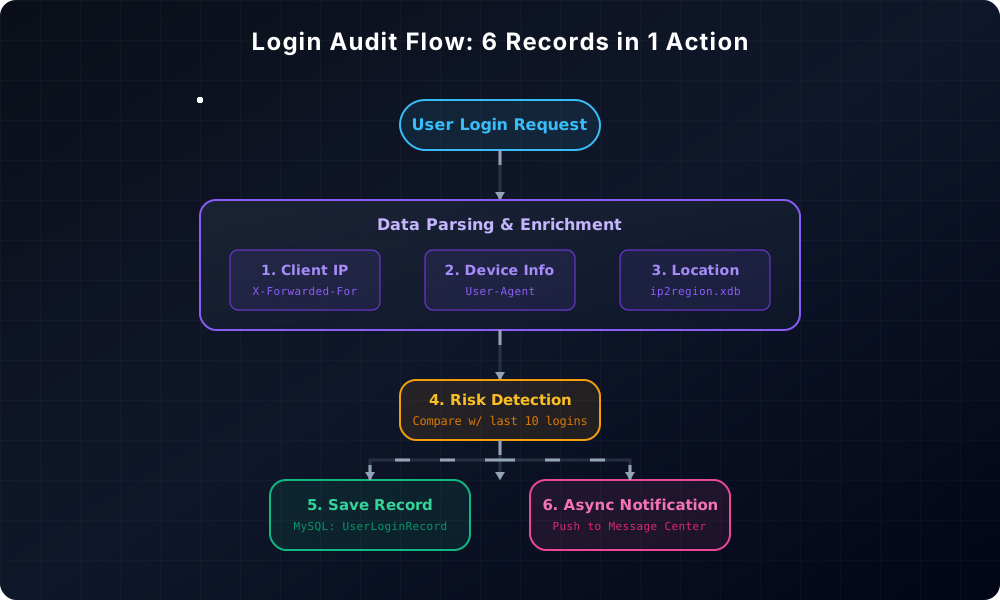
IP, device, city, risk, notification — one login records and pushes all of it. Of the six, IP and city are "where you logged in," device is "what you logged in with," risk is "is this login suspicious," and the notification is "let the user know." Together, one login record becomes a complete "login event snapshot."
Why record so much? Two uses: user-side — the login-record page shows "time/IP/location/device," letting users judge "this wasn't me"; security-side — audit logs are the first-hand material for spotting abnormal logins and brute force. Login logs aren't "nice to keep" — they're "traceable when something happens, visible when something's abnormal."
One easily-ignored field: loginMethod — recording which method this login used (password, WeChat code, admin manual login, etc.). Why record even the method? Because different methods carry different trust levels: password login can be credential-stuffed, WeChat-code login is bound to a WeChat identity and relatively trustworthy. When auditing, seeing "this account has been logging in via WeChat lately, then suddenly one password login" is itself a signal worth watching. The login-method dimension is a column in the audit that's often ignored but carries real information.
And sessionId — recording the session this login corresponds to. Its value is "event correlation": when you later want to trace "what did this session do," the login record lets you locate which login created it. A login record isn't just "logged in once" — it's the "entry archive" of the account's entire lifecycle.
DeviceInfoUtil.parseDeviceInfo is an easily-underestimated tool — it parses device type, device name, operating system and browser out of the User-Agent string:
DeviceInfoUtil.DeviceInfo deviceInfo = DeviceInfoUtil.parseDeviceInfo(request);
// → deviceType: "Mobile" / "Desktop" / "Tablet"
// → deviceName: "iPhone 15 Pro" / "Pixel 8"
// → osType: "iOS" / "Android" / "Windows"
// → osVersion: "17.2" / "14"
// → browserType: "Chrome" / "Safari"
// → browserVersion: "131.0"
The User-Agent is the "self-introduction" every browser sends on every request, hiding the OS, browser and even the device model inside. parseDeviceInfo is a series of pattern matches — hit "iPhone" and it's an iOS phone, hit "Chrome" and that's the browser version. This parsing depends on no external service; it's pure local string matching.
Device info is the core basis in risk detection — later you'll see that "common device" is judged by deviceType. Ten logins from the same phone is normal; a login from a new device can be a risk. The device fingerprint is "who you are," a stable identifier.
But the device fingerprint has a natural limitation: the User-Agent can be forged. Write a crawler and tweak the User-Agent, and you can pose as a phone or desktop. So this device info is only used for "rough comparison against the behavior baseline," not as the sole strong-verification basis — it's a reference for "is this device common," not proof of "who you are." Every signal in a security system has to know its own confidence level: IPs drift (mobile networks, proxies), UAs can be forged; what's really reliable is stacking multiple signals.
One detail: the deviceName that parseDeviceInfo extracts (say "iPhone 15 Pro") gets displayed on the login-record page — the user sees "oh, it's my phone" at a glance, far more convincing than just a device type. Audit data isn't just recorded; it has to be shown in a way users can understand, otherwise no matter how complete the records are, users just think "can't understand, never mind."
For IP location, the usual thought is "call an IP-database API." But this project uses ip2region — an offline IP database whose xdb file loads into memory at startup, with zero external calls per query:
// at startup, load ip2region.xdb into memory
byte[] cBuff = Searcher.loadContentFromFile(dbPath);
SEARCHER = Searcher.newWithBuffer(cBuff); // in-memory query object

// on query, purely local computation
public static String getCityInfo(String ip) {
    String region = SEARCHER.search(ip);
    // → format like "China|Guangdong|Guangzhou"
    return parseCity(region);
}
Why not an online API? Three reasons. Fast — in-memory queries are microsecond-level; an online API is a network round-trip, and login is a high-frequency operation that can't afford that. Stable — no dependence on a third party's availability; ip2region being down doesn't affect login. Cheap — download the IP file once and use it forever, no per-call billing. Offline lookup is perfect for "login records": it doesn't need 100% precision, just "this IP is roughly in which city" is enough for the user to judge.
There's a detail here: the xdb file sits in the classpath (/ip2region.xdb), and at startup it's first copied to a temp directory before loading. Why the extra step? Because classpath resources are read-only, and ip2region's loading requires reading from a file path — so first FileUtils.writeFromStream copies it out, then loads by path. This "copy from classpath to a readable path" maneuver is a common fix for a whole class of resource-loading tools.
ip2region's query result is a country/province/city format like "China|Guangdong|Guangzhou," which getCityInfo parses into a readable city name. There's a defensive detail too: ip.trim() before parsing, and returning "unknown" on query failure — a dirty IP must never crash the whole login-record flow. Login records are "best-effort" audit — if the IP can't resolve to a city, record "unknown," and login itself is unaffected.
Why is ip2region's data good enough? Because for "login location," it's over-precise — the user only needs "which city is this IP roughly in" to judge "was that me logging in." City-level precision is more than enough for this use, and ip2region's city-level lookup is free, offline and microsecond-level. Matching an "good-enough" scenario with a "just-right" tool is smarter than matching it with the best tool — a high-precision online IP database is waste for login audit.
The most valuable part of the login record is detectLoginRisk — it judges this login's risk level, based on recent login history:
public int detectLoginRisk(Long userId, String loginIp, String deviceInfo) {
    // take the most recent 10 successful logins
    List<UserLoginRecord> recentLogins = ...; // order by time desc, LIMIT 10

    if (recentLogins.isEmpty()) {
        return 0; // first login, normal
    }

    // is it a common IP?
    boolean isCommonIp = recentLogins.stream()
            .anyMatch(record -> loginIp.equals(record.getLoginIp()));
    // is it a common device?
    boolean isCommonDevice = recentLogins.stream()
            .anyMatch(record -> deviceInfo.equals(record.getDeviceType()));

    // how many logins within 1 hour?
    long recentLoginCount = recentLogins.stream()
            .filter(r -> now - r.getLoginTime() < 3600000)
            .count();

    if (!isCommonIp && !isCommonDevice) return 2; // high risk: new IP and new device
    else if (!isCommonIp || !isCommonDevice) return 1; // suspicious: new IP or new device
    else if (recentLoginCount > 5) return 1; // suspicious: frequent logins
    return 0; // normal
}
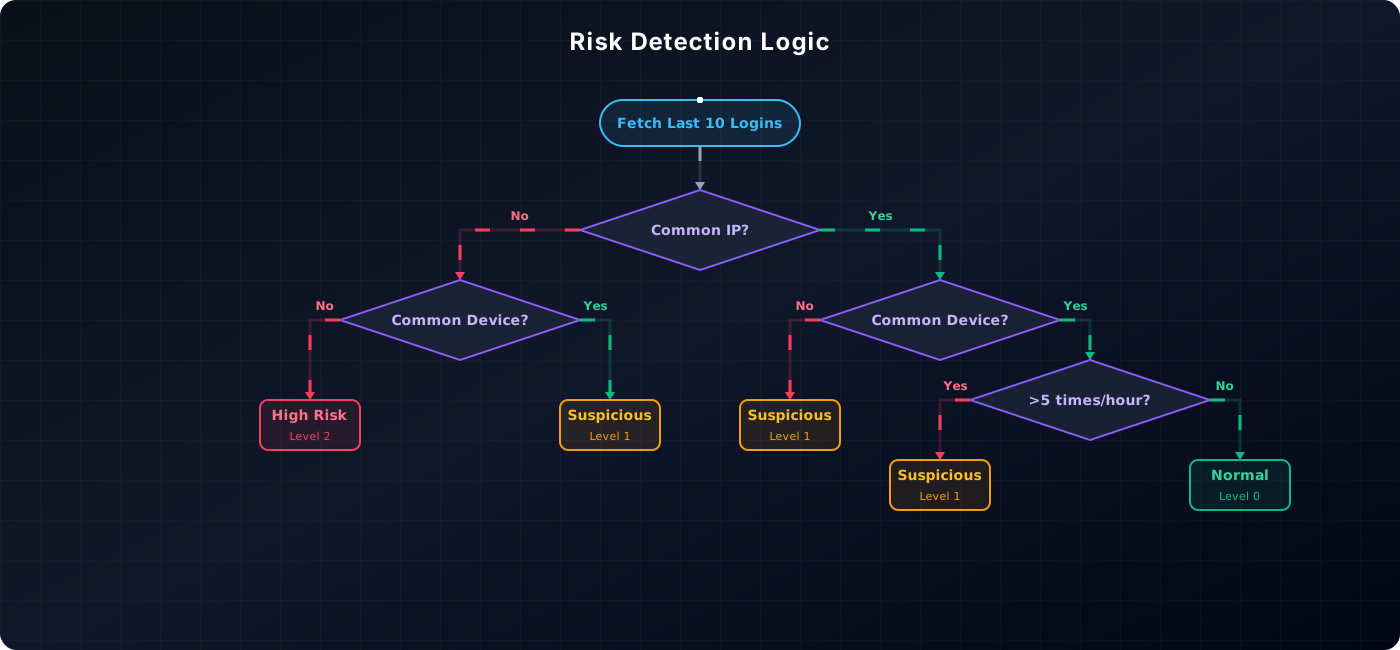
The logic is plain but effective: common IP + common device = normal; new IP or new device = suspicious; new IP plus new device = high risk; more than 5 logins in an hour = suspicious (possibly brute force, or an account being poked after theft).
The essence of this design is the "behavior baseline" — it doesn't assume "login is fine," it compares "this login" against "the user's historical behavior." Logging in from the same phone in the same city, normal; logging in at midnight from the far side of the Earth on a device never seen before, high risk. Security detection is fundamentally about finding anomalies, and the definition of an anomaly comes from habit — this "baseline + deviation" approach is far more advanced than a blacklist.
The LIMIT 10 window is worth discussing: why take only the 10 most recent logins as the baseline instead of all history? Because a baseline should be "recent" — an IP from six months ago has nothing to do with now; the 10 most recent roughly covers "recently used IPs and devices." Too large a window and old data dilutes the weight of current habits; too small, and one business trip changing IPs throws the baseline off. Ten is the "recent but stable" compromise for this scenario.
False positives also deserve consideration in the judgment: marking new IP + new device as high risk — does it hurt? Yes — a user who just got a new phone or switched networks might get flagged high-risk on their first login. But that's the design trade-off of audit: better an occasional false alarm than ever missing real risk. A flagged-high-risk user gets an "abnormal login" notification, knows they just changed phones, and dismisses it; a user whose account was truly credential-stuffed gets the notification and can change their password immediately. The cost of a false alarm is "one extra notification"; the cost of a miss is "a stolen account." For that ledger, security systems always choose the latter.
Recording only successful logins is incomplete — failed logins are often more valuable. recordLoginFailure specifically records failures:
public void recordLoginFailure(Long userId, String loginMethod, HttpServletRequest request, String failReason) {
    UserLoginRecord loginRecord = new UserLoginRecord();
    loginRecord.setUserId(userId);
    loginRecord.setLoginIp(loginIp);
    loginRecord.setLoginLocation(loginLocation);
    loginRecord.setDeviceType(deviceInfo.getDeviceType());
    // ...
    loginRecord.setLoginStatus(0); // failed
    loginRecord.setRiskLevel(2); // a failed login is marked high-risk outright
    loginRecord.setRiskReason(failReason);
    this.save(loginRecord);
}
A failed login is marked high-risk (riskLevel=2) directly, because behind a failed login is very likely not the account owner — is it a forgotten password? A stolen account being password-tried? Or a brute-force script scanning? Whatever it is, marking it high-risk and keeping the reason at least leaves a thread for later analysis. An account with a trail of consecutive failures, paired with detectLoginRisk's frequent-login judgment, gets noticed by the security system.
A detail here: failure records also record IP and device. Why? Because if you discover "a certain IP is launching failed logins against a batch of accounts," that's the signal source of brute force — a single failure record shows nothing, but aggregated by IP, the attack pattern surfaces. Audit data is useless one record at a time; it's useful aggregated — which is why every record tries to fill in all fields.
A failed login record has another hidden value: it's the earliest signal of "an account is being attacked." An account used daily, then suddenly ten consecutive failures one night — that's almost certainly credential stuffing or brute force. Though a single failure shows nothing, once you "aggregate failures per account + time," the attack pattern appears immediately. So failure records aren't just "written down" — they're raw material for security detection, slotting right alongside detectLoginRisk's "frequent login" judgment.
And an easily-missed point: failure records deliberately don't record the password itself. Whether failed or successful, no password field exists in the login record — because an audit log shouldn't bear the responsibility of "storing sensitive credentials," and a password entering a log is a security-incident waiting to happen. Choosing which fields to audit is itself a security decision: record everything you should, and never record what you shouldn't.
Login records don't just lie in the database — they proactively notify the user. sendLoginNotification sends a different notification by risk level:
if (loginRecord.getRiskLevel() == 2) {
    title = "Account Security Alert: Abnormal Login Detected";
    icon = "alert";
} else if (loginRecord.getRiskLevel() == 1) {
    title = "Login Reminder: New Device Login";
    icon = "announce";
} else {
    title = "Login Success Notification";
    icon = "info";
}
The risk level decides the notification copy: high-risk sends "Account Security Alert," suspicious sends "New Device Login," normal sends "Login Success Notification." This tiering lets the user judge at a glance "should I be tense" — a normal-login notification is a quiet one, an abnormal one carries a warning.
This feature is the turning point where "login records" go from "passive audit" to "active defense": records only know "what happened"; notifications let "the people who should know" know. When a user receives a "new device login" reminder without having logged in themselves, their first reaction is to change the password — far more effective than any after-the-fact investigation. The login-audit loop truly closes here.
Notifications are sent asynchronously — sendLoginNotification doesn't block the login request itself. Login must be fast; a user who clicks the login button doesn't want to wait for a notification to be sent; a notification is a background action, fine to arrive a few seconds late. This "separate the core flow from peripheral actions" design is the same principle as "non-core failures degrade silently" in earlier articles: login is the main flow, notification is the garnish, and the main flow must never be slowed by the garnish.
Notifications aren't sent through one channel — they enter the message center (the user's in-site notification list) and may go through other pushes. Tiering's role here: a high-risk notification should be prominent (warning icon), while a normal one just arrives quietly. Tiering a notification is essentially translating "importance of information" into "urgency of display" — the user scans once and knows whether to tense up, instead of every notification looking the same.
The message body carries a detail too: it carries this login's IP, location and time — "You logged in at Guangzhou, Guangdong at 14:32 (IP 113.xx.xx.xx)." Why include these details? Because saying just "new device login" leaves the user unable to judge "was it me"; with location and time, the user can check whether they really logged in at that moment. A notification's value is enabling the receiver to make a judgment — a notification that can't be used for judgment is just an interruption.
Many products have a setting: "allow the same account to be logged in on multiple devices simultaneously." This project's implementation lives in an AOP aspect:
@Around("execution(* ...UserServiceImpl.userLogin(..))")
public Object handleMultiDeviceLogin(ProceedingJoinPoint joinPoint) throws Throwable {
    Object result = joinPoint.proceed(); // first run the original login

    if (StpUtil.isLogin()) {
        Long userId = StpUtil.getLoginIdAsLong();
        String currentToken = StpUtil.getTokenValue();
        Integer allowMultiDeviceLogin = userService.getUserMultiDeviceLogin(userId);
        // if multi-device isn't allowed, kick all previous tokens, keep only the current one
        if (allowMultiDeviceLogin != null && allowMultiDeviceLogin == 0) {
            StpUtil.logoutByLoginId(userId); // kick other devices
            StpUtil.login(userId);           // log in again, keep only this one
        }
    }
    return result;
}
Using an AOP aspect around the login method instead of hard-coding the logic inside it buys decoupling — "whether multi-device is allowed" is the user's setting, and the login method itself doesn't need to know. The aspect checks the setting after login completes; if not allowed, it kicks all old tokens and re-logs-in on the current one. So "multi-device control" becomes a pluggable cross-cutting concern, fully isolated from the login main flow.
StpUtil.logoutByLoginId(userId) is one of Sa-Token's powerful abilities — you can specify kicking out all sessions of a user. This is invaluable in security: when an account is stolen, an admin can invalidate all its device sessions with one call. Session management isn't just "login/logout" — it also has operational abilities like "remote kick."
One frontend detail pairs with multi-device control: when a user gets kicked (say, another device logs in and squeezes them out), their next operation gets a "not logged in" response, and request.ts's interceptor guides them back to the login page. The "experience after being kicked" deserves design too — not a blank 401 and confusion, but letting the user know "your session expired, please log in again." The side effects of security actions also need to close the loop in user experience, otherwise users think the system is broken.
A strategy choice: allowMultiDeviceLogin is set by the user themselves. Allowed means "multiple devices online at once" (default); not allowed means "a new login bumps the old one" (like many game-account rules). This setting sits in the user's hands rather than being hard-coded by the product, because "how many devices one account can be on at once" means different things to different users — some need phone and computer simultaneously, some want the account to only log in at one place for more security. When a security-policy granularity can be pushed down to the user, push it down — the product only provides the options.
This site also has WeChat login — not web QR scanning, but code login through the official account. The user follows the official account, replies with a command, the account replies with a 6-digit code, and the user enters it on the web page to log in. The core is in WxLoginManager:
public String generateLoginCode(String openId) {
    String code = RandomUtil.randomNumbers(6); // 6 random digits
    // the code is stored in Redis, expiring in 5 minutes
    stringRedisTemplate.opsForValue().set(
        OPENID_KEY_PREFIX + code, openId,
        CODE_EXPIRATION_TIME, TimeUnit.SECONDS);
    return code;
}
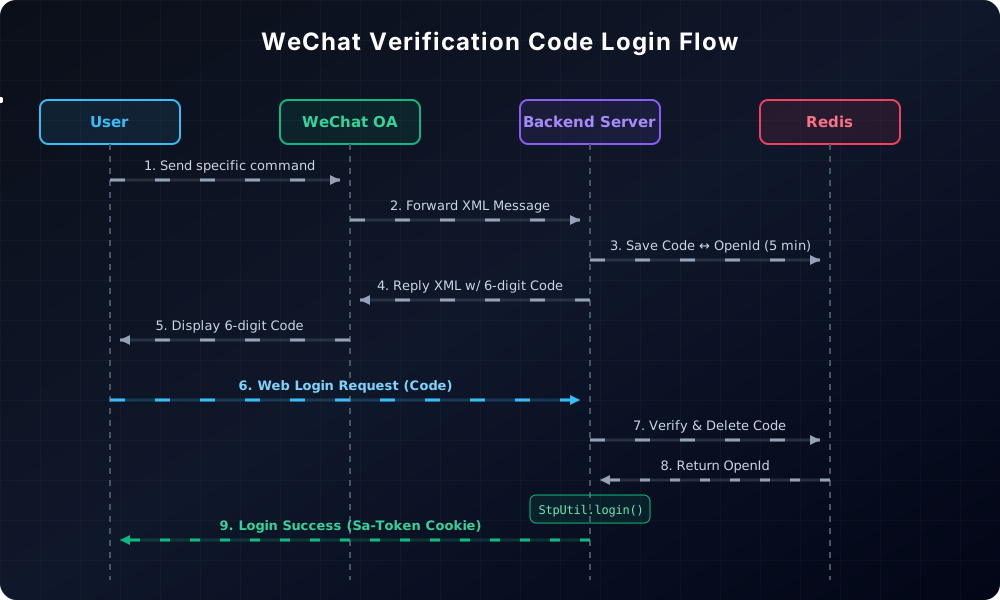
The flow: the user replies with a command → the official-account server (WxController) generates a 6-digit code and binds it to the user's openId in Redis → the web page gets the code → calls userLoginByWxCode → exchanges the code for the openId → StpUtil.login. The code expires in 5 minutes and can be used only once (deleted on read), and the openId is the user's unique identifier under this official account on WeChat.
WxController also handles the official account's XML messages — WeChat's public-platform messages come in XML format, and replies are also XML. This is another "protocol adaptation" detail: the send/receive format of official-account messages is entirely different from ordinary endpoints, and produces = "application/xml;charset=UTF-8" tells WeChat "I'm replying in XML." When integrating with the WeChat ecosystem, half the work goes into adapting to its message protocol.
The Redis key design is also worth mentioning: wx:login:code:, wx:login:openid:, wx:login:req:code:, wx:login:req:scene: — prefixes isolate keys of different purposes, each with a clear expiry. The code is stored as a "code → openId" mapping, and with the 5-minute expiry, "exchange a code for identity" gains a time-window security boundary. Designing a temporary credential comes down to "short-lived + single-use + explicit mapping" — a verification code is a temporary identity exchange coupon, not a long-term identity marker.
There's also the sceneId concept — the official-account message carries a scene value used to distinguish "this is a login request" from "something else." WeChat's messages arrive via asynchronous callback, so the server must first judge "what does the user want to do" when a message arrives; sceneId is that "intent label." In protocol integration, the field that judges intent and the field that carries data must be separated, so one official account can serve multiple features at once.
Another real constraint in official-account messaging: WeChat's server requires a reply within 5 seconds; a timeout counts as failure and it retries. So WxController's handling is "reply instantly to what can be answered instantly, do slow work asynchronously" — generating a code is instant, but the login is actually triggered after the user enters the code on the web page, not inside the official-account callback. When integrating with an external system, know its timeout boundary and split "fast confirmation" from "slow business" — otherwise one slow endpoint drags the whole callback chain to death.
Login-related endpoints all carry rate limits. Look at registration's:
@PostMapping("/register")
@BucketRateLimit(key = "user_register", dimension = RateLimitDimension.IP,
        permitsPerMinute = 0, permitsPerHour = 3, message = "注册过于频繁,请稍后再试")
public BaseResponse<Long> userRegister(...)
Only 3 registrations per IP per hour. permitsPerMinute = 0 is interesting — the minute-level is zeroed out, meaning "don't even think about firing multiple times in a minute," leaving only the hourly allowance. Why so harsh? Because the registration endpoint is the entry for junk accounts — scripted mass registration, SMS-code farming, account breeding all come through here. Throttling it hard by IP leaves normal users (one registration per hour) completely unaffected while scripts' batch operations hit a wall.
Login endpoints are also rate-limited, but with a different strategy (per-user dimension, so failure retries don't lock yourself out). How tight a rate limit is depends on the consequences of the endpoint being abused: the consequence of registration abuse is a site full of junk accounts, so it's throttled hardest; the consequence of login abuse is brute force, so the throttle has to work together with "failure records + risk detection" instead of a one-size-fits-all cut.
Let me expand that: rate limiting is the brake, but the brake can't replace "watching the road." Registration throttling blocks mass registration, but real security still relies on all the earlier pieces — failure records (see who's trying), risk detection (judge new devices/IPs), tiered notifications (let users know). Throttling is "slow the attacker down"; audit is "leave the attacker nowhere to hide"; together they form a complete security strategy. Only putting on the brake without watching the road, and the attacker just changes IP and gets around; only watching the road without the brake, and the service gets overwhelmed first.
One more detail: the login endpoint's rate-limit dimension is "per user" — to avoid hurting users behind shared IPs. But "per user" is ineffective against unauthenticated brute force (which doesn't know usernames, only tries passwords), because the attacker has no "user" dimension at all. So such endpoints usually add a supplementary IP-dimension throttle on top. The choice of rate-limit dimension should hug the attacker's dimension — if the attacker comes by IP, throttle by IP; if by user, throttle by user.
On the frontend, two pieces are directly tied to login: the request interceptor in request.ts and LoginRecordManagePage.vue, the login-record page.
The key in request.ts is withCredentials: true — Sa-Token's token sits in a cookie, and without this, cross-origin requests won't carry the cookie, so the login state is lost. It also does global error translation: backend hard-coded Chinese errors ("not logged in," "no permission") are uniformly translated into frontend multilingual copy in the response interceptor. This solves a very real problem — backend-returned Chinese error messages would display in Chinese on the English site; global translation stops the cross-language leakage.
The login-record page shows the complete information of each login:
// device icon (by device type)
const deviceIcon = getDeviceIcon(record.deviceType)
// status dot (colored by login status + risk level)
const statusClass = getStatusClass(record.loginStatus, record.riskLevel)
// location, IP, risk reason
record.loginLocation || $t('...unknownLocation')
record.loginIp
record.riskReason // only shown when riskLevel > 0
On the page you can see at a glance: which device this login used, what time, from which city, which IP, and whether there's a risk alert. It also specifically counts "risk records" — flagging the high-risk/suspicious logins on the page so users don't have to flip through every row. The value of the login-record page is turning backend audit data into user-readable "peace of mind" — you see all your login records are normal, and you relax; you see one unfamiliar "new device login," and you get alert.
The frontend also has a layer of global "login-state" management: after login, login info (user ID, role, etc.) lives in a Pinia store, and route guards check the store when entering pages that require login — not logged in, jump to the login page. This layer and request.ts's 401 handling are "double insurance": the route guard handles "the frontend knows you shouldn't enter," the response interceptor handles "the backend found you're not logged in and guides you." Frontend login-state management is two gates — the route guard and the request interceptor — and without either, users get lost in a "half-logged-in" state.
A common interaction on the login-record page: display in reverse chronological order, with the most recent login on top. This ordering isn't arbitrary — users care most about "have there been any logins I didn't see recently," and the newest on top is scannable in one glance. Older history is collapsed or paginated to keep the page from being dragged down by thousands of records. A list page's sorting and pagination are half its experience, especially for data like login records where "recent is most important."
The "risk record count" statistic on the page is also thoughtful — records.filter(r => r.riskLevel > 0).length, singling out the high-risk/suspicious records. This is really translating the backend's security judgment into a frontend "warning number": seeing "you have 3 risky login records" is more direct than flipping through every row. Turning audit data into a security signal users can grasp at a glance is the login-record page's real value.
This login chain has its share of potholes too. The most memorable ones:
Pothole 1: IP location was wrong. Initially request.getRemoteAddr() grabbed the IP, and every login record on the site showed "the server room's city" — because all requests pass through Nginx, and getRemoteAddr returns Nginx's IP. Switching to ServletUtils.getClientIP (taking the real IP from the X-Forwarded-For proxy-header chain) made login locations accurate. Whenever you grab a client IP, you must account for the proxy chain — the first lesson of any IP-related feature.
Pothole 2: The verification code could be replayed. For WeChat login, the code wasn't deleted on read, so the same code could log in repeatedly. Switching to "delete on read" (remove the Redis key after getting it) made a code usable only once. A one-time credential's "one-time-ness" relies on deleting after reading, not on agreement.
Pothole 3: Too many failure records bloated the log table. A brute-force script sends thousands of failed requests per hour; recording a failure each time made the MySQL table balloon. Adding deduplication and thresholds for failure records (only one aggregated record per IP per short window) brought it under control. Audit logs need rate limiting too — the record itself can't become an entry point for attack.
Pothole 4: Multi-device kick-out kicked the admin too. The multi-device aspect initially didn't distinguish admins; a user setting "don't allow multi-device" caused the admin to be kicked while checking in the backend. Adding a role check, with admins exempt from the multi-device limit, fixed it. Security logic must distinguish roles — a one-size cut hurts the wrong people the most.
Pothole 5: The sessionId was recorded, but Spring Session wasn't enabled. The login record has a sessionId field, originally assumed to be the Servlet session, but the project doesn't enable spring-session, so this session is created anew per request — recording it was recording nothing. The fix was either to record Sa-Token's token instead, or to enable Spring Session so the session truly spans requests. Recording a meaningless field is more misleading than not recording at all — audit fields must be verified to actually carry information.
Pothole 6: Remote-login false alarms were treated as bugs. After risk detection launched, users who traveled and first logged in from a new city got flagged high-risk and received an "abnormal login" alert, then came to support confused. Adding "if this was you, you can ignore this reminder" to the copy, and letting users confirm "this is me" to refresh the baseline, fixed it. A security alert needs a built-in exit for resolving false alarms — otherwise users just get confused, then lose trust in the alerts.
Pothole 7: Brute force on the login endpoint slipped past the throttle. The login endpoint was throttled per user; a script randomly trying usernames and passwords never logs in successfully, so the user dimension was a formality. Adding an IP-dimension throttle on the login endpoint plus per-IP aggregated failure alerts brought it under control. Security measures must be designed against the attacker's actual behavior — if the attacker strikes by IP, your defenses need an IP dimension, or they're a wall made of paper.
Pothole 8: The login record's User-Agent was too long and got truncated. Some browsers' User-Agents reach hundreds or thousands of characters; writing to the database exceeded the field length and threw, failing the login-record save. Adding length truncation (storing the first 255 characters) fixed it. For anything "client-input" that lands in the database, length validation and truncation are the floor — the User-Agent is given by the browser, and it doesn't care how long your database field is.
Collected together, you'll find: "verifying the password" is only the very surface of login. The real craft lives after verification — how sessions are managed, how logins are recorded, how risk is judged, how anomalies are notified, how multi-device is controlled. These five things together turn "login" from "one entrance" into "a whole security system."
Three sentences summarize this article:
Sessions must be manageable and kickable. Sa-Token + Redis lets sessions share across instances, and logoutByLoginId lets an admin kick users remotely — session management isn't just login/logout, it's also "recyclable."
Logins must be recorded fully and tiered. IP, device, city, risk level and failure reason — one record fills them all; risk is judged by the behavior baseline of "common IP + common device," and a new IP plus a new device gets flagged high-risk.
Anomalies must proactively notify. The turn where login records go from "passive audit" to "active defense" is letting "the people who should know" know in the first place — a new-device-login reminder is a hundred times more effective than any after-the-fact investigation.
If you're building login too, check it along this chain: can your sessions span instances and be kicked remotely? Can your login records tell the user "who logged in, where, with what"? Will the user know about an abnormal login in the first moment? These three questions are the dividing line between login that "works" and login that "is trustworthy."
And one candid closing note: every piece in this article, taken alone, is nothing stunning — Sa-Token is a popular framework, ip2region is a ready-made library, risk detection is a few if-judgments. But stringing them into a "login means audit, anomaly means notification" loop — making one login go from "verify the password" to "record the full case + judge the risk + push the reminder" — that's what sets this system apart from "good enough." Security isn't one feature; it's a habit running through everything before and after login. I hope this article passes that habit on to you.
When you get this far, the gap between "usable" and "trustworthy" login comes down to three questions: can sessions span instances and be revoked remotely? can the audit record tell you who logged in, from where, with what? does the right person learn about an anomaly immediately? Answer all three, and login becomes something you can rely on.