
A user types "starry sky" and hits enter. A second later, the page shows four kinds of results — images, posts, spaces, users — and the "hot list" beside them now includes "starry sky," which wasn't there yesterday. Behind that second are three independent systems that interlock: search (turning the user's words into results), index sync (letting search reach the site's new content), and the hot list (turning "what everyone searched" into a ranking).
This article takes all three apart. The protagonist is Meilisearch — a search engine far lighter than ES, yet here it carries both search and the hot list. You'll find the real difficulty isn't "search" itself, but everything around it: how to keep the index in step with the database, and how to turn "who searched what" into a hot list you can trust.
The default answer for a search framework is usually Elasticsearch, but this project chose Meilisearch. Why? Look at its connection config first:
@Bean
public Client meiliSearchClient() {
    try {
        Config config = new Config(host, apiKey);
        Client client = new Client(config);
        // verify the connection at startup, and log the version while at it
        String version = client.getVersion();
        log.info("Successfully connected to Meilisearch server. Version: {}", version);
        return client;
    } catch (Exception e) {
        log.error("Failed to initialize Meilisearch client", e);
        // still return a client, so Spring Boot startup doesn't fail
        return new Client(new Config(host, apiKey));
    }
}
Two details worth mentioning. First, getVersion() verifies the connection at startup — if Meilisearch is down, you see it in the startup log immediately, instead of waiting for the first search request to blow up. Second, the catch block still returns a client instead of throwing — the comment says it plainly: "so Spring Boot context startup doesn't fail." A search component dying shouldn't take down the whole site; that's the classic "fault isolation for non-core components" thinking.
The selection reasons boil down to three for this scenario: light. Meilisearch runs in a few hundred MB of memory on a single machine, while ES needs several GB just for the JVM heap — for an image community, the memory saved can run several more services. Fast. Its near-real-time indexing and prefix search are naturally friendly to "search as you type." Enough. An image site needs full-text search over title, description and tags, not ES's sprawling analyzer ecosystem.
Of course it isn't a silver bullet. ES's distribution, sharding and complex queries — Meilisearch has none of that. But a small-to-medium site doesn't need any of it — selection isn't about picking the strongest, it's about picking the one that's enough and takes the least care over the longest time. That judgment is the same one that chose prerendering over SSR in the previous article.
Add a practical comparison dimension: deployment and maintenance cost. ES is written in Java; just starting it takes several GB of memory, plus you get to worry about shards, replicas and cluster discovery. Meilisearch is written in Rust — one binary, one command, and it runs, loading indexes from disk on demand. For an independent site with limited ops energy, this saves more than a little — the memory and mind-space saved can go to real problems.
And one experience detail: Meilisearch has typo tolerance built in. Search "stary sky" and it still matches "starry sky," because its default tolerance engine allows minor errors in adjacent characters. That's especially precious for Chinese search — pinyin-Ime users mistype constantly, and tolerance solves most of "type it wrong and you can't find it," the single most experience-damaging problem. These out-of-the-box abilities are exactly the value a lightweight engine brings to an independent site.
Meilisearch's indexes aren't created automatically; they're explicitly configured at startup. initIndices builds six indexes at once, each declaring clearly "which fields are searchable, which filterable, which sortable":
private void initIndices() {
    initIndex(INDEX_NAME_PICTURE, new String[]{"name", "introduction", "category", "tags"},
            new String[]{"userId", "spaceId", "category", "tags", "reviewStatus", "isDelete", "isDraft"},
            new String[]{"createTime", "updateTime", "viewCount", "shareCount", "likeCount", "hotScore"});

    initIndex(INDEX_NAME_USER, new String[]{"userName", "userAccount", "userProfile"},
            new String[]{"userRole", "isDelete"},
            new String[]{"createTime", "updateTime"});

    initIndex(INDEX_NAME_POST, new String[]{"title", "content", "category", "tags"},
            new String[]{"userId", "category", "tags", "status", "isDelete"},
            new String[]{"createTime", "updateTime", "hotScore"});

    initIndex(INDEX_NAME_SPACE, new String[]{"spaceName", "spaceDesc"},
            new String[]{"userId", "spaceType", "spaceLevel", "isDelete"},
            new String[]{"createTime", "updateTime"});

    initIndex("search_keyword", new String[]{"keyword"},
            new String[]{"type", "keyword"},
            new String[]{"count", "updateTime"});
}
Each of the three groups has its own meaning. searchable decides what a user search can hit — images match on name/introduction/category/tags, posts on title/content/category/tags. filterable decides which conditions a query can narrow by — like "only this user's images," "only approved ones"; these all have to be declared before they can filter, a security feature of Meilisearch. sortable decides what the results sort by — note the picture index carries a hotScore, the seed of the hot-list/scoring that comes later; search results can sort by popularity.
Two hidden indexes round it out: search_keyword (the keyword-count index, the source of the hot list) and rag_memory (RAG memory, another feature). One search feature — the index web behind it is broader than you'd think.
Looking closer at filterable, it's actually putting "guardrails" on search. Meilisearch by default refuses to filter by undeclared fields — to filter by reviewStatus, you must first declare it filterable. The constraint looks like a hassle, but it prevents the security and performance hazard of "passing any field in the query": the field whitelist is locked down, and no matter how many filter conditions a malicious request sends, the index only recognizes the declared ones.
An ops trick hides in sortable: both the picture index's hotScore and the post index's hotScore are in their sortable lists. That means search results aren't just "relevance order" — they can switch to "sort by popularity." If ops wants certain content to be easier to discover, tweak the hotScore. The sortable fields of search are actually a back door for operations, and that door has to be left open in the index config in advance.
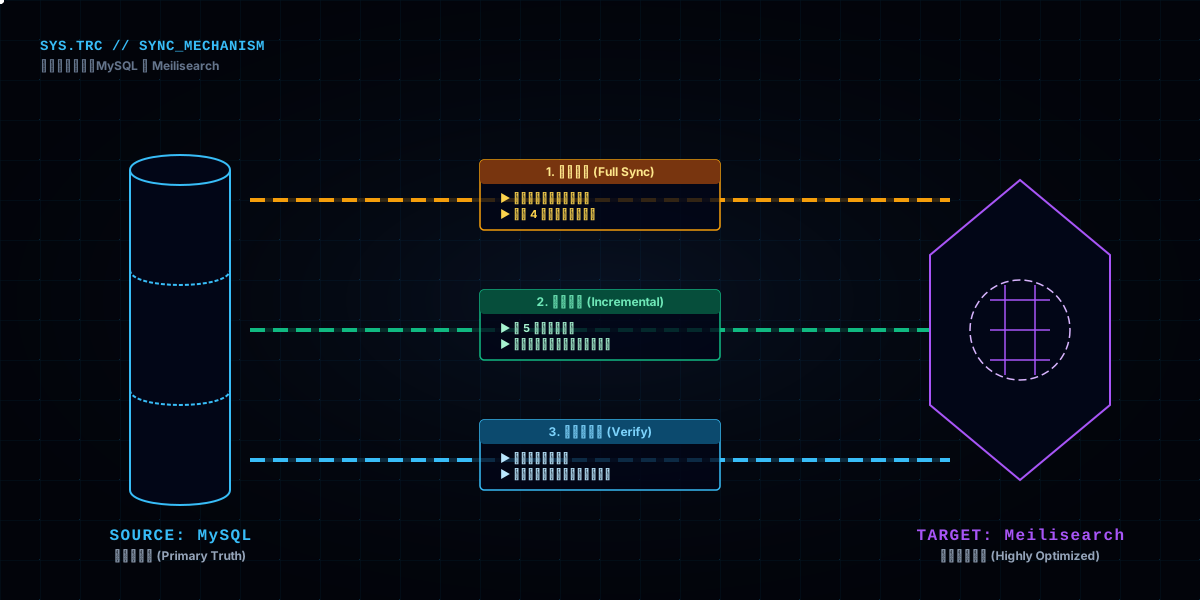
The indexes are configured, but they contain no data — search is spinning idle. So startup runs an "initialization judgment":
public void run(String... args) {
    // only initialize index config, don't delete existing indexes
    initIndices();

    // check whether a full sync is needed: no documents in the index = first deployment
    boolean needFullSync = false;
    String[] indices = {INDEX_NAME_PICTURE, INDEX_NAME_USER, INDEX_NAME_POST, INDEX_NAME_SPACE};
    for (String indexName : indices) {
        if (getMeiliSearchDocumentCount(indexName) == 0) {
            needFullSync = true;
            break;
        }
    }
    if (needFullSync) {
        fullSync();
    }
}
The criterion is plain: does the index have documents? No — first deployment or data cleared, so run a full sync; yes — it was synced before, so skip. This judgment avoids pouring the whole database through a full sync on every restart — which for millions of images would be a disaster.
Full sync itself has its own care: paginated fetch + concurrent write, controlled per type by switches:
public void fullSync() {
    if (pictureSyncEnabled) fullSyncPictures();
    if (userSyncEnabled) fullSyncUsers();
    if (postSyncEnabled) fullSyncPosts();
    if (spaceSyncEnabled) fullSyncSpaces();
}
When syncing pictures in full, it first queries MySQL for the total count of eligible records (not deleted, not draft, public space), then paginates by batch (batchSize=500) and writes to Meilisearch concurrently (4-thread thread pool). Between batches there's a BATCH_SLEEP_TIME (100ms) gap — not so the database can catch its breath, but so Meilisearch doesn't get hammered. A full sync is a "one-time big move," and its worst fear is crushing a service that just came up.
The concurrency (4 threads) and batch size (500) were tuned, not guessed. Too aggressive, and Meilisearch's writes time out and retry, ending up slower; too conservative, and a few million records take hours. 500 per batch, 4 concurrent threads, 100ms breathing room between — that's the sweet spot measured on this machine. The numbers aren't universal, but the thinking behind them is: a full sync has to be load-tested, not eyeballed — run a small batch to find the stable speed, then unleash the full run. That's far more relaxing than going all-out from the start.
An easily-missed point: every type in the full sync can be toggled independently via config switches (pictureSyncEnabled etc.). If one index has a problem, you can turn off just its full sync without affecting the others. Fine-grained switches are the first line of fault isolation — don't bind all your syncs to a single switch.
A full sync only runs on first deployment. Everyday inserts, updates and deletes are handled by incremental sync — four scheduled jobs, running every 5 minutes:
@Scheduled(fixedDelay = INCREMENTAL_SYNC_DELAY_MILLIS) // every 5 min, initial delay 20s + random 0-30s
public void incrementalSyncPictures() {
    executeIncrementalSync(this::incrementalSyncPicturesInternal, "picture");
}

@Scheduled(fixedDelay = INCREMENTAL_SYNC_DELAY_MILLIS, initialDelay = 20000)
public void incrementalSyncUsers() {
    executeIncrementalSync(this::incrementalSyncUsersInternal, "user");
}

@Scheduled(fixedDelay = INCREMENTAL_SYNC_DELAY_MILLIS, initialDelay = 40000)
public void incrementalSyncPosts() {
    executeIncrementalSync(this::incrementalSyncPostsInternal, "post");
}

@Scheduled(fixedDelay = INCREMENTAL_SYNC_DELAY_MILLIS, initialDelay = 40000)
public void incrementalSyncSpaces() {
    executeIncrementalSync(this::incrementalSyncSpacesInternal, "space");
}
Note the initialDelay values are staggered: pictures 20s, users 40s, posts 40s, spaces 40s. Why stagger? Because if all four jobs started simultaneously and hit the database and Meilisearch at the same time, the instant the service comes up would be a concurrency spike. Staggering the initial delays so the sync jobs "line up to start" is the most plain-spoken peak-shaving in ops. The comment also mentions "random delay 0-30s" — further scatter, so that with multiple instances, not every instance's sync job collides on the same second.
Internally, an incremental sync queries records whose "update time falls within a time window," syncing the data inserted or modified during that window. That window plus the "every 5 minutes" cadence guarantees new content can be searched within at most 5 minutes — an acceptable delay for an image community where "the user just uploaded it and wants it searchable."
With multiple instances, staggering has an extra effect: suppose 3 instances run their sync jobs in perfect lockstep — the database receives 3 copies of the same queries and writes. Not data corruption (idempotent), but a pointless threefold load. incrementalRandomDelayMax (random 0-30s) exists to offset each instance's sync, avoiding "three brothers crashing into each other."
Also note executeIncrementalSync wraps a unified dispatch: inside are failure counters, retries and skip logic. An incremental sync's goal is "only process the increment each time," so it's naturally idempotent — syncing the same window twice produces no error, just waste. This combination of "idempotent + staggered + retry-on-failure" lets scheduled syncs run stably for the long haul with nobody watching.
Incremental sync is "optimistic" — it assumes most of the time everything is fine. But surprises happen: deleted without syncing, half-modified, a job failed. So once a day there's a consistency check:
public void dailyConsistencyCheck() {
    // clean all sorts of deleted/invalid data
    cleanDeletedPictures();
    cleanDraftPictures();
    cleanDeletedUsers();
    cleanDeletedSpaces();

    // check and fix data consistency
    checkAndFixDataConsistency();
}
It does two things: clean — delete records from the index that MySQL has already removed or turned into drafts; repair — if the document-count difference between MySQL and Meilisearch exceeds the threshold (CONSISTENCY_CHECK_THRESHOLD = 10), trigger the corresponding full sync.
A design philosophy worth calling out: incremental sync pursues "timeliness," the consistency check pursues "correctness." Incremental pushes new data in fast; the consistency check pulls back the missed and misplaced. One handles efficiency, one handles the bottom line, and only together do they make a healthy index system. Watch only the incremental and never the consistency, and the index grows dirtier and dirtier.
More crucial is the alerting. The whole job is littered with sendAlertEmail(...) — sync failures, consistency anomalies, alert count over threshold, all email the admin. Failures also auto-retry (retryTimes times, retryInterval spacing, capped by MAX_RETRY_WAIT_TIME at 30 seconds). This "retry-on-failure + email alert + threshold circuit-breaker" combination lets a scheduled job recover itself and report itself with nobody watching. An unattended system doesn't rely on people remembering to check — it relies on the system knowing how to shout.
The retry details deserve expansion: retryTimes controls the count, retryInterval the spacing, and there's a MAX_RETRY_WAIT_TIME cap of 30 seconds — retries can't wait forever; at 30 seconds it gives up, preferring failure over blocking the job queue. What retries is a "single query or write," not the whole task — the task itself is covered by the scheduled dispatch and will run again.
The alerting also has a circuit breaker: ALERT_FAILURE_THRESHOLD = 3 — three consecutive failed alert sends and it stops alerting, so that when the mail service itself is down, alerts don't pile up into spam. These details look trivial, but together they form a scheduled job that "recovers itself, reports itself, and breaks its own circuit." Ops maturity often lives in these 'the system shouts for itself' details, not in how flashy the monitoring dashboard is.
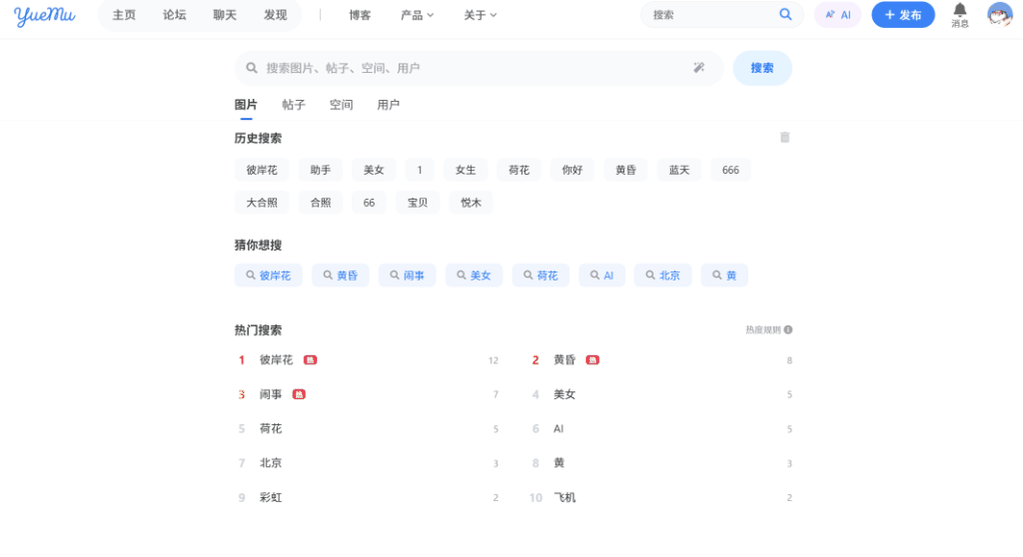
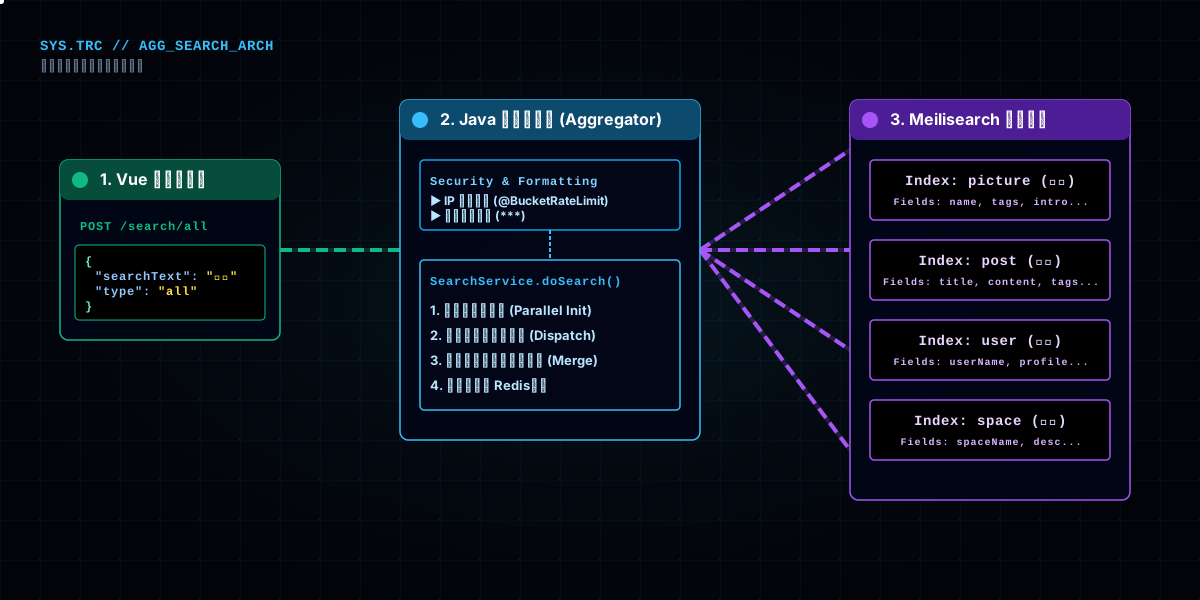
The search endpoint is POST /search/all. Its core isn't "searching" — searching is Meilisearch's job — it's aggregation: one keyword, searched in all four indexes (images, users, posts, spaces), then the results merged into one page.
@PostMapping("/all")
@BucketRateLimit(key = "search", dimension = RateLimitDimension.IP, permitsPerMinute = 80, permitsPerHour = 800, burst = true, message = "搜索过于频繁,请稍后再试")
public BaseResponse<Page<?>> searchAll(@RequestBody SearchRequest searchRequest, HttpServletRequest request) {
    // sensitive-word filter
    if (searchRequest != null && StringUtils.isNotBlank(searchRequest.getSearchText())) {
        String originalText = searchRequest.getSearchText();
        // ... filter the search term, replacing with *
    }
    return ResultUtils.success(searchService.doSearch(searchRequest));
}
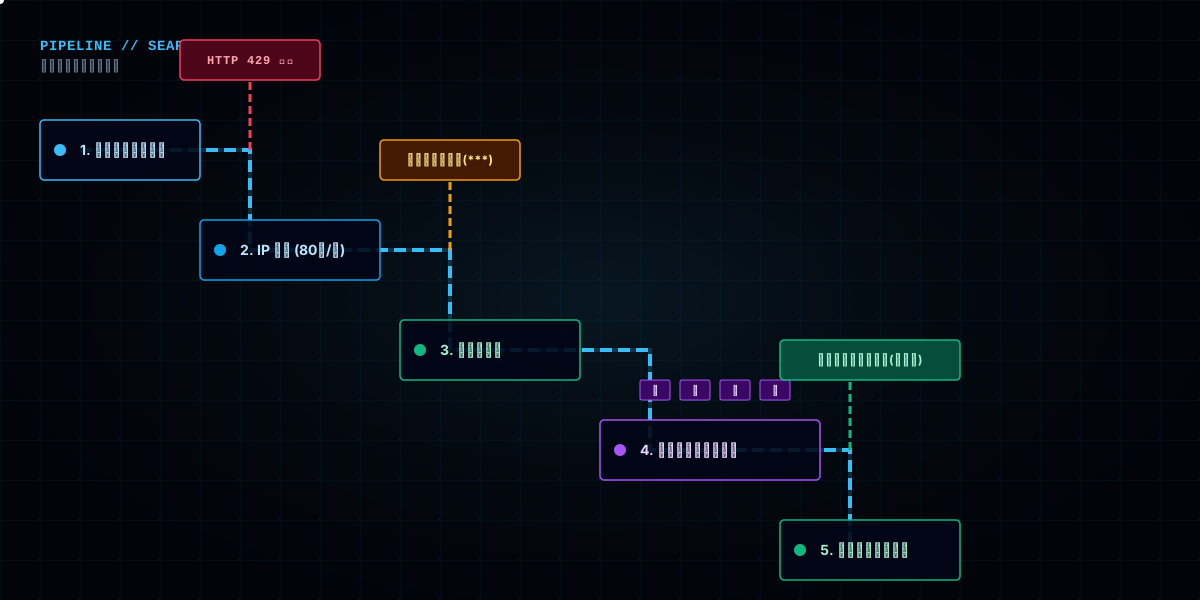
Two details. First, rate limit by IP — search is a public endpoint that works without login, so it's throttled by source IP (80 per IP per minute), preventing crawlers from hammering the service through the search endpoint. Second, the search term must pass a sensitive-word filter first — whatever a user searches feeds the hot list; without the filter, sensitive words could be boosted onto the hot list. This "filter before you even search" ordering is content compliance's first gate at the search layer.
Inside doSearch: parse the search type (all / image / user / post / space), call the corresponding Meilisearch index per type, then wrap the results into a paginated response. This "one endpoint aggregating multiple indexes" is the standard pattern for aggregated search — for the frontend it's one call, one render; for the backend, each index queries independently and merges the results.
A pre-query detail: the search term gets normalized — leading/trailing spaces trimmed, special characters handled. Because Meilisearch matches token-by-token, a user searching " starry sky " (with spaces) and "starry sky" should get the same result, but without normalization the index tokens won't match. SearchRequest also carries a type field — the user can search only images, only posts, or everything. All-types search is "aggregation," single-type is "triage," two uses of the same endpoint.
Switching the rate-limit dimension from per-user (in a19) to per-IP also has its reasons: search is a public feature usable by guests, so per-user throttling would miss unauthenticated crawlers. Per-IP throttling may catch legitimate users behind shared IPs, but paired with burst = true, normal users barely notice. The rate-limit dimension must match how open the endpoint is — the first principle when picking a dimension.
And the boundary of multi-index merging: in aggregated search, each type's results are paged independently — images get one page, posts another, and the frontend switches via tabs. Why not merge into one unified list? Because different result types differ structurally too much (images have thumbnails, posts have body excerpts, users have avatars) — forcing them into one list means either sacrificing display quality or writing a pile of branch logic. Tabs let each type display its own, with clean types and simple rendering; the cost is that a user sees one category at a time. The "aggregate" in aggregated search means one request fetches everything, not that the results get blended into one — that boundary needs to be thought through.
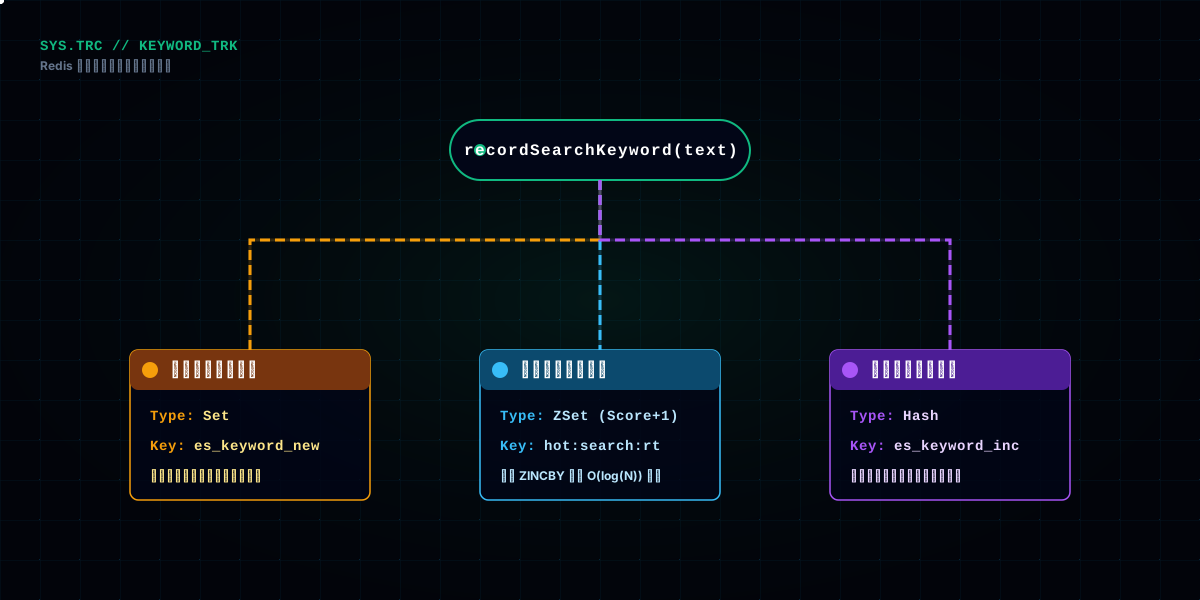
Search isn't just returning results — every search is a signal of "what the user wants to find," and it gets recorded. recordSearchKeyword writes three ledgers at once:
// 1. real-time hot list: increment the keyword's count in a Redis ZSet (+1, only for existing keywords)
stringRedisTemplate.opsForZSet().incrementScore(zsetKey, searchText, 1d);

// 2. if the keyword doesn't exist in Meilisearch (a new word), add it to the "to-create" set
stringRedisTemplate.boundSetOps("es_keyword_new:" + type).add(searchText);

// 3. new or old, add to the "to-increment" hash, batched back to Meilisearch
stringRedisTemplate.boundHashOps("es_keyword_increment:" + type)
        .increment(searchText, 1);
The three ledgers have completely different purposes: the ZSet is the hot list's real-time layer — each keyword has a score (search count), and Top N is available anytime; the "to-increment" hash is for Meilisearch — search counts don't write directly to Meilisearch (a low-frequency write engine), but accumulate in Redis first, merged back periodically by a batch job; the "to-create" set specifically tracks words that don't exist in Meilisearch yet — the first time a new word appears, it needs a record created before counting.
A clever design sits here: the hot list's real-time counting goes through Redis, not directly to Meilisearch. Because the hot list needs "second-level visibility of change," and Redis ZSet's incrementScore is an O(log n) high-frequency operation; Meilisearch document updates are low-frequency writes, unfit for a write on every search. Two paths separated: high-frequency real-time counts into Redis, low-frequency archiving into Meilisearch and MySQL.
There's also a "personal ledger" — recordUserSearchKeyword records what each user searched into the UserSearchRecord table, the data source for the search-history feature.
This "high-frequency to Redis first, archive to low-frequency later" two-path design is really a microcosm of the whole hot-list architecture — the next few sections are just this idea writ large. The three-ledger code looks simple, but it fixes the starting point of the entire hot-list data flow: search action → real-time count in Redis → batch write-back to Meilisearch/MySQL. Where data enters, where it's stored, how it's archived — all pinned down in these three lines.
One consistency detail: recordSearchKeyword is "best effort" — it's wrapped in try-catch, and on failure only log.warns without affecting the search main flow. Why? Because losing one "record a search count" only means the hot list misses one count — not worth failing a search request over. Non-core failures degrade silently and must not drag down the core flow — a principle running through the whole search chain; the hot list's three-tier degradation is the same idea.
The hot list's "real-time layer" is a Redis ZSet: hot:search:realTime:{type}, value is the keyword, score is the search count, incremented by one with every incrementScore. Getting the list is reverseRangeWithScores — take the top N in descending score order.
Why a ZSet? Because it's inherently the "leaderboard" data structure — sorted by score, range queries, incremental updates, all the essentials of a leaderboard. Switch to a Redis List or Hash and you're either writing the sorting yourself or managing the increments yourself. Pick the right data structure and the leaderboard is half done — the most valuable sentence in Redis usage.
The real-time layer's position is "second-level visibility": right after a user searches, the hot list should immediately show this action's accumulation. Redis ZSet's incrementScore is O(log n), so a leaderboard of hundreds of thousands of keywords can absorb high-frequency writes. And a ZSet natively supports "take only the top N" — reverseRangeWithScores(key, 0, N) is a leaderboard in one call, no extra sorting needed. That's why the real-time layer chose a ZSet over other structures: not because it's popular, but because it packs "counting + sorting + slicing" into one.
An easily-ignored point: a ZSet's score is a float, more than enough for integer search counts, and it conveniently supports the decimal math in trend calculation like "multiply by a time-decay coefficient" — with an integer counter, decay would have to round, losing precision. Picking the right type for a data structure saves a pile of type-conversion hassle downstream — another layer of meaning in "pick the right structure."
But the real-time ZSet has a problem: it only records "cumulative count," not "searched a lot today" vs "searched a lot yesterday." If a word was hot yesterday and nobody searches it today, its score in the ZSet lingers, keeping it on the board forever. So the hot list can't just look at real-time counts — it also has to compute "heat" and "trend" — which is what the next layer does.
Real-time counting is "the process"; the hot list's "official ranking" is generated periodically by the computation layer. syncHotSearch runs every 5 minutes, takes a distributed lock per type, then computes:
@Scheduled(fixedRate = 5 * 60 * 1000) // every 5 min, because trend calculation depends on data from 1 hour ago
public void syncHotSearch() {
    for (String type : SEARCH_TYPES) {
        RLock lock = redissonClient.getFairLock(String.format(HOT_SEARCH_SYNC_LOCK_KEY, type));
        if (lock.tryLock(5, calculateDynamicLockTimeout("hot_search_sync_" + type), TimeUnit.SECONDS)) {
            syncHotSearchForType(type);
        }
    }
}
Two details. First, Redisson fair lock — with multiple instances, only one instance computes the same type's hot list, avoiding duplicate writes. A fair lock instead of a plain one prevents a type from "starving" because it can never grab the lock. Second, dynamic lock timeout — calculateDynamicLockTimeout computes the timeout from historical execution duration, so a stuck task can't hold the lock forever. These "distributed task" details are never used on a single instance, but the moment you go multi-instance, they're hard requirements.
syncHotSearchForType is the core. It reads the real-time ZSet, computes trends, writes MySQL, and updates the Redis cache:
// 1. read the real-time ZSet (limited range, to reduce memory)
var tuples = stringRedisTemplate.opsForZSet()
        .reverseRangeWithScores(zsetKey, 0, TREND_CALCULATION_LIMIT);

// 2. length-check and truncate keywords (database field length limits)
// 3. compute trends for only the top N (performance optimization)
calculateTrendsForTopItems(hotSearchList, type);

// 4. batch insert or update into MySQL
hotSearchMapper.batchInsertOrUpdate(hotSearchList);

// 5. update the Redis cache (for the /hot endpoint to read)
updateCache(type, hotSearchList);
A key comment sits right there: "trend calculation depends on data from 1 hour ago." The hot list isn't only about "who searched most" — it's also about "who is getting hot." A word nobody searched 5 minutes ago suddenly exploding now — its "trend" should push it onto the board. calculateTrendsForTopItems roughly compares the current count against the count from a while ago and computes the rise. This "heat = count + trend" model gives the hot list both thickness (searched a lot) and vitality (getting hotter), instead of a lifeless tally table.
One detail, easy to miss but important: before a keyword lands in MySQL, there's a length check and truncation. The database's keyword field maxes at 128 or 512 characters; if a user searches an overlong string (or maliciously constructs one), not truncating means a database error. Defensive truncation is standard for this "external input going into storage" scenario.
calculateTrendsForTopItems also has a performance consideration — the comment says "only compute trends for the top N." Why only the top N? Because trend is a relative concept: only the words at the top of the board need to care "is it getting hotter," and a word ranked a thousand places back computed for nobody. Querying an hour-old datum for a word nobody sees is waste. Optimization isn't doing all computations correctly — it's cutting out the ones you don't need, which is especially obvious in a leaderboard where "only the head matters."
The dynamic lock timeout calculateDynamicLockTimeout is also worth a word: if the lock timeout were hard-coded, a stuck task would hold the lock forever while other instances wait. Dynamic computation means "based on the average duration of recent runs, grant a slightly generous timeout" — letting normal tasks finish while releasing the lock promptly when a task freezes. That "adaptive timeout" pattern is well worth borrowing in distributed systems.
The trend's concrete algorithm isn't shown in full, but the idea can be explained: it compares "current count" against "count one hour ago" and computes a growth rate. Why one hour instead of shorter? Because a shorter window is too noisy — a word riding a wave of traffic from a single post might surge within 5 minutes without being genuinely hot content; a one-hour window filters out most short-term noise and keeps the "consistently getting hotter" signal. That's where the comment "trend calculation depends on data from 1 hour ago" comes from. The hot list's window granularity decides whether it chases trends or noise — the parameter that sets the whole flavor of the hot list.
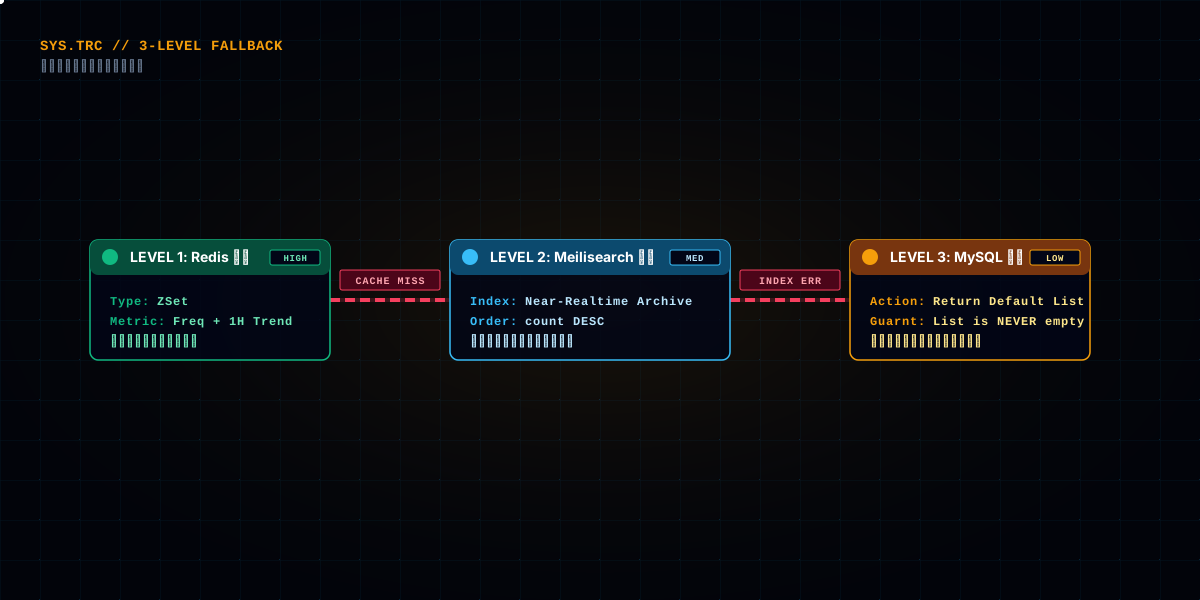
The hot list's worst fear is "no data" — an empty board is uglier than a wrong one. So syncHotSearchForType builds in three tiers of degradation:
Tier 1: Redis real-time ZSet (highest priority, second-level data)
  ↓ none
Tier 2: Meilisearch's search_keyword index (near-real-time archived counts)
  ↓ none
Tier 3: MySQL's default hot words (last resort, guaranteeing the board is never empty)
warmUpCache is the pre-warmed version of this degradation: when the cache doesn't exist, it first preloads the top 1000 search words from MySQL into Redis (Hash structure, 24-hour expiry), so the /hot endpoint has ready cache to read without recomputing every time.
This "real-time → archived → last-resort" degradation chain reflects the hot list's positioning: it's a garnish feature; its failure must not affect the main functionality, and it must never turn into a "blank incident" itself. The data source can degrade, but "there's always a board" is non-negotiable.
warmUpCache's "only preload if absent" also has a reason: preloadMysqlTopKeywordsIfNeeded first hasKey-checks whether the cache exists, skipping if it does. Why? Because a cache rebuilds after expiry, but if the cache is still there (meaning the data is still fresh), rebuilding is wasted work. This "check before build" idempotent logic avoids re-loading on every warm-up. The preloaded Top 1000 keywords go into a Redis Hash (keyword → count) with 24-hour expiry — enough for the /hot endpoint to read the cache directly during peak hours instead of going back to MySQL or Meilisearch. The cache TTL is a trade-off too: too short, frequent rebuilds; too long, stale data; 24 hours is a reasonable middle for this scenario.
The frontend /hot endpoint also carries validation: type must be one of picture/user/post/space, size must be 1-100, rate-limited by IP — every layer of defense for an external endpoint is covered.
On the frontend, SearchPage.vue is the entrance to aggregated search: input box, search button, results list (four tabs: images/posts/spaces/users), with the hot list beside it. RankingPage.vue is the fuller ranking page.
The search page calls one endpoint:
import { searchAllUsingPost, getHotSearchKeywordsUsingGet } from '@/api/searchController'

const res = await searchAllUsingPost({ searchText, type, current, pageSize })
The hot list's data comes from the /search/hot endpoint, and clicking a hot word triggers searchByTag — treating the hot word as a new search term. This "clickable hot words" interaction closes the loop between hot list and search: user looks at the list → clicks a word → searches → the word gets counted again → hotter. The hot list thus gains a "self-reinforcing" property, and genuinely popular content becomes easier and easier to find.
RankingPage.vue is the board's "formal showroom," displaying by dimension (works/authors), fed by author-ranking and post-ranking endpoints. The search hot list and the works leaderboard are two separate systems — one is "what everyone is searching," the other is "what's most popular on the site," each with its own data source and computation.
The search page also has an interaction detail: the input box usually carries debounce — only actually searching after the user pauses for a few hundred milliseconds, instead of firing a request on every keystroke. Debounce is mandatory in search: without it, one bout of typing can fire a dozen search requests, wasting bandwidth and burning the rate-limit budget. The debounce duration has its own trade-off — too short doesn't block fast typing, too long feels sluggish; around 300ms is a common value.
The clickable hot words (searchByTag) turn the hot list into search's "entry list." The experience loop is also worth pointing out: after clicking a hot word, the frontend fills it into the search box and triggers the search — the user sees "starry sky" on the list, clicks it, and sees the search results. This loop makes the hot list not just a "look at it" board, but a "click to search" guide.
This search-and-hot-list chain has plenty of potholes too. The most memorable ones:
Pothole 1: Unconfigured index fields turned search into a full scan. Initially no searchableAttributes was configured, so Meilisearch searched every field — slow and imprecise. After initIndices explicitly declared "which to search, which to filter, which to sort," both speed and quality returned. A search engine's index config is the hidden switch of search experience.
Pothole 2: Incremental syncs collided. Four types' sync jobs started simultaneously, and within the first 5-minute window the database and Meilisearch took four waves of queries and writes at once. Staggering initialDelay (20s/40s) flattened the spike. Lesson: multiple scheduled jobs must stagger their initial delays, or you're manufacturing a traffic spike yourself.
Pothole 3: The hot list got bloated by an overlong string. A user searched a string hundreds of characters long, and writing to MySQL blew up with "field too long." Adding the length check and truncation (128/512) fixed it. For anything external that lands in the database, length validation is the floor.
Pothole 4: A distributed lock was used as a single-machine lock. Initially the hot-list computation had no lock, fine on one instance; go multi-instance and two instances computed the same type's hot list simultaneously, writing duplicates. Redisson fair lock + dynamic timeout fixed it. The classic "fine on single instance, explodes on multiple."
Pothole 5: Hot words weren't filtered, and a sensitive word made the board. The search endpoint forgot its sensitive-word filter, so a sensitive word repeatedly searched could push onto the hot list. Adding the filter before the search term enters recording fixed it. Content-compliance gates belong at the first door where data enters the system, not patched in after it spreads.
Pothole 6: The consistency check only caught deletions, not modifications. Initially the daily check only cleaned deleted data; a title changed in MySQL with the old title still in the index went unhandled. Adding checkAndFixDataConsistency for count-difference detection, triggering a full sync over threshold, is what truly made it "consistent."
Pothole 7: A hot word counted twice per search. Early on, recordSearchKeyword and the frontend-triggered search path duplicated — the search endpoint counted once, clicking a hot word triggered another search which counted again, so a word kept getting boosted. The fix confirmed "a search request reaching the backend" as the single counting point; the frontend's hot-word click just triggers one ordinary search request, no extra count. The counting point must be unique — every extra entry is extra fake data.
Pothole 8: The index and MySQL fell out of step. After a full sync, next day's newly-added images weren't searchable — because incremental sync only processes records "updated within the window," and when old data was bulk-modified (say ops rewrote a batch of titles) without the update time changing, it got missed. checkAndFixDataConsistency's count-difference detection covers part of it, but the root cause "update without refreshing updateTime" can only be fixed by discipline: any modification that affects search results must refresh updateTime.
Pothole 9: A full sync crushed the service that just started. After a first deployment restart, the empty index triggered a full sync, and millions of images poured in while other services were also starting — memory went critical. Adding batch limits and concurrency control, and letting it run after app startup finished (CommandLineRunner ordering), steadied it. A heavy job like a full sync should never compete with startup for resources — stagger, throttle and background it, all three.
Pothole 10: The sensitive-word filter sat in the wrong place. Initially it only ran at "displaying results," so a sensitive word could be searched and reach the hot list, just replaced when shown. Moving the filter to the first step "when the search term enters the system" — before the hot-list count, before history — replaced it with asterisks early. The position change turned "plugging the leak" into "cutting the source": neither the hot list nor history ever sees a sensitive word again. The content-compliance gate goes as far forward as possible; the further forward, the cheaper.
Collected together, you'll find: "search" itself is only a small half of the effort; the real engineering lives outside it — how the index stays in sync with the database, how the hot list distills "who searched most" into "what's getting hot," how the data sources degrade across layers without crashing. These are what turn "can search" into "searches well," and "hot search" into a "trustworthy hot list."
Three sentences summarize this article:
The index must be synced, not poured once and done. Full sync as the bottom line, incremental sync to keep it fresh, the consistency check to correct — all three, paired with "retry-on-failure + email alerts," make a healthy index system.
The hot list must compute trends, not count occurrences. The real-time ZSet counts, the computation layer works out "count + trend," and the three-tier degradation protects the bottom — a board with both thickness and vitality, never blank.
Search must filter, not run naked. The search term passes the sensitive-word filter before entering the system, the hot-list word gets length-truncated before landing in the database, and external endpoints all carry validation and rate limits — content compliance and robustness both start at the first door.
If you're building a site with search, check it along this chain: is your index keeping up with the database? Is your hot list counting occurrences or computing heat? Is your search term filtered before it enters the system? And a closing note: nothing in this search system is "tech nobody else knows" — anyone can install Meilisearch, everyone knows Redis ZSets, scheduled jobs are standard equipment. But this project's value is that it interlocked the three into a complete loop: search, index and hot list feed each other data and cover each other's backs; no single link's failure brings the whole down. That "interlocking" wasn't designed — it was stepped into. Every degradation layer, every switch, every defense stands behind a production incident. Architectural maturity is bought with incidents — and that's worth more than any framework.
If you're adding search to your own site, keep this article's core judgment: search isn't installing an engine and done — it's the interlock of three systems: search + index + hot list. Anyone can install an engine; what really separates you is how the index stays fresh, how the hot list computes reliably, and how a failure in any link doesn't drag down the whole. Think those three through, and your search is genuinely "usable."
When you get this far, the gap between "it runs" and "it works" comes down to three questions: does the index keep up with new content? does the hot list reflect real momentum? can users actually find what they need in the aggregated results? Answer all three, and search finally earns its place.