
You type a sentence into an AI box, hit enter, and the characters start appearing one by one — not a whole block at once, but as if someone were typing. That "typewriter" effect has become the default for AI products, but behind it is a streaming chain stretching across the browser, a Java backend, and a Python service.
This article takes that chain apart hop by hop, from "the user presses enter" to "the last character is typed." You'll find the typewriter is only the surface — what's really interesting is how that string of characters crosses the browser, passes through Nginx, gets relayed by Java, gets processed by an Agent with a pile of tools in Python, and then comes back the same way, carrying a bill.
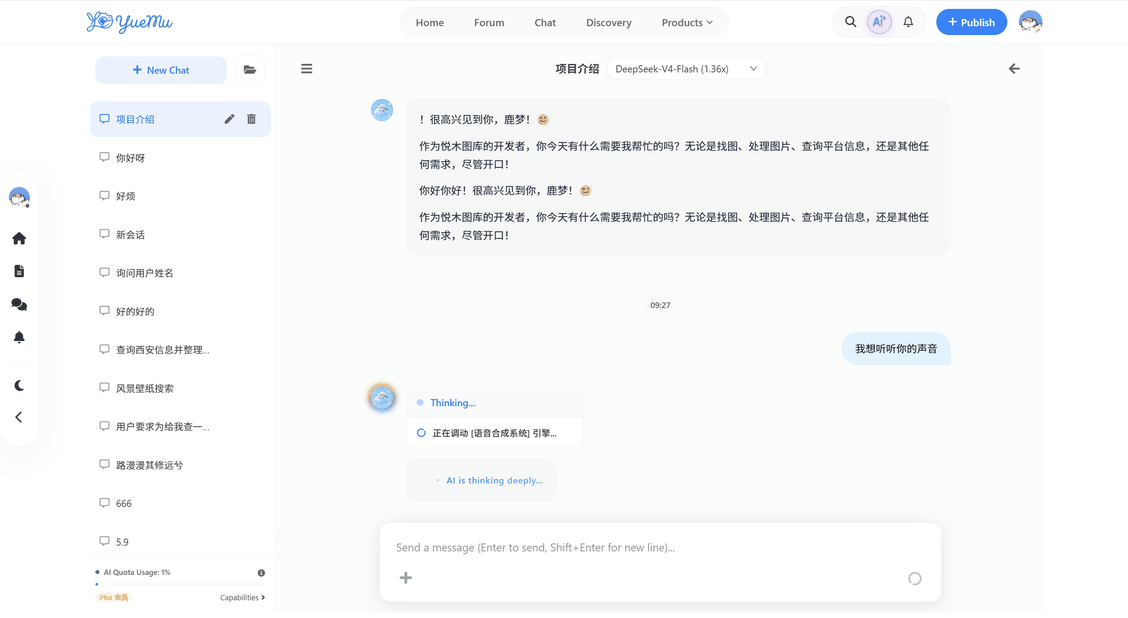 ▲ Fig: The AI conversation as the user sees it — typewriter, thinking steps and token balance all on one screen
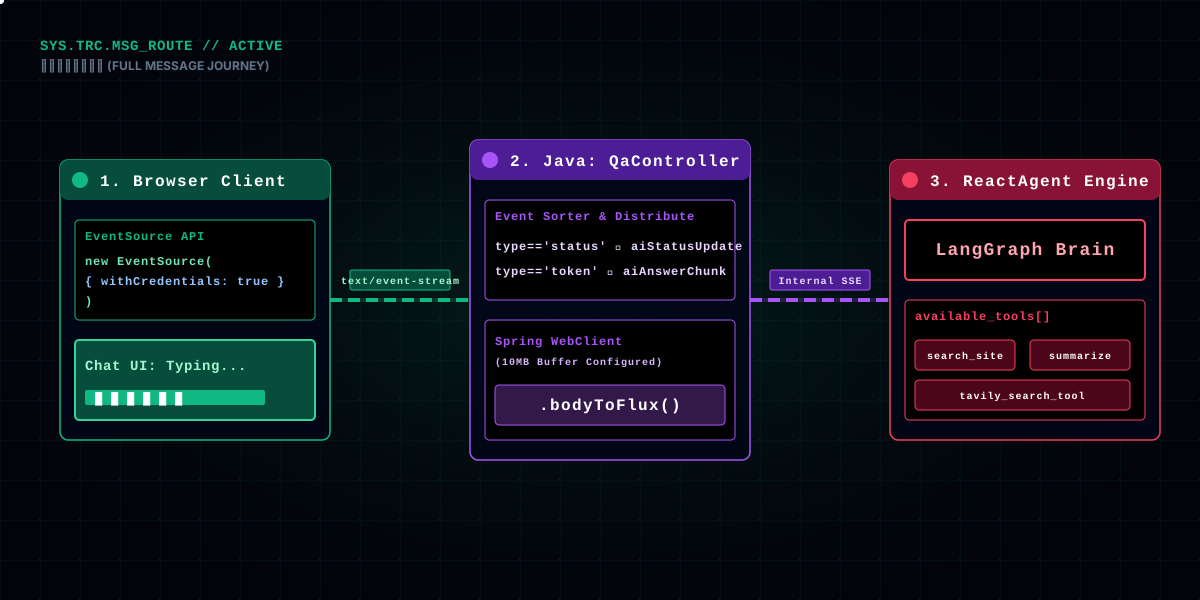
Hold on to this relay chain — each later section unpacks one of its hops:
EventSource;MessageQaController receives the request, runs a quota pre-check, creates a session, and opens an SseEmitter;WebClient; inside Python, ReactAgent calls a pile of tools (search the site, look up data, read images, check the weather...) to get the answer;text/event-stream chunks; the Java relay sorts "status" and "content" into two kinds of events and pushes them to the frontend;Notice there are two transports in those six hops: SSE (server pushes one-way to the browser, carrying content) and WebSocket (bidirectional, carrying the token balance). One AI conversation feature, why two transports at once? That's the first question this article wants to answer properly.
The boundary between the two transports is clear: SSE is "one-shot" — one Q&A, one stream, closed when the answer is done; WebSocket is "resident" — it lives for the whole page lifecycle. So content goes over SSE (it lives and dies with the Q&A), the balance goes over WebSocket (it lives and dies with the page). Every later hop revolves around this boundary.
One thing to get straight up front: this chain wasn't "designed in one pass" — it was forced into existence layer by layer by production problems. It probably started as the frontend EventSource hitting one backend endpoint directly, then someone discovered Nginx buffering had to be switched off, then a transfer station was needed, then heartbeats, then multi-tab relay, then billing. Every "design" in the later sections is, looking back, a "product of a pothole." As you read, ask yourself: this layer — if it didn't exist, what would break? Understand that, and you'll know why it's there.
The frontend's first hop picks EventSource over fetch with a ReadableStream. Why? Because AI conversation streaming is purely one-way — the browser only receives, and never needs to send anything mid-stream (sending a request goes over plain HTTP). For one-way push, SSE is the native fit: one URL, one new EventSource(url), the server just keeps emitting events, and it even auto-reconnects.
const eventSource = new EventSource(url, { withCredentials: true })
currentEventSource = eventSource // keep the instance, for interrupting

eventSource.addEventListener('aiStatusUpdate', (event) => {
  const dataObj = JSON.parse(event.data)
  if (dataObj?.status) {
    aiMessagePlaceholder.statusSteps.push(dataObj.status) // the "thinking" steps
    aiMessagePlaceholder.isThinking = true
  }
})

eventSource.addEventListener('aiAnswerChunk', (event) => {
  const dataObj = JSON.parse(event.data)
  const token = dataObj.token
  if (token == null) return
  if (dataObj.isSync) {
    // multi-tab relay: sync the cached full text directly, skip the typewriter
    fullContent = token
    displayedContent = token
    return
  }
  fullContent += token
})
The two custom event names are worth noting: aiStatusUpdate is "thinking status," aiAnswerChunk is "answer content." The backend deliberately splits Python's stream into these two kinds of events when relaying — status and content separated, so the frontend can show step hints like "searching materials, organizing the answer" while the typewriter types away, without interfering with each other.
withCredentials: true is also critical: SSE requests don't send cookies by default, and authentication relies on Sa-Token (in the cookie), so without credentials the backend rejects it outright. This one line decides whether a "logged-in user" can connect at all.
Deeper still, EventSource has an often-overlooked strength: automatic reconnection. If the network hiccups and drops the connection, EventSource reconnects per the protocol and even sends a Last-Event-ID header so the server knows where to resume. Although the interrupt logic here manages the connection actively (covered next section), this protocol-level ability still beats hand-writing a fetch stream for convenience.
One more comparison worth making: why not push content over WebSocket? Because content is a product of "one Q&A," and using WebSocket means maintaining a resident bidirectional connection yourself, managing your own heartbeats, your own reconnects — while SSE bundles all of that. One-way streaming uses SSE, bidirectional interaction uses WebSocket; that's the first-principles judgment of "which transport." On this site, the chat room uses WebSocket (because it sends messages both ways), and the AI conversation uses SSE (because it only receives one way) — each in its place.
Receiving aiAnswerChunk only accumulates content into fullContent. What actually shows on screen is the requestAnimationFrame-driven "typewriter," deciding each frame how many characters to type:
const typeNext = () => {
  if (displayedContent.length < fullContent.length) {
    const remaining = fullContent.length - displayedContent.length
    // dynamically decide chars per frame by backlog: stay smooth, speed up when backlogged
    let charsToAdd = 1
    if (remaining > 50) charsToAdd = Math.ceil(remaining / 5)
    else if (remaining > 20) charsToAdd = 3
    else if (remaining > 5) charsToAdd = 2

    displayedContent += fullContent.substring(displayedContent.length,
      displayedContent.length + charsToAdd)
    aiMessagePlaceholder.content = displayedContent
    scrollToBottomRealtime()
    typeFrame = requestAnimationFrame(typeNext)
  }
}
The core of this is "dynamic chars per frame." If you fixed it at one character per frame, when the model produces quickly, the frontend falls further and further behind and the user thinks it's stuck; when the model produces slowly, it looks choppy. So it throttles by backlog: if more than 50 characters are backed up, type at most one fifth of the remainder per frame to catch up fast; when the backlog is small, drop back to the normal one-or-two-chars-per-frame rhythm. The secret of a "smooth" typewriter lives in that little charsToAdd calculation.
scrollToBottomRealtime is called every frame, keeping the chat box scrolled to the latest content during long answers. This kind of high-frequency operation needs performance care — it internally manipulates DOM scrolling directly, bypassing Vue's reactivity, because one reactive update per frame (triggering a full list re-render) is enough to make a low-end device drop frames.
There's also a "placeholder" design hiding here: before the first character of an AI message arrives, the frontend already inserts a "thinking" placeholder message into the list, marked with isStreaming. The typewriter renders fullContent frame by frame into that placeholder. Why place it first? Because list rendering is reactive — if you waited for the first character to arrive before pushing a new message into the list, the whole list would flicker; place it first, fill it after, and the list stays rock still while only the content grows. Users can't articulate why it feels better, but anyone who's compared knows how smooth "the answer didn't just pop in out of nowhere" feels.
scrollToBottomRealtime being called every frame also has a reason: it skips Vue reactivity and directly touches DOM's scrollTop. Because one reactive update per frame (re-rendering the whole list) is enough to make low-end machines stutter. This trade-off of "where to use reactivity, where to touch the DOM directly" is the key to a typewriter that doesn't drop frames — Vue's reactivity is a convenience, not a cure-all, and high-frequency operations have to bypass it.
Halfway through an AI answer, the user wants to interrupt — a hard requirement for chat products. The implementation relies on a globally saved currentEventSource:
const stopStreaming = () => {
  if (currentEventSource) {
    currentEventSource.close() // close the SSE connection
    currentEventSource = null
  }
  // pull the placeholder AI message out of the "streaming" state
  const sIndex = streamingMessageIds.value.indexOf(Number(id))
  if (sIndex > -1) streamingMessageIds.value.splice(sIndex, 1)
  finalizeMessage()
}
streamingMessageIds is a list of message IDs currently streaming; there can be several streaming messages at once (say, asking two questions concurrently). On interrupt, you have to not only close the connection, but also pull this message out of the streaming list and finalize the placeholder — otherwise the UI keeps showing a fake "typing" cursor.
A detail here: currentEventSource is a module-level variable, not bound to a single message. Why? Because only one stream is allowed at a time — if the user sends another message while the previous one is still on the typewriter, the frontend interrupts the previous one first. That's a product-level constraint, and the reason the implementation stores "only one current stream globally."
Another detail: a user-initiated interrupt and a network drop are two completely different finishes. An active interrupt is stopStreaming — close the connection, remove the message, finish cleanly; the server may still be generating, but the frontend no longer cares. An accidental disconnect is EventSource's onerror — the connection is gone, currentEventSource still points at a stale instance; here you have to clear the reference and mark the message "unfinished," to be restored on the user's next action. If you don't distinguish these two, you get bugs like "the message still shows a typing cursor after an interrupt" or "the state freezes on thinking after a disconnect."
The server side of interruption is also worth mentioning: when the frontend closes the EventSource, the backend SseEmitter's onCompletion fires, removing the emitter from the session list and stopping the heartbeat task. In other words, "interrupt" is a linked pair of actions across frontend and backend — the frontend closes the connection, the backend does cleanup on the completion event. If any link in between is missed, a "ghost connection" is left holding resources, and enough of those eventually drag the server down.
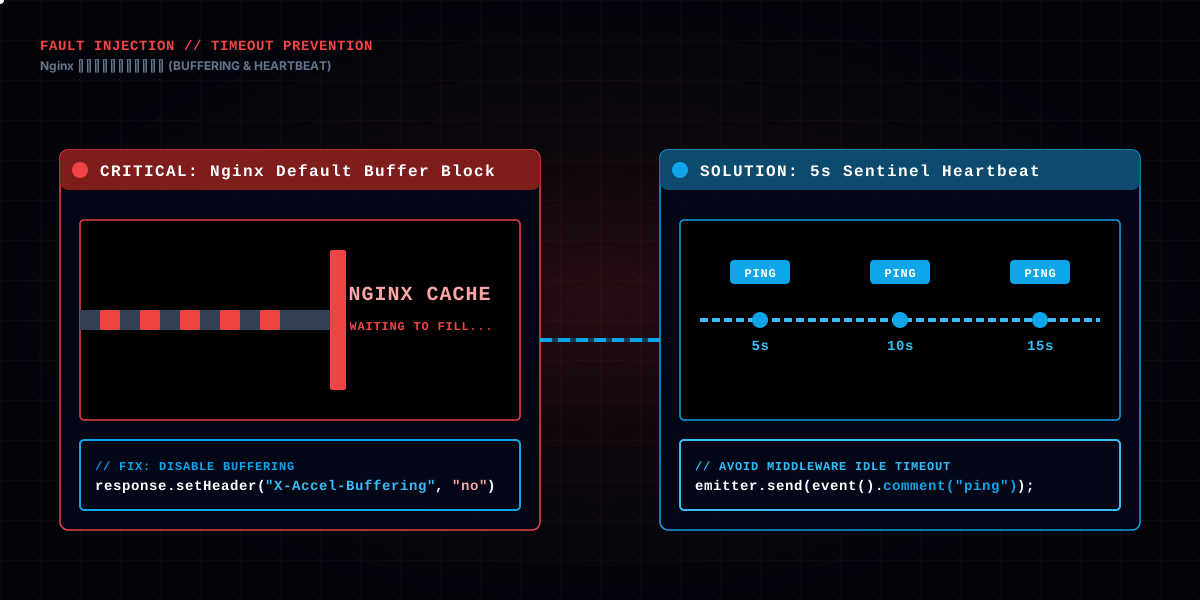
The EventSource connects to the backend's /api/rag/qa/message/send/stream. The backend uses Spring's SseEmitter to carry this long connection. Hidden in this method is a pothole that can kill SSE, dealt with before anything else:
response.setHeader("X-Accel-Buffering", "no");  // tell Nginx not to buffer SSE
response.setHeader("Cache-Control", "no-cache");
response.setHeader("Connection", "keep-alive");
response.setContentType("text/event-stream");
response.setCharacterEncoding("UTF-8");

SseEmitter emitter = new SseEmitter(180000L); // 180-second timeout
That X-Accel-Buffering: no line was bought with blood. Nginx buffers upstream responses by default — it collects the stream Java emits, and only forwards to the browser once a batch accumulates. That's fine for ordinary pages, but for SSE it's fatal: the stream gets stuck inside Nginx until the buffer fills or the connection times out, and the frontend receives nothing. X-Accel-Buffering: no tells Nginx "don't buffer this response, forward it piece by piece as it arrives." Without that line, all the streaming work before it is wasted.
SseEmitter's lifecycle has three callbacks to handle: onCompletion, onError, onTimeout. They do almost the same thing — stop the heartbeat task and remove themselves from the session's emitter list. Why not share one piece of code? Because the emitter's state differs when each callback fires, though the cleanup logic does repeat. Repeating here buys clarity, which is acceptable — three callbacks each own one exit path, so when something goes wrong you can spot at a glance which one fired.
The 180-second timeout has its own reasoning. It's longer than the model's slowest answer, yet doesn't let the connection hang forever. The real risk: if the timeout fires mid-answer, onTimeout completes the connection and the frontend gets an EOF — by then it has already displayed whatever content arrived, and the remaining half is simply gone. So heartbeat and timeout must work together: the heartbeat keeps the connection "busy," and the timeout is only a last-resort backstop. You set a timeout not because you expect it to fire, but because you're afraid of the times it should fire and doesn't.
The SseEmitter timeout is 180 seconds. AI answers usually take seconds to tens of seconds, so 180 is enough — but if it does time out, the backend's onTimeout callback handles the cleanup. Read this timeout together with the "5-second heartbeat" that follows — the heartbeat exists precisely to keep a long answer from being cut off by some gateway idle timeout in the middle.
SSE is a long connection, but any proxy layer in between (Nginx, load balancer) can set an idle timeout — a connection with no data for too long gets killed as a zombie. When an AI answer is long, during those tens of seconds the model is "thinking," the browser and backend are quiet, and the connection is an easy kill. The fix: the backend periodically stuffs a "comment" into the connection:
ScheduledFuture<?> heartbeatTask = heartbeatExecutor.scheduleAtFixedRate(() -> {
    try {
        emitter.send(SseEmitter.event().comment("ping"));
    } catch (Exception ignored) {
    }
}, 5, 5, TimeUnit.SECONDS);
Every 5 seconds it sends a comment("ping"). Note it's a comment, not data — in the SSE protocol, comments start with :, and the browser ignores them while parsing; they never trigger onmessage or any event listener. It's purely a sentinel that "keeps traffic flowing on the connection," and the frontend is completely unaware.
The 5-second interval isn't arbitrary either. Too short, and every 5 seconds is a TCP packet — light, but pointless; too long, like 30 seconds, and an upstream idle timeout may have already killed the connection. 5 seconds is the compromise between "won't make the middleware misjudge idleness" and "isn't too frequent." This value may need tuning per deployment — whatever your cloud load balancer's idle timeout is, your heartbeat interval must be clearly smaller than it. X-Accel-Buffering deals with Nginx buffering, the heartbeat deals with "idle timeout"; they're a pair of brothers — one governs "hoarding instead of sending," the other "being killed for being too quiet," and you need both. Many SSE apps only handle one and not the other, and they all end up dying halfway.
One detail worth remembering: the heartbeat's payload must be invisible to the browser. If it were plain data, the frontend would process an extra event per heartbeat and have to specially ignore it; a comment is never treated as an event by the browser — zero cost. That's a difference between SSE heartbeat and WebSocket heartbeat (the latter has to send a real message).
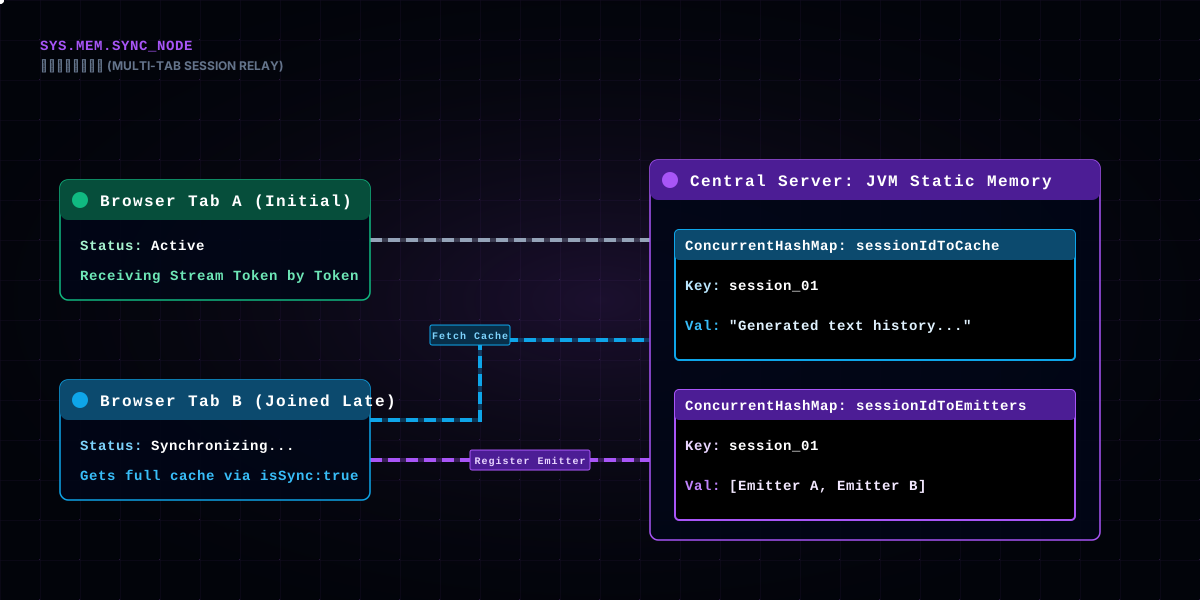
The user asks a question in tab A, then opens the same conversation in tab B — B's EventSource also connects to the same sessionId. If B started waiting from scratch, it would miss the content already emitted. The backend's handling is a "relay":
if (sessionIdToEmitters.containsKey(actualSessionId)) {
    CopyOnWriteArrayList<SseEmitter> emitters = sessionIdToEmitters.get(actualSessionId);
    emitters.add(emitter); // late tab joins the same distribution list

    // sync the already-accumulated content to the late connection in one shot
    StringBuilder cache = sessionIdToCache.get(actualSessionId);
    if (cache != null && cache.length() > 0) {
        Map<String, Object> tokenMap = new HashMap<>();
        tokenMap.put("token", cache.toString());
        tokenMap.put("isSync", true); // frontend sees isSync and displays it whole, skipping the typewriter
        emitter.send(SseEmitter.event().name("aiAnswerChunk").data(tokenMap));
    }
    return emitter;
}
The key is the two tables sessionIdToEmitters (all connections to the current session) and sessionIdToCache (the full text already emitted for this session). When a new connection joins, the cached full text is sent in one shot with isSync: true; the frontend sees isSync and displays the whole thing, skipping the typewriter. Afterward, distributeEvent fans out new content to every connection in the list at once — tabs A and B walk down in sync.
This design answers an easily-ignored question: one backend session can carry multiple SseEmitters at the same time. CopyOnWriteArrayList guarantees concurrency-safe iteration; distributeEvent sends one by one and removes failed ones (tab closed) from the list along the way.
Where do sessionIdToEmitters and sessionIdToCache live? They're static Maps in MessageQaController — sitting on the JVM. That means a session's "in-flight stream" info is reachable from every request thread, which is the precondition for multi-tab sync. But mind the lifecycle: after the session ends, if the entries in these two Maps aren't cleaned up, they'll hold memory forever. So onCompletion doesn't just remove the emitter — when the last emitter leaves, it deletes the whole session's entry. Static Map + manual cleanup is where this design "remembers to close the lid" — build without ever clearing, and memory will teach you a lesson.
Once the backend gets the question, the one that actually does the work is the Python service. Java uses WebClient (WebFlux's reactive client) to consume Python's SSE stream, turning results into one type event at a time:
ragService.chatStream(userId, actualSessionId, reqContent, saToken, model, result -> {
    String type = (String) result.get("type");
    String chunkContent = (String) result.get("content");
    if ("token".equals(type)) {
        // content chunk → push to the frontend typewriter
        Map<String, String> data = new HashMap<>();
        data.put("token", chunkContent);
        distributeEvent(actualSessionId, "aiAnswerChunk", data);
    } else if ("status".equals(type)) {
        // thinking status → push to the frontend "thinking" hint
        Map<String, String> data = new HashMap<>();
        data.put("status", chunkContent);
        distributeEvent(actualSessionId, "aiStatusUpdate", data);
    }
}, ...);
This block is the chain's "sorting station": Java takes the raw stream Python emits and sorts it by the two types token and status into the two events the frontend recognizes. distributeEvent then broadcasts to every connection in the session (multi-tab).
Why relay through Java instead of having the frontend connect to Python directly? Two reasons. First, authentication lives in Java — the Python service sits in an isolated network and can't be exposed to the public internet; the frontend only knows Java, and Java passes the credential saToken to Python. Second, Java does the billing — when the stream ends it has to count tokens, write to the database, and update the session context, all of which must happen on the backend.
There's one more detail in WebClient's initialization: raising the default buffer to 10MB. Because AI answers may embed audio (TTS-generated speech), a long-text-to-audio stream can exceed WebClient's default 256KB buffer limit and throw. That comment is a pothole left behind: "prevent long-text synthesized audio streams from exceeding the 256KB limit." Every layer of a streaming architecture has to consider "how large can a single chunk be" — a subtle difference from ordinary APIs, where the response is one whole object; in a streaming API, a single chunk may be a small part of the whole response, yet that small part can already exceed the default buffer.
Before calling Python, Java also does two pieces of context engineering: first, it converts the conversation history (short-term memory) into a message list; second, it fetches the "long-term memory" LTM and the user persona. LTM is a summary of the points worth remembering across past turns, effective across sessions; the persona is a user-feature description generated from past behavior. These two get stitched into the prompt so the model's answer "remembers who you are." The gap between an AI that "remembers you" and one that "starts from zero every time" is enormous — and that gap lives in this piece of Java code. It isn't magic; it's doing context engineering faithfully before the frontend call.
The real "brain" lives in Python. ReactAgent uses LangChain's create_agent to build a ReAct-style agent with a pile of tools:
from agent.tools import available_tools

agent = create_agent(
    model=chat_model,
    tools=available_tools,
    system_prompt=system_prompt,
)
available_tools is that pile of "hands": search the site (search_site), read my personal data (get_my_personal_data), RAG summarize (rag_summarize), analyze an image (analyze_image), web search (tavily_search_tool), check the time, report the weather, search Pexels assets, query system status... dozens of tools. The agent's reasoning process is "judge which tool to use → call it → get the result → judge again" — that's the ReAct loop.
A detail: the system prompt is read from a file, and the model can be switched dynamically (get_agent(model_name) caches a different Agent instance per model name). In other words, the same agent logic, swap the model and you get a different "brain," tools unchanged. This "dynamic multi-model switching" is a selling point of this AI service, and the seed of the token multiplier that comes later — different models bill at multipliers that differ by more than ten times.
Python's stream generator exposes the agent's thinking process as events: lines in the agent's output marked with __STATUS__: are recognized as status, lines marked with __TOKEN_USAGE__: are recognized as token consumption. These markers are the "secret code" agreed between the agent and the streaming layer, smuggling structured information through the text stream.
How do tools work? Take search_site as an example: the agent judges "the user might be asking about something on the site," calls the tool with the search term as a parameter, the tool returns the site's search results, and the agent organizes the answer based on them. That's the "think-act-observe" of the ReAct loop. The coupling point between tool and agent is the "tool description" — the docstring each tool carries at registration is what the agent uses to decide "when to use which tool." How well a tool's description is written directly decides whether the agent uses it; this is prompt engineering at the tool layer. A tool with a vague parameter description may never be called, or get called with wrong parameters — as good as not registering it.
One more detail: the system prompt is read from a file rather than hard-coded. The benefit is that changing the prompt means changing a file, not the code, not a redeploy. For an AI service that tunes prompts frequently, that's a huge ops convenience — you can keep adjusting "this AI's personality settings" without ever interrupting the live service. A large part of AI product iteration isn't changing code; it's changing this piece of text.
The biggest experience problem with AI answers is the "black box" — the user doesn't know what it's doing. This chain tears a crack in it with the aiStatusUpdate event: every step the agent takes (searching materials, organizing the answer) is pushed to the frontend as a status, which displays step hints like "searching materials" "organizing the answer," paired with a "thinking" animation.
if (dataObj?.status) {
  aiMessagePlaceholder.statusSteps.push(dataObj.status)
  aiMessagePlaceholder.isThinking = true
}
The value of this step can't be underestimated. Without it, the user faces a static "inputting..." and, after waiting long enough, assumes it's dead and hammer-retries; with it, the user sees the progression of "it's searching, it's summarizing," and patience rises exponentially. Visualizing the thinking process is the hidden lever of AI product experience — cheap to build, huge in return.
Why is the "thinking" hint so important for AI products? Behind it is "perceived latency" psychology: a person's patience for "waiting" depends on whether they can see progress. The same 10 seconds, facing a static spinner versus facing step progression "searching materials → organizing the answer → generating the reply," the latter feels much shorter. This feature adds zero "actual value," but it dramatically improves "perceived value" — the highest-value-for-cost UX investment an AI product can make.
An implementation detail: statusSteps is an array, pushed to one step at a time, rendered as a timeline in the UI. Why an array instead of overwriting with just the last step? Because "the sense of steps progressing" itself signals "it's genuinely working" — seeing all three steps walk through is more convincing than staying frozen on step one. These small UI touches, like the engineering details before them, are all part of "making the user feel it's really doing something."
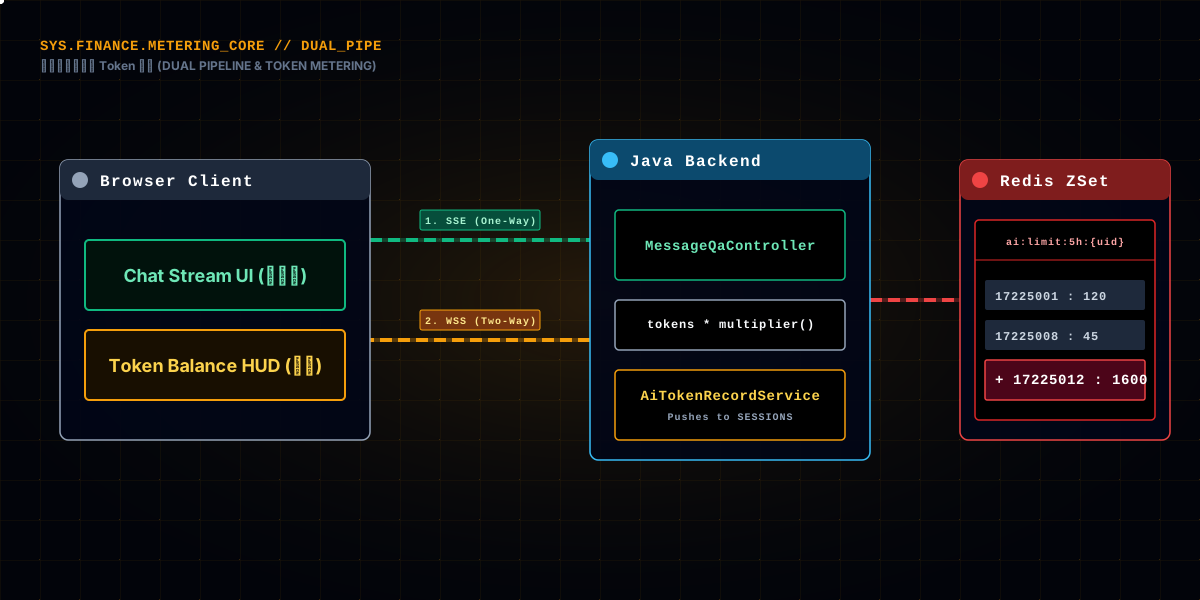
The most "real-world" link of this chain is billing. Every AI call costs money, and this site turns it into a "quota system": users have a balance, and when it's gone they upgrade. The quota check happens before the stream even starts:
try {
    aiTokenRecordService.checkTokenQuota(userId); // pre-check quota, end the stream if over
} catch (BusinessException e) {
    // send a system message and end the stream normally, instead of erroring
    ...
    emitter.complete();
    return emitter;
}
The quota is a "rolling window," implemented with Redis ZSets: a 5-hour window and a weekly window, each counting its own usage, rejecting when over. This "rolling window + ZSet" is more advanced than a simple counter — it natively supports "old consumption sliding out of the window auto-expires," with no scheduled cleanup job.
The genuinely valuable part is the real metering at stream end:
int consumeToken = (totalTokens != null && totalTokens > 0) ? totalTokens
        : (reqContent.length() + finalContent.length()); // estimate by length if no real value
int finalConsumeToken = (int) Math.ceil(consumeToken * getModelTokenMultiplier(model));
aiTokenRecordService.recordTokenUsage(userId, finalConsumeToken);
getModelTokenMultiplier is a veto-level presence:
private double getModelTokenMultiplier(String model) {
    if (model == null) return 1.0;
    String lowerModel = model.toLowerCase();
    if (lowerModel.contains("deepseek-v4-pro")) return 16.36;
    if (lowerModel.contains("qwen3.5-plus")) return 2.55;
    if (lowerModel.contains("deepseek-v4-flash")) return 1.36;
    return 1.0;
}
The same question, asked with the Pro model, consumes more than 16 times the tokens of the standard model. The multiplier isn't plucked from thin air — it roughly tracks each model's actual unit price. An action as simple as "typing a few characters" can consume dozens to thousands of "metered tokens" depending on the model chosen. Billing without the multiplier lets users enjoy the most expensive model at the cheapest model's price — an account every AI product has to get right.
Look at the quota check's implementation. checkTokenQuota uses two Redis keys: ai:limit:5h: and ai:limit:week:, both ZSets. In the 5-hour window ZSet, each element is "a record of one consumption," with the score as its timestamp. On check, it first removeRangeByScores old records outside the window, then ranges and sums, comparing against the quota. The essence is the "rolling window" — not counting from the month start or midnight, but from "5 hours before the current moment," so whoever consumed first slides out first and the quota naturally recovers.
Quotas also tier by membership: ordinary users, members and admins each have their own 5-hour and weekly caps. This "quota by identity" design turns AI cost from "uniform loss" into "tiered operations" — ordinary users get a tighter limit, paying members get more, and cost follows identity.
And one more layer: when recordTokenUsage records consumption, the Redis ZSet's score is the timestamp and the value is the consumed amount. When querying the balance, getTokenUsage sums the 5-hour and weekly consumption separately, and subtracting from the quota gives the remainder. The whole metering system uses no MySQL table for real-time addition/subtraction; it's pure Redis rolling windows — because "consumption" is high-frequency appending, Redis's write performance is an order of magnitude better than MySQL's, and rolling windows natively carry expiry semantics with no scheduled cleanup. Choosing Redis isn't chasing novelty; it's that "high-frequency writes + auto-expiry" is a scenario where Redis is simply more appropriate than MySQL.
A fallback layer: if Python doesn't return a real total_tokens, the code estimates by "question length + answer length." When real metering is unavailable, length estimation is rough, but at least it isn't zero-cost.
Billing is the backend's job, but the user wants to see the balance change in real time. That's where the second connection comes in — a standalone WebSocket (/ws/ai-token) dedicated to pushing token usage. The backend pushes the current usage once when the user connects, then once after each billing:
public void sendUsageToUser(String userId) {
    WebSocketSession session = SESSIONS.get(userId);
    if (session != null && session.isOpen()) {
        AiTokenUsageVO tokenUsage = aiTokenRecordService.getTokenUsage(Long.valueOf(userId));
        Map<String, Object> response = new HashMap<>();
        response.put("type", "ai_token_usage_response");
        response.put("data", tokenUsage);
        sendMessage(session, response);
    }
}
So within one AI conversation feature, SSE and WebSocket each mind their own business: SSE pushes content one way, WebSocket manages the balance (bidirectional, though here mostly pushing). Why not stuff the balance into SSE too? Because SSE is a "one Q&A" connection that closes when the Q&A ends; the balance is something displayed for the "entire page lifecycle" and needs a resident connection. Two connections, two lifecycles, each managing its own — that's the answer to "why use two real-time technologies at once."
On the frontend, aiTokenWebSocketService is a singleton (same pattern as a19's chat-list WebSocket), with heartbeats, reconnects, and an ai_token_usage_response listener that updates the balance display at the top of the page when received.
Why open a separate WebSocket for the balance instead of piggybacking it on the SSE stream's done event? Because the SSE stream is one Q&A and closes when done; the balance is resident — the user looks at it, switches away and back, asks the next round, and it has to stay correct. If you only push once at stream end, the balance is stale the moment the user switches pages and comes back. A resident WebSocket can push the latest balance to "still-open pages" at any point — that's what its lifecycle dictates.
This WebSocket's heartbeat and reconnect follow the same pattern as the chat article (a19): singleton, exponential-backoff reconnect, heartbeat keep-alive. One point worth noting: it special-cases the EOF exception — the EOFException caused by a client normally switching pages or the app going background is demoted to a DEBUG log, so it doesn't pollute error alerts. This detail says: not every "disconnect" is an incident. Separating normal disconnects from abnormal ones is what makes logs meaningful. Otherwise every page switch sets off an alert, and you'll soon lose your trust in logs.
The stream ending isn't the end. After the stream ends, the backend still has to do three things, and the order can't be wrong:
// 1. replace the placeholder message (content is "...") with the real answer
RagSessionMessage finalMsg = new RagSessionMessage();
finalMsg.setId(aiMessageId);
finalMsg.setContent(finalContent);
ragSessionMessageService.updateById(finalMsg);

// 2. extract and save resources from the answer (images, audio, etc.)
aiResourceService.extractAndSaveResources(finalContent, aiMessageId, userId);

// 3. save this Q&A into the context, for the next question to reference
saveSessionContext(sessionId, updatedContext);
First, the placeholder replacement. Note the frontend displays the streaming-rendered text, but the placeholder message in the database starts as just "...", and the real full text is written in only after the stream ends — so that if the stream dies mid-way, the database at least holds a "half-finished" record instead of nothing. Second, resource extraction — AI answers may embed image URLs and audio URLs that have to be fished out and recorded as resources. Third, context saving — the next question stitches this history into the message list as the model's context (plus a "long-term memory" LTM that stores cross-session key points).
All three are "finish-line but not late" work: late, and the user sees a half placeholder on refresh; skipped, and the next question loses context. So they all sit in the onComplete callback, running serially with the streaming transfer.
A trade-off exists here: is resource extraction "synchronous" or "asynchronous"? Synchronous, and the onComplete callback waits for extraction to finish before returning, delaying the user's "answer complete"; asynchronous, and a failed extraction is silently lost. The project chose synchronous — because the resources embedded in the answer (images, audio) are part of the answer itself, better slow but guaranteed to hit the database, than the bizarre state of "it answered but the image is gone" after a refresh. There's no standard answer to this trade-off; it depends on whether "the resource is the core output or a garnish" — and for an image community, an AI-generated image is the output itself, so synchronous is worth it.
This chain has hit more potholes per square inch than any other feature. The most representative ones:
Pothole 1: Nginx buffering killed the SSE. Early on, the frontend received nothing, yet the browser console showed the connection was open. After hours of hunting, it was Nginx's default buffering hoarding the stream. X-Accel-Buffering: no fixed it in one line, but the despair of those hours is only understood by those who lived it. It's the #1 suspect for every "works locally, dies in production" SSE problem.
Pothole 2: withCredentials forgotten. EventSource sends no credentials, the backend auth rejects it, and it looks like "connects then immediately disconnects." Later { withCredentials: true } was added to every EventSource uniformly, and the SseEmitter's X-Accel-Buffering and Cache-Control headers were hardened into a template so nobody hand-writes and misses one.
Pothole 3: Typewriter framerate explosion. The first version fixed one character per frame; fine when the model is slow, but when it produces fast and tens or hundreds of characters pile up, the user sees a freeze. Switching to "throttle dynamically by backlog" made it smooth. That charsToAdd calculation was tuned, not derived.
Pothole 4: No multi-tab relay. Originally every tab opened its own connection; when a second tab opened the same conversation, the history was a blank void until the next question produced output. The sessionIdToCache relay was added later, and only after adding it did we realize "one backend session carrying multiple SseEmitters" was a capability that should have been there all along.
Pothole 5: The token multiplier. Originally billing skipped the model multiplier, so users all used the Pro model at Flash prices, and costs leaked. Once getModelTokenMultiplier was added, Pro at 16.36×, the cost ledger finally stood up. It taught me: an AI product's cost control must rest on both "real metering" and "model pricing" — missing either, and it leaks.
Pothole 6: The stream-end race. There was a race between the frontend's finalizeMessage and the typewriter's typeNext — the stream-end signal arrived first while the typewriter hadn't finished its last frame, dropping the final character. The fix: finalizeMessage only executes when typeFrame is null (the typewriter has stopped); otherwise wait for it to finish.
Pothole 7: Mixed content under HTTPS. If the page is https but the EventSource address is http (say, VITE_WS_URL misconfigured), the browser flat-out refuses with a "mixed content" error. It's the most insidious because local http development works and production https breaks. The fix: use relative paths or protocol-relative addresses uniformly (the wss:/https: check), letting the protocol follow the page.
Pothole 8: The heartbeat kept the connection alive, but fooled the tests. Once, debugging a production issue, the logs made the connection look healthy, but the heartbeat was silently keeping it alive and masking the fact that the upstream model had slowed down. Keep-alive and real health are two different things — the heartbeat only proves "TCP is up," not "the service isn't stuck." In monitoring, beyond the heartbeat you also need a "business heartbeat" (say, a content event must arrive within N seconds) to catch "connection alive but service frozen."
Collected together, this AI conversation chain is just six actions: EventSource receives the stream → SseEmitter relays → WebClient transfers → the Agent processes → sorted into status and content → billed and balance pushed. No single action is hard by itself; what's hard is making them connect end to end, not crash on error, and resume from a breakpoint.
Two things I want to stress here. First, SSE and WebSocket aren't either/or — they divide by lifecycle: one-shot content streams use SSE, resident balance pushes use WebSocket. Second, the "typewriter" is just the face; the substance is the reliability of every link in the chain — Nginx not buffering, heartbeat keep-alive, multi-tab relay, breakpoint finish — these invisible parts are the real reason an AI conversation feels "smooth."
If you're ever building an AI conversation product, check the chain link by link: does your stream run all the way from the browser to the model, with no proxy layer buffering or cutting it mid-way? Is your money billed at the model's real price? Is your "thinking" genuinely visible to the user? Think those three through, and your AI conversation is already stronger than most demos.
And one candid closing note: everything this article dissected is, link by link, "common sense everyone else does too" — EventSource, SseEmitter, WebClient, Agent, Redis billing. But stringing them into a chain, and making every link not crash under extreme conditions (disconnects, timeouts, multi-tab, quota exhaustion) — the potholes stepped in, the holes patched — that's the accumulation that's actually worth money. Tech isn't valuable; the judgment to use tech correctly is. I hope this piece hands some of that judgment to you. And if this article was about "how the AI answers your question," the next one wants to talk about "how the things on your site get found" — search and the hot list. One turns the user's intent into an answer, the other turns the site's content into an entry point — two faces of the same thing: letting what deserves to be seen actually be seen.