
Early on, this site looked like an empty shell to search engines: a Vue SPA with full features and polished animations, but Baidu couldn't find it, and what Google Search Console fetched was an almost blank HTML with a single <div id="app"></div> and nothing else. The articles, titles, and descriptions you carefully wrote simply didn't exist to a crawler.
This isn't your page "lacking content." It's that search-engine crawlers don't execute JavaScript — more precisely, not during the crawl stage. They download the HTML, parse the tags, and leave. All your content is rendered by JS in the browser, so what you've delivered to the crawler is an empty shell.
What's more ironic is that this "empty shell" isn't even empty-handed — its title is also a hard-coded default. Crawl a hundred of your pages and you get a hundred identical titles and a hundred empty shells; the engine can only conclude this is a low-quality template site. Whether it indexes you at all becomes a coin toss. So don't gamble on "Google will do a second render anyway" — that's not a path you should depend on. Getting the static HTML right is the right path.
There are three mainstream answers: SSR, which renders the complete HTML on the server; headless browsers, which execute JS on the fly at crawl time; or — what this article is about — build-time prerendering. This article breaks down the approach this project actually runs: no SSR framework, no headless browser farm, just a few build scripts, and Baidu, Bing and Google can all crawl the full article text.
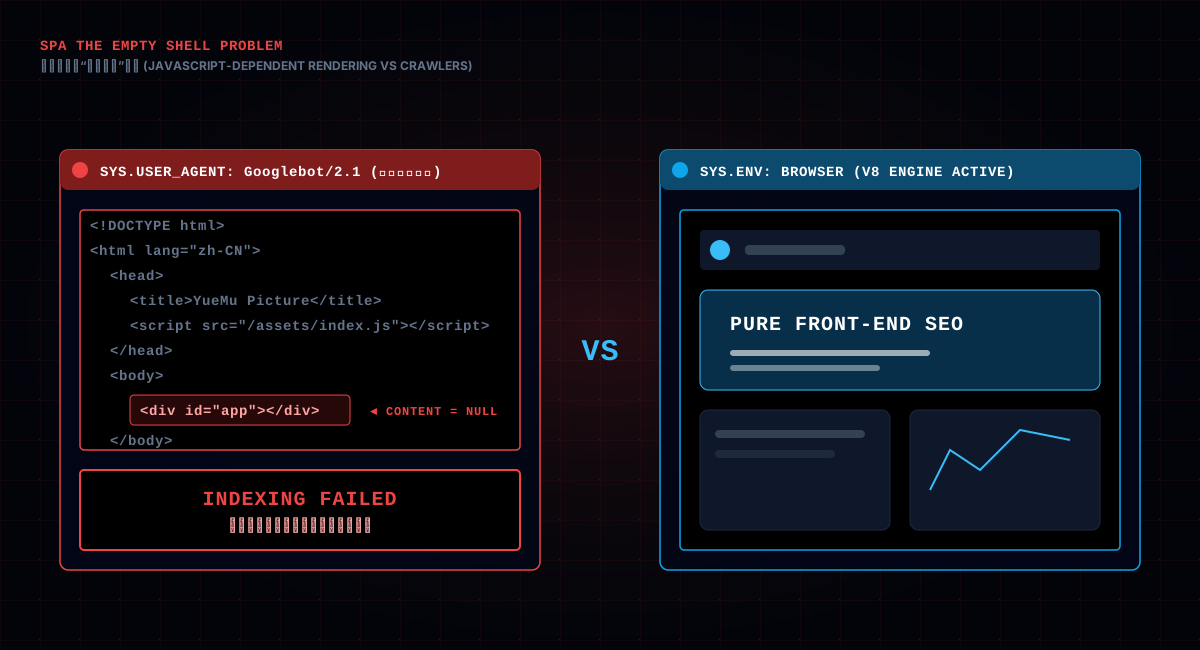
Pin the problem down first. A Vite-bundled SPA produces an HTML file that looks roughly like this:
<!doctype html>
<html lang="en">
  <head>
    <title>Yuemutuku - HD Wallpapers, Photography & Image Library</title>
    <meta name="description" content="..." />
  </head>
  <body>
    <div id="app"></div>
    <script type="module" src="/assets/index-xxxx.js"></script>
  </body>
</html>
The homepage has a title and description the crawler can see. But the body? Nothing — just an empty #app. Guide article pages are worse: their title is even the hard-coded homepage title. Every article's title, description and body only exist once the JS runs.
A key fact to get straight: crawlers do execute JS, but not all of them do it during the crawl stage. Google uses a headless browser for a second render, but that happens "after crawling," and it's quota-limited; Baidu has never been eager about JS rendering; and a pile of small search engines never render at all. You can't bet on "Google will re-render anyway" — your content would be running naked in Baidu.
So the goal is plain: make the HTML served at crawl time complete on its own — title, description, body, nothing missing.
To do that, you have to answer one question: who generates this HTML, and when? Three answers — the server renders on every request (SSR), a dedicated rendering service executes JS at crawl time (headless browser), or everything is generated once at build time (prerendering). The third path is what this project chose, and it's the protagonist of this article.
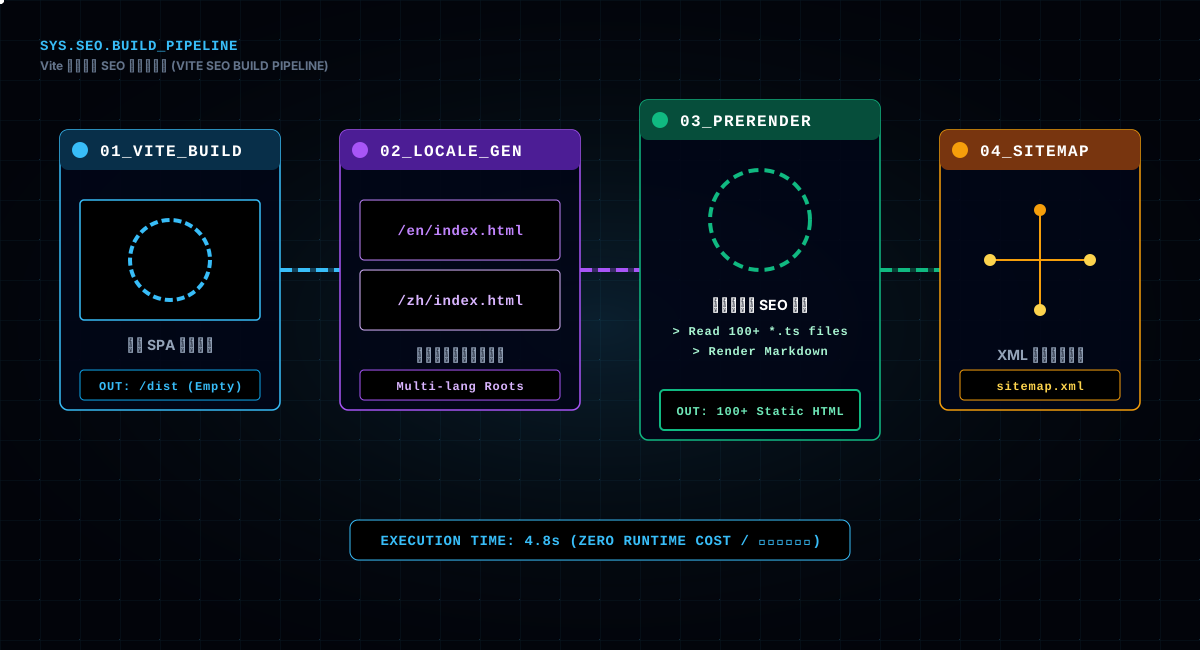
The solution lives in the build scripts. Look at this command chain in package.json:
"build": "vite build && node scripts/generate-locale-html.mjs",
"build:seo": "npm run build && npm run prerender && npm run sitemap:static",
"prerender": "node scripts/prerender.mjs",
"sitemap:static": "node scripts/generate-sitemap.mjs --static-only"
Taken apart, each of the four steps does one thing:
vite build does the normal bundle, producing dist;generate-locale-html produces two homepages — one Chinese, one English — as Nginx's multilingual try_files fallback;prerender walks every static route and every guide article, writing static HTML with "full TDK + real body" into dist;sitemap generates sitemap.xml, handing the index to search engines.The order matters too: first build the real SPA output, then do the locale HTML and prerendering on top of that output, and finally the sitemap. Each step depends on the previous step's output, chained into a pipeline. Anyone who flips the order — say, prerender before build — will have the prerendered files overwritten by the later build, which is exactly as useful as doing nothing.
Every step is a one-time build-time action, with zero runtime cost — no server-side rendering process, no resident headless browser. Users still hit the lightning-fast SPA. That's the most attractive thing about the prerendering path: the cost of SEO is all spent at publish time, not per request.
One side note: these commands are chained under npm run build:seo, which runs the whole SEO pipeline in one go. Daily development with npm run dev is completely unaffected; prerendering only steps in at release-build time. This is where it beats SSR — the dev experience doesn't change, you just gain one extra packaging step before deploying.
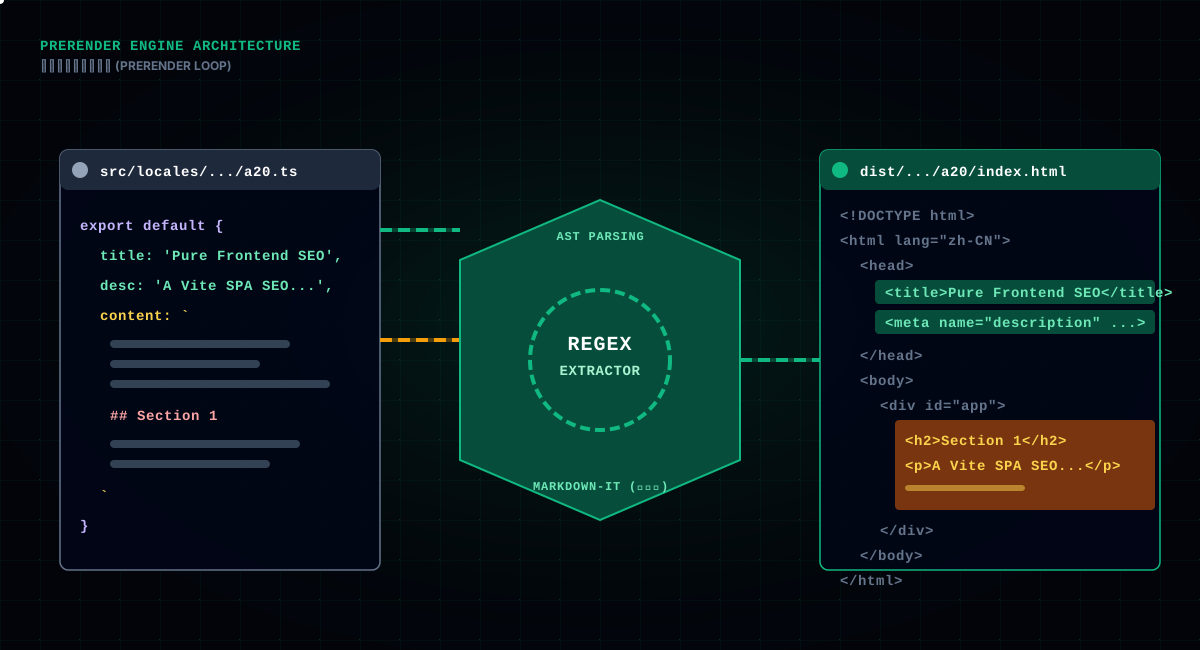
The core is prerender.mjs. It reads the built dist/index.html as a template, then runs a two-level loop of "language × route," writing a standalone index.html for every page:
for (const locale of ['zh', 'en']) {
  for (const path of STATIC_PATHS) {
    // static pages: inject the site description as SEO body, output dist/{locale}{path}/index.html
    const seoIntro = PAGE_INTRO[path] ? PAGE_INTRO[path][locale] : ''
    writeFileSync(resolve(dir, 'index.html'), generateHTML(locale, path, { seoIntro }), 'utf-8')
  }
  // guide articles: inject each article's real title/description + the markdown-rendered full body
  const guideArticles = discoverArticles(locale)
  for (const article of guideArticles) {
    const contentHtml = loadArticleContentHtml(locale, article)
    writeFileSync(resolve(dir, 'index.html'),
      generateHTML(locale, path, { title: article.title, desc: article.desc, contentHtml, jsonLd }), 'utf-8')
  }
}
The two loops are worth comparing. Static pages follow the "functional route" logic: homepage, about, privacy policy — inject a site description as SEO body so the crawler at least reads "what this site is." Guide articles follow the "content route" logic: each article uses its own title and description plus the markdown-rendered full text — that's what lets a crawler actually reach your article.
Why not render on the fly with puppeteer? The code comment says it plainly: "Unlike puppeteer-based approaches, this reads locale files directly." Headless rendering has a few pains: slow (spawn a browser, wait for the network, wait for JS), fragile (one slow async API and the whole render fails), and expensive (server memory eaten by browsers). Prerendering, by contrast, generates HTML by reading the source — the article content is sitting right there in src/locales/{zh|en}/pages/guides/a*.ts, so read it, render it, write it. The whole site finishes in seconds, steady as a rock.
The output structure is worth mentioning too: every page in dist is a directory plus an index.html, like dist/zh/guides/a1/index.html, dist/en/about/index.html. This "directory + index.html" layout, combined with Nginx's try_files, lets any path resolve to the right static file. And precisely because each page is a standalone HTML, a search engine gets one URL mapped to one complete piece of content, and hreflang and canonical can be set per page with precision — a granularity a single SPA file can never offer.
SEO has a trap that's easy to miss: hundreds of pages across the site, all with the same title. When a search engine sees hundreds of identically-titled pages, it concludes this is a template site and dilutes the weight across them. So a unique TDK per page is mandatory.
prerender.mjs keeps a route map and a page-title table:
function pathToRouteName(path) {
  const m = { '/': 'Home', '/about': 'About', '/guides': 'Guides', '/ranking': 'Ranking', ... }
  return m[path] || null
}

// unique description per page: guides use the article's own desc, others = 「title — site short description」
const title = opts.title || (routeName && PAGE_TITLES[locale][routeName]) || seo.defaultTitle
const rawDesc = opts.desc || `\${title} — \${seo.shortDescription}`
const desc = rawDesc.length > 150 ? rawDesc.slice(0, 149) + '…' : rawDesc
The recipe: the homepage uses the default title; functional pages look up PAGE_TITLES by route name; guide articles use the article's own title and desc. This way every article's <title> is its own title, and "one title for the whole site" is dead.
One detail in the description: the 150-character truncation. Google shows roughly 158 characters of description in search results; anything longer gets cut off with an ellipsis and looks broken. So this code forces slice(0, 149) + '…' — better to truncate it ourselves, decently, than to let Google do it.
And one point that can't be skipped: every string inserted into HTML must be escaped. escapeXml replaces &, <, > and quotes with entities, so an & in an article title can't dirty the whole HTML. The line looks trivial, but special characters leaking into SEO data and breaking the page structure is a real, recurring thing.
The most central step of prerendering: how do you turn an article's body into HTML and stuff it into the empty #app? Two steps — first dig the content out of the .ts source file, then render it with markdown-it.
Extracting content from a TypeScript source file relies on one regex:
function extractContentFromSource(source) {
  const m = source.match(/content:\s*`((?:[^`\\]|\\.)*)`\s*\}/)
  if (!m) return ''
  // restore the template-string escapes
  return m[1].replace(/\\`/g, '`').replace(/\\\\/g, '\\')
}
The article content lives in a .ts file as a template string, with code blocks (backticks) and all kinds of escapes embedded. This regex matches "the template string after the content colon" while crossing over internal backticks and backslash escapes, then reverses the escaping. Speaking of which — writing these guide articles, I deal with backtick escaping every single day (a previous article ranted about it); this regex exists to safely unwrap all that escaping at build time.
Once extracted, render it to HTML with markdown-it, run a media fix, and inject it into the template's #app:
if (opts.contentHtml) {
  html = html.replace('<div id="app"></div>',
    () => `<div id="app">\n\${opts.contentHtml}\n</div>`)
}
After injection, when the crawler downloads this page, #app contains the complete article body — headings, paragraphs, code blocks, all crawlable text. Google can extract keywords, judge the topic, build an index; Baidu can read the full text. That's immeasurably stronger than "empty shell + JS-rendered."
markdown-it here uses its defaults plus a few switches: html: false (no raw HTML in articles, prevents injection), linkify: true (bare links become clickable), breaks: false (newlines don't silently become paragraphs, preserving markdown's line semantics). These switches aren't arbitrary — html: false matters most. Article content is written by creators, and if raw HTML were allowed, a malicious script could get stuffed into the page. Content injected by prerendering has to pass the same security gate.
Most animations in the articles are webm, but markdown-it renders the image syntax as <img>, and webm is a video, not an image — the <img> just breaks. Prerendering fixes it into a <video> on the fly:
function fixMediaTags(html) {
  return html
    .replace(
      /<img src="([^"]*\.(?:webm|mp4|ogg|mov))"([^>]*?)alt="([^"]*)"([^>]*?)\/?>/gi,
      (_m, src, _p1, alt, _p2) =>
        `<video src="\${src}" controls muted loop playsinline preload="metadata" aria-label="\${escapeXml(alt)}">...`
    )
    .replace(/(<(?:img|video)[^>]*\s(?:src|poster)=")\/(guides|webm)\//g,
      '$1../../../$2/')
}
The second replacement deserves more explanation: it converts absolute paths /guides/xxx, /webm/xxx into relative ones like ../../../guides/xxx. Because the prerendered HTML sits in a three-levels-deep directory like dist/{locale}/guides/{id}/, and the images live under dist's root guides/ and webm/, relative paths are what resolve correctly from any depth. The payoff: even if you double-click a local HTML file (file://), the images load — easy local verification of the crawler's perspective, and no dependence on the site root when search engines fetch.
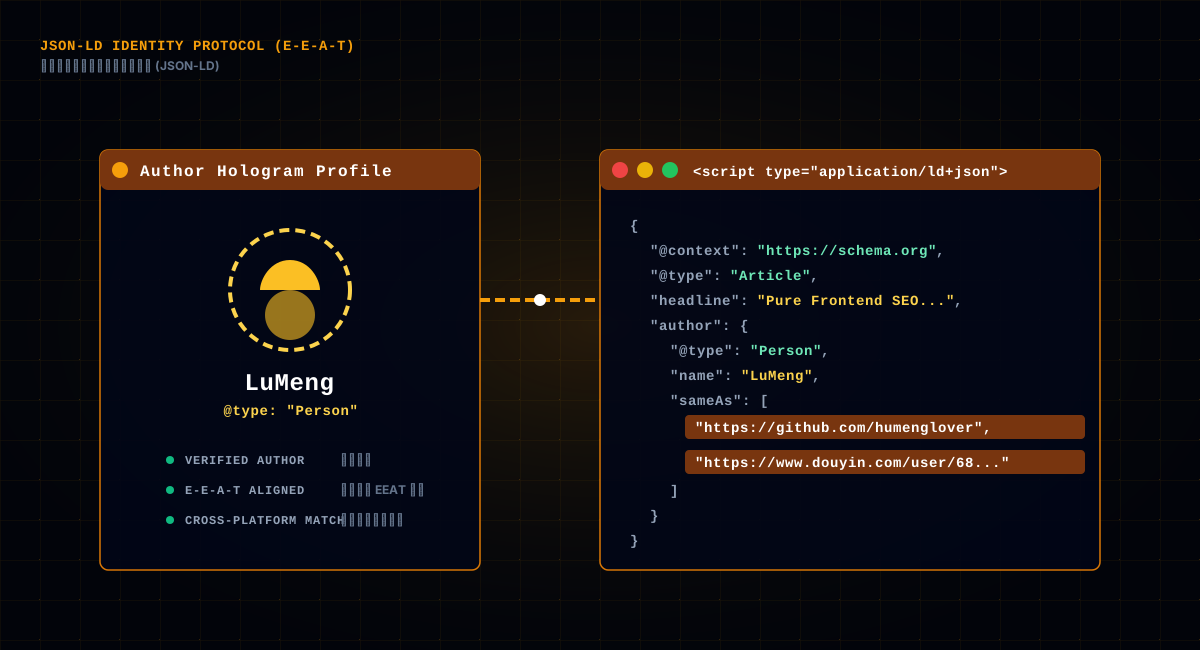
Body text alone isn't enough. Search engines like structured data — JSON-LD tells the engine "who wrote this article, when it was published, which site it belongs to." prerender.mjs generates an Article structure for every article:
const jsonLd = JSON.stringify({
  '@context': 'https://schema.org',
  '@type': 'Article',
  headline: article.title,
  description: article.desc,
  datePublished: article.date,
  url: `\${BASE_URL}/\${locale}\${path}`,
  author: {
    '@type': 'Person',
    name: 'LuMeng',
    url: 'https://github.com/humenglover',
    email: "mailto:shengqiangwang666{'@'}gmail.com",
    sameAs: ['https://github.com/humenglover', 'https://www.douyin.com/user/68316901625', ...],
  },
  publisher: { '@type': 'Organization', name: 'Yuemutuku', ... },
})
This pile of fields isn't filled in arbitrarily. Google has a concept called E-E-A-T (experience, expertise, authoritativeness, trust), and it tends to reward content where the author's identity can be confirmed. So the author here is described as a complete person — name, GitHub, Douyin, email — and the Contact page, the About page and the privacy policy all use the same email. The code comment says it: establish a machine-readable "author name ↔ email" mapping. When the engine sees consistent emails across pages, it's far more likely to confirm "this author is real."
This identity consistency is what most independent sites miss: the author name is one thing in articles, another on the About page, and the email changes everywhere — the engine can't line up any of it. Unified identity is a low-cost, high-return E-E-A-T move.
And someone will ask: does JSON-LD even matter? The honest answer is that it doesn't directly boost rankings, but it makes the engine understand your page — that this is an article, who wrote it, when it came out. Only after understanding do you qualify for featured snippets and rich-result spots with high visibility. For an indie developer, it's a ten-minute job with a stable long-term return.
SEO isn't about pushing every page at the search engine. Some pages should never be indexed — login, register, upload. These functional pages are worthless in search results and dilute your weight. Prerendering keeps a dedicated "do-not-index" list:
const NOINDEX_PATHS = new Set([
  '/add_picture', '/user/login', '/user/register',
  '/invite', '/creator/analytics', ...
])
const INDEX_META = '<meta name="robots" content="index,follow,max-image-preview:large">'
const NOINDEX_META = '<meta name="robots" content="noindex,nofollow">'

// when generating HTML, decide the robots directive by path
.replace(/<meta name="robots"[^>]*>\s*/g,
  NOINDEX_PATHS.has(path) ? NOINDEX_META : INDEX_META)
This logic has two layers. First, noindex tells the engine "don't index this page," but the page still gets static HTML and its own unique TDK — because routes have to be reachable, Nginx's try_files has to find the file, and a user visiting the login page can't hit a 404. Second, max-image-preview:large lets the engine show a large image preview in results — a real click-rate win for an image site.
"Which pages get indexed, which don't" is an easily-ignored strategic choice in SEO. Submitting the whole site for indexing looks fair, but it's really spending your limited crawl budget on login pages.
One more point people miss: noindex does not mean "don't generate the page." These functional pages still need to be accessible and still need unique TDK — you're just telling the engine "don't index." Generating HTML and forbidding indexing are two different things. Plenty of people hear "this page shouldn't be indexed" and promptly delete it from prerendering, only to give users a 404 — that's the real disaster. The prerender's coverage should be larger than "what should be indexed."
This site has Chinese and English. Multilingual SEO has a nuisance: the engine has to tell the "Chinese version" from the "English version," which relies on hreflang and canonical — and both need corresponding, independent URLs. generate-locale-html.mjs does exactly that — producing one homepage index.html per language:
// one per language, with each title/desc/H1 hard-coded
const zhDir = resolve(DIST, 'zh')
writeFileSync(resolve(zhDir, 'index.html'), localize(html, ZH), 'utf-8')
const enDir = resolve(DIST, 'en')
writeFileSync(resolve(enDir, 'index.html'), localize(html, EN), 'utf-8')
Paired with the Nginx rule (spelled out in the script's comment):
try_files $uri $uri/ /$1/index.html /index.html;
The rule means: visiting /zh/xxx, look for dist/zh/xxx first, and fall back to dist/zh/index.html if not found; /en/xxx falls back to the English homepage the same way. So /zh/ and /en/ are two independent URL spaces, each with its own lang, canonical and hreflang, and the engine can clearly see "this site has Chinese and English versions, and the mapping is as follows." The localize function is a pile of regex replacements — swapping the Chinese content in <html lang>, title, og, twitter, canonical and JSON-LD per language. Why regex instead of template replacement? To survive the hash file names Vite produces on every build — regex matches by structure, so no matter how the hash changes, it still lines up.
The mindset worth learning here: multilingual isn't just a translation problem, it's a routing-and-SEO problem. Giving each language its own URL prefix is the precondition for the engine to understand your multilingual site; sharing one URL and switching language via JS leaves the engine permanently confused.
One more detail: hreflang doesn't just have zh-CN and en-US — it also adds x-default, pointing at the default-language version. x-default tells the engine "when the user's language is neither Chinese nor English, give them this version," preventing it from mis-pairing because it can't find a suitable language. And the homepage canonical gets special treatment at the root path — /zh/'s canonical is /zh/, but the root index.html (the no-prefix fallback) gets its canonical rewritten to the domain root without a language prefix, so the root page and the Chinese homepage don't end up with two canonicals pointing at the same content.
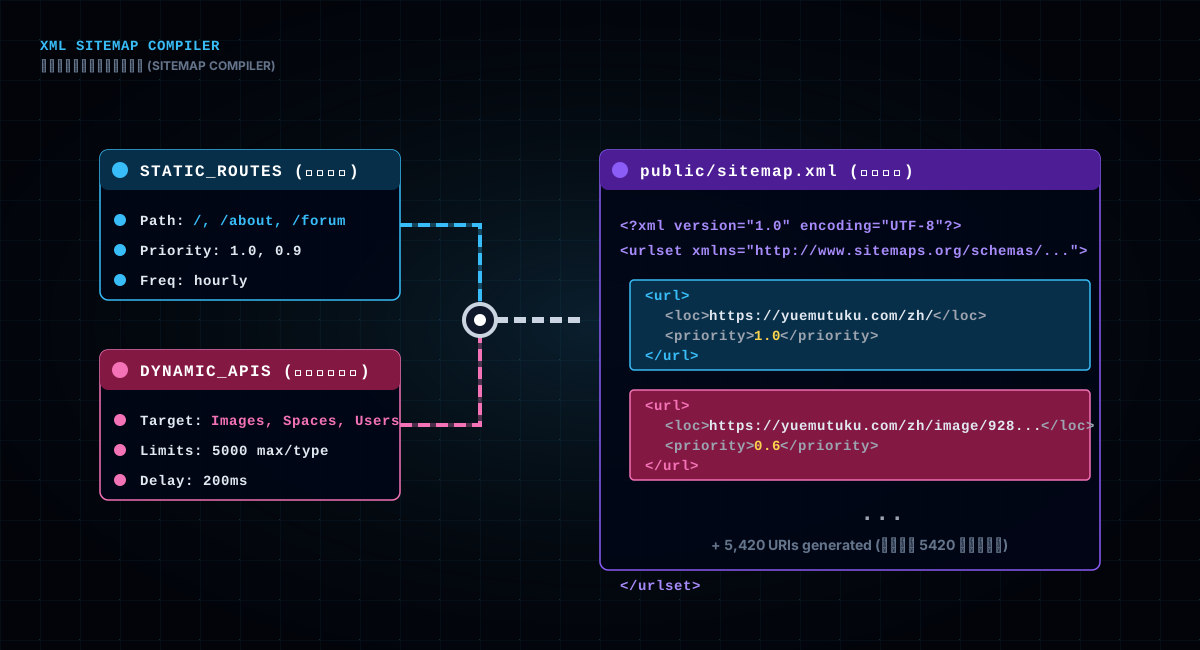
sitemap.xml is handing the engine a "site index," telling it which pages are worth crawling, how often they change, and how important they are. generate-sitemap.mjs builds it in three layers: static routes, guide articles, and dynamic content (images, spaces, users — pulled from the backend API).
In the static routes you can see a detail — every page carries a changefreq (update frequency) and priority:
const STATIC_ROUTES = [
  { path: '/', changefreq: 'hourly', priority: '1.0' },
  { path: '/forum', changefreq: 'hourly', priority: '0.9' },
  { path: '/ranking', changefreq: 'daily', priority: '0.8' },
  ...
]
The homepage hourly (updated hourly? The homepage doesn't actually change every hour, but the engine grants it a higher budget), the forum hourly, the leaderboard daily — these values aren't random. They tell the engine "how often this page's content changes, so how often you should come back and crawl it." priority is the relative weight; 1.0 is the most important homepage.
The dynamic part is more impressive: the script calls the backend API, pulls the URLs of images, spaces, users, posts and activities that actually exist, and writes them all into the sitemap. So even dynamically generated pages get indexed, and the script is meant to run "once a day" so fresh content reaches the sitemap promptly. With "static + dynamic all in the sitemap," the indexing foundation is solid.
Generation should be hooked into CI/CD and run once a day. Because the site's content is dynamic — the image a user uploaded today, the space created today, should be in the sitemap tomorrow so the engine knows. Without updates, the sitemap is a stale directory, and new content has to wait for the engine to discover it on its own, stretching the indexing cycle. Scheduling this script is the highest-value-per-cost action for "getting new content indexed fast," more effective than any manual submission.
Prerendering solves "what the crawler sees," but what runs in the user's browser is still the SPA. How does the SPA inject JSON-LD for dynamically generated pages (say, a picture detail page)? The answer is runtime injection, wrapped in a composable:
export function useStructuredData(data) {
  let scriptEl = null
  onMounted(() => {
    const initial = typeof data === 'function' ? data() : data
    scriptEl = injectStructuredData(initial)
    if (typeof data === 'function') {
      watchEffect(() => { scriptEl.textContent = JSON.stringify(data(), null, 2) })
    }
  })
  onUnmounted(() => { scriptEl?.parentNode?.removeChild(scriptEl) })
}
Usage is simple: useStructuredData(() => ({ '@type': 'Article', headline: article.title, ... })) in the component — on mount, the JSON-LD script goes into <head>; on unmount, it's cleaned up. That keeps structured data on dynamic pages maintained in real time. watchEffect makes the script content auto-update when the data changes — say the article title arrives asynchronously, and the JSON-LD refreshes with it.
One tool, two paths: static injection at build time for the crawler, dynamic injection at runtime for the browser. They complement each other, covering the full span of "static + dynamic pages."
The two paths share one trait: what's injected is content the page really shows, just in a different form. Don't fabricate a fake schema users never see just to "look like you have structured data" — that's the same kind of boundary-crossing as injecting body text.
Writing this far, I have to stop and face a question that can't be skipped: the body prerendering stuffs into #app is invisible to users (Vue replaces #app's contents on mount) but visible to crawlers. In the SEO world there's a word for this: cloaking — showing the search engine one thing and the user another, and it's cheating that Google explicitly forbids.
Does this scheme count as cloaking? Honestly, it sits in a gray zone. But there's one key distinction, one the code comment also stresses: what gets injected is real — static pages get the site's real description, article pages get the article's complete body. What the user and the crawler see is essentially the same content, just in different "presentation": the user sees the Vue-rendered interactive interface, the crawler reads the prerendered static version. This isn't "showing the crawler fake content," it's "showing the same true content two ways."
Why dare to do it? Because the engine's intent is "give users valuable content," and this body is content users genuinely read. The risk is that mechanical rules might misfire, which is why the comment notes "the injected content is the site's real description, not deceptive content" — a bottom line kept for ourselves, and a gesture of good faith to the engine.
There's no perfect answer to this trade-off. SSR can sidestep the controversy entirely, but it costs a server-side rendering architecture to maintain. Prerendering is a pragmatic balance between "indexing results" and "engineering complexity," and the price is honestly facing this gray zone.
At bottom, search-engine rules are written for "people trying to exploit the system," and your purpose is "let real content be read." As long as what's injected is real, complete, and identical to what users see, this scheme stands the straightest inside the gray zone. I keep one bottom line for myself: whatever is injected for crawlers must be content users can also see. Hold that line and prerendering is a tool; lose it and it's cheating. The difference between tool and cheating isn't in the tech — it's in the intent.
This SEO pipeline has hit enough potholes to fill a page. The most memorable ones:
Pothole 1: The template shipped its own canonical and hreflang. The index.html template originally carried fixed canonical and hreflang, and prerendering appended another set per page — so every page ended up with two canonicals and two og:titles. When the engine meets conflicting canonicals, it only trusts the first one it reads — the whole effort wasted. The fix: strip the template's own tags with a regex first, then uniformly append the per-page unique set. That's where the code's "eliminate the two og:title problem" comes from.
Pothole 2: Chinese leaking into English. The template's JSON-LD Organization description was hard-coded Chinese. If it weren't replaced when generating English pages, the /en/ pages' structured data would carry a Chinese description — odd to both the engine and users. The fix: replace the Organization description per language in prerendering — a class of pothole unique to multilingual sites.
Pothole 3: Images three levels deep. The prerendered HTML sat in three-levels-deep directories like dist/zh/guides/a1/, but images used absolute paths /guides/xxx. Initially, double-clicking a local file to verify showed all broken images. Switching to relative ../../../ fixed both local verification and live crawling. Lesson: prerendered HTML must consider path correctness when accessed from any depth.
Pothole 4: Backticks in the article's code blocks. The extractContentFromSource regex originally didn't handle backtick escapes; as soon as an article had a code block, the content got truncated at the first backtick. The fix was a regex that crosses over escapes, plus a reverse-unwrap pass. Writing these guide articles is itself an endless supply of test cases for that regex.
Pothole 5: The sitemap's request delay. The dynamic sitemap calls the backend API to pull hundreds or thousands of records; at first there was no throttling, and it hammered the backend until it squealed. Adding requestDelay: 200 (200ms between requests) and maxPerType: 5000 (cap each type at 5000 records) settled it. Don't let the directory you hand to search engines bring down your own backend.
Pothole 6: Title mismatch between prerender and SPA. After prerendering generates static HTML, Vue mounts in the user's browser and replaces <title> with the value the SPA runtime sets. If the two sides' title logic differs (say prerender uses the article title, runtime uses a different concatenation), you get "the crawler sees one title, the user sees another." Fix: unify the title source — both read from the same page-title table.
Pothole 7: Forgetting to re-run prerender. Edit an article's title or content, deploy directly, and find the live site still shows the old title — because prerendering is a build-time action and won't regenerate without re-running. This one has no technical content, it's a process problem: every content change requires re-running the full build:seo. Write it into your deploy pipeline; don't rely on memory.
Collected together, this scheme's core philosophy is four words: good enough and cheap.
No SSR, because a content community doesn't need a full server-side rendering architecture just for SEO; no headless browsers, because they're slow, fragile and expensive. Prerendering does one build-time action, writes the complete HTML into dist, and lets the crawler "have content the moment it fetches." It's not perfect — there's the gray-zone controversy, and a pile of multilingual, path and escaping details to babysit — but it solves the most lethal problem for an SPA: your content, search engines can now read.
If you're building an SPA and losing sleep over indexing, the combination in this article — "build-time prerendering + unique TDK per page + JSON-LD + sitemap" — is homework you can copy directly.
Three things to remember when you copy: the TDK per page must be unique, or it's as good as not doing it; what gets injected must be real, don't cross the line; the sitemap has to be updated on a schedule, don't let it go stale. Do those three and your SPA stops being an empty shell in the eyes of search engines. And one last mindset note: SEO isn't mysticism, and it isn't black magic — it's a chain of engineering actions that make "real content easier to understand." Prerendering, unique TDK, structured data, sitemap — at bottom they're the same thing: lowering the cost for search engines to understand your site. The lower the cost, the higher the chance your content gets read. It's that simple.
And the most important sentence, saved for last: don't let the crawler see an empty shell — show it what you actually wrote. The phrase "content is king" gets worn out in SEO circles, but prerendering was the first time I truly felt its weight — write the content well first, and leave the rest to engineering to deliver the message.