
The first busy night after the chat feature went live, ops sent an alert faster than users could complain: the WebSocket service's GC time was spiking, message latency had gone from tens of milliseconds to over two seconds, and individual connections were getting dropped. The logs showed several threads writing to the same WebSocketSession within the same second.
That's the most common way a chat architecture flips over: send to each connection directly. A message arrives, grab the session and broadcast. Looks innocent — but once concurrency climbs, problems cascade: multiple threads writing the same session out of order, throwing exceptions, blowing up the TCP buffer; objects littering everywhere filling up the young generation until GC chokes the service. Chat is exactly the kind of IO-heavy, high-concurrency scenario where all of these concentrate.
This article breaks down the scheme this project actually runs in production: WebSocket catches the connections, Disruptor digests the concurrency. How the frontend heartbeats, reconnects and keeps messages from being lost; how the backend uses a lock-free ring buffer to turn "concurrent broadcast" into "single-threaded consumption"; and how the barrage holds 60fps on a canvas. The code is the real thing, kept close to the source — no sanitized "teaching version." And this isn't a theory primer: every component here is something that was deployed, survived real traffic, and only then got written about — including the reasons that only became clear in hindsight. You'll find that a lot of the "whys" weren't thought through up front; they were forced out by production incidents.
Before any code, hold on to this chain — each section later unpacks one of its links:
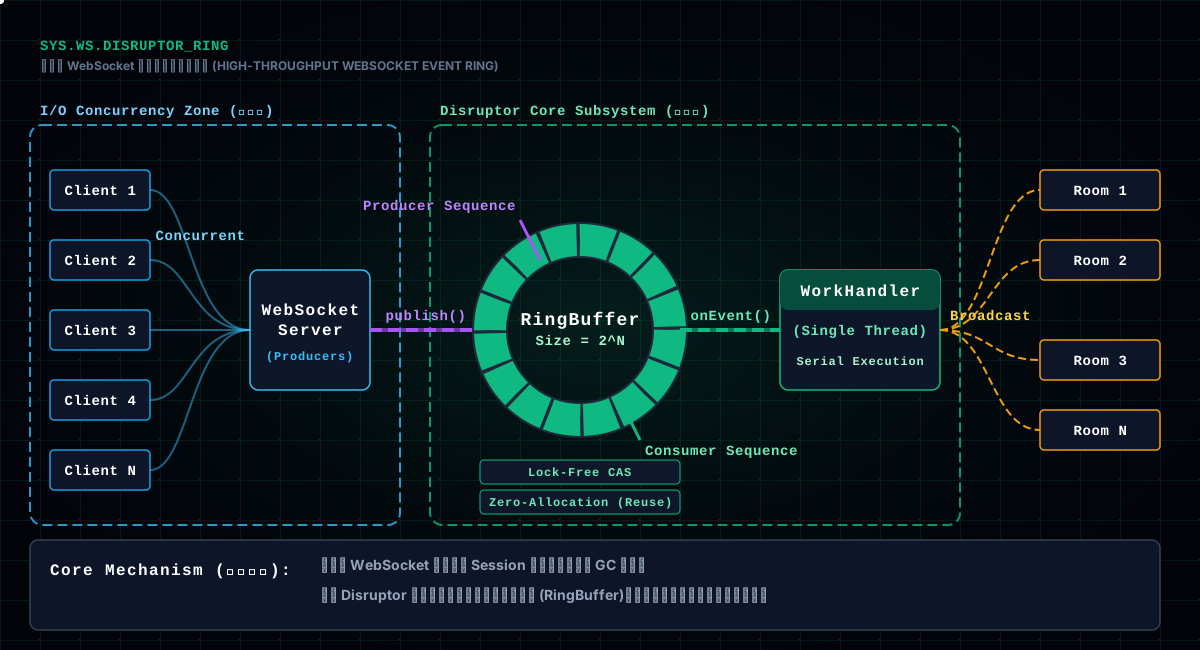
/api/ws/chat;ChatWebSocketServer.handleTextMessage parses the message, validates the fields, and decides the target (private chat / picture chat room / space chat);RingBuffer;handleXxxChatMessage: save to DB, fill in sender info, broadcast the message to every session still open in the target room;onmessage receives the broadcast and inserts the message into the list.The key moment is between step 3 and step 4: the producer only publishes; the real "process + broadcast" is serialized into a single thread. Why go around this way? Because WebSocketSession.sendMessage is not thread-safe — multiple threads writing the same session concurrently means out-of-order messages at best, an IllegalStateException that kills the connection at worst. Disruptor's value is taking the concurrent entrance where "anyone can shove a message in" and collapsing it into a serial exit where "only one is processed at a time."
Remember the architecture in one sentence: concurrent in, serial out.
"High throughput" here doesn't mean pushing the maximum messages per second. It means surviving a spike without crashing, scrambling, or dropping. Chat traffic is bursty — one event, one trending topic, and message volume can jump tenfold in an instant. What truly tests an architecture is that tenfold moment, not the everyday onefold. Disruptor's pre-allocation, single-threaded consumption and backpressure all exist to cover that moment.
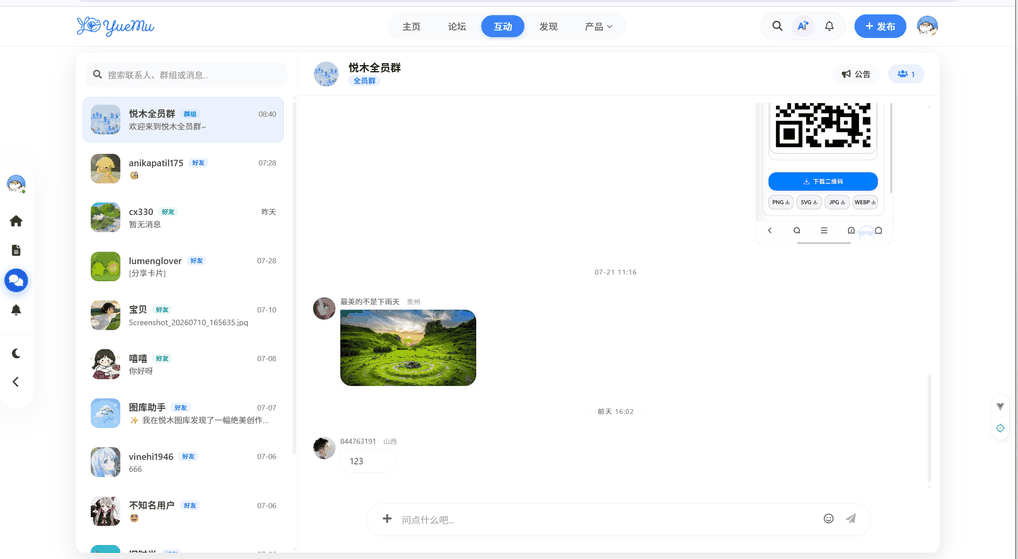 ▲ Fig: The chat room as the user sees it — from the input box to a string of bubbles, everything in the architecture eventually lands here
If you haven't met Disruptor, it's a high-performance queue open-sourced by the LMAX trading platform, famous for its "lock-free ring buffer." To see why it fits chat, answer one question first: in Java, for "producer-consumer," isn't there BlockingQueue?
There is, but BlockingQueue has two hard flaws under high concurrency. First, it's lock-based at its core (or CAS for ConcurrentLinkedQueue), and under heavy contention the lock-switching overhead is real. Second, it can't reuse objects — every event is freshly allocated, and once message volume climbs, the young-generation GC follows. Chat is precisely "high concurrency + a flood of tiny objects," and it hits both flaws squarely.
Disruptor takes a different route: pre-allocate a fixed-size ring array (bufferSize = 1024 * 256, i.e. 260,000+ slots), and all events exist in that array from the very beginning. To publish, the producer doesn't new an object — it takes a slot from the array and fills it in. When processing is done, clear the slot and the next cycle reuses it. Across the entire lifetime, not a single event object is newly allocated — GC pressure is pinned down directly.
That's Disruptor's first key design: object reuse through pre-allocation and clearing, not garbage collection.
The second key design is lock-freedom. The RingBuffer maintains two sequence numbers: the producer sequence and the consumer sequence. To grab the next available slot, the producer calls ringBuffer.next() — a CAS operation returning a sequence number. Then it fills in the data and finally calls ringBuffer.publish(sequence) to make the data visible to consumers. No locks, just CAS and a simple sequence comparison.
Let's run the numbers. bufferSize = 1024 * 256 is 262,144 slots; each ChatEvent holds a message, a session, a user and a few Longs — roughly one to two hundred bytes per object, so the whole ring buffer reserves a few dozen MB. That memory is one-time: allocated at startup, and never grows afterward no matter how dense the traffic. The contrast with BlockingQueue is intuitive: BlockingQueue does "use some, new some," with GC chasing after it; Disruptor does "buy it all at once," and everything after is zero-cost reuse. And why must bufferSize be a power of two? Because the ring array locates a slot with bit math — index = sequence & (bufferSize - 1) — and a power-of-two length is what lets a mask replace a modulo.
The config is a few short lines, but dense with meaning:
int bufferSize = 1024 * 256;
Disruptor<ChatEvent> disruptor = new Disruptor<>(
        ChatEvent::new,          // event factory: used to create objects at pre-allocation
        bufferSize,              // ring buffer size, must be a power of two
        ThreadFactoryBuilder.create().setNamePrefix("chatEventDisruptor").build()
);
disruptor.handleEventsWithWorkerPool(chatEventWorkHandler); // worker pool consumes
disruptor.start();
handleEventsWithWorkerPool deserves a closer look: it starts a worker thread pool, where threads divide the work — each event is handled by exactly one thread, never consumed twice. Here the pool actually has just one worker thread, so messages are strictly serialized. That's where "concurrent in, serial out" lands: no matter how many connections send at once, the one thread that actually does "save + broadcast" at any moment is singular, and a session is never written concurrently.
The producer ChatEventProducer.publishEvent is the standard Disruptor idiom, done in five steps:
public void publishEvent(ChatMessage chatMessage, WebSocketSession session,
        User user, Long targetId, Integer targetType) {
    RingBuffer<ChatEvent> ringBuffer = chatEventDisruptor.getRingBuffer();
    long sequence = ringBuffer.next();       // 1. grab a slot (CAS)
    try {
        ChatEvent event = ringBuffer.get(sequence); // 2. get the object in the slot
        event.setChatMessage(chatMessage);    // 3. fill it in
        event.setSession(session);
        event.setUser(user);
        event.setTargetId(targetId);
        event.setTargetType(targetType);
    } finally {
        ringBuffer.publish(sequence);        // 4. publish, visible to consumers
    }
}
Two details. First, ringBuffer.next() can block — if the ring buffer is full (the consumer can't keep up), the producer waits right here. That means Disruptor comes with backpressure built in: when messages pile up, it doesn't stuff them in forever until memory explodes; it makes the producer (i.e. the WebSocket message-handling thread) stop and wait. For a chat system that's a very reasonable trade-off — better to process messages a little slower than to blow up memory.
Second, the finally wrapping publish. This is Disruptor's iron rule: next() and publish() must always come in pairs. Even if an exception flies in between, publish has to run — otherwise the slot stays claimed, the ring buffer effectively shrinks, and eventually the whole event ring seizes. I've stepped in this one myself; the pitfalls section covers it in detail.
The event object itself is unremarkable — a set of fields plus a clear():
public class ChatEvent {
    private ChatMessage chatMessage;
    private WebSocketSession session;
    private User user;
    private Long targetId;
    private Integer targetType; // 1-private 2-picture room 3-space chat

    public void clear() {
        this.chatMessage = null;
        this.session = null;
        this.user = null;
        this.targetId = null;
        this.targetType = null;
    }
}
clear() is the key to object reuse: once an event is handled, clear its fields, so the next time this slot is reused it carries no residue from the previous event. Forget to clear, or miss a field, and it's data pollution at best, and at worst the previous user's message gets sent into the next user's room — a privacy incident.
The consumer ChatEventWorkHandler implements Disruptor's WorkHandler interface. This is where the pipeline actually does the work:
public class ChatEventWorkHandler implements WorkHandler<ChatEvent> {

    @Resource
    @Lazy
    private ChatWebSocketServer chatWebSocketServer;

    @Override
    public void onEvent(ChatEvent event) {
        try {
            ChatMessage chatMessage = event.getChatMessage();
            switch (event.getTargetType()) {
                case 1: // private chat
                    chatMessage.setPrivateChatId(event.getTargetId());
                    chatWebSocketServer.handlePrivateChatMessage(chatMessage, event.getSession());
                    break;
                case 2: // picture chat room
                    chatMessage.setPictureId(event.getTargetId());
                    chatWebSocketServer.handlePictureChatMessage(chatMessage, event.getSession());
                    break;
                case 3: // space chat
                    chatMessage.setSpaceId(event.getTargetId());
                    chatWebSocketServer.handleSpaceChatMessage(chatMessage, event.getSession());
                    break;
                default:
                    log.error("Unknown target type: {}", event.getTargetType());
            }
        } catch (Exception e) {
            log.error("Failed to handle chat message", e);
        } finally {
            event.clear(); // clear event data for ring buffer reuse
        }
    }
}
The @Lazy annotation is worth noting. ChatWebSocketServer and ChatEventWorkHandler depend on each other; without @Lazy, Spring throws a circular-dependency error while creating the beans. @Lazy means: don't rush to inject the other at startup, resolve it only when it's actually needed. It's a common Spring trick for circular dependencies, at the cost of a slightly slower first call (lazy resolution), which doesn't matter for a low-frequency startup like chat.
The real broadcast logic lives in handleXxxChatMessage. Space chat as an example:
private void sendToSpaceRoom(ChatMessage chatMessage) throws IOException {
    Set<WebSocketSession> sessions = spaceSessions.get(chatMessage.getSpaceId());
    if (sessions != null) {
        String messageStr = webSocketObjectMapper.writeValueAsString(chatMessage);
        for (WebSocketSession session : sessions) {
            if (session.isOpen()) {
                session.sendMessage(new TextMessage(messageStr));
            }
        }
    }
}
The flow: save the message → fillMessageInfo fills in the sender's avatar and nickname → serialize the whole message to JSON → iterate the room's session set and send one by one. Because the entire onEvent runs on the same Disruptor worker thread, these sendMessage calls are naturally serial — two threads never write the same session.
One thing is easy to overlook: why save to the database before broadcasting? Because chat history must be traceable — refreshing the page or re-entering the room pulls the history back out. So every message is "save first, broadcast second," and the order can't be reversed: if the save fails, you should never broadcast a message that doesn't exist in the database and vanishes on refresh.
Chat isn't a single room. This system has four chat scenarios at once: private chat, picture chat rooms, space chat, plus the notion of "a user being online globally." Correspondingly, the backend maintains four ConcurrentHashMaps:
private static final Map<Long, WebSocketSession> userSessions = new ConcurrentHashMap<>();
private static final Map<Long, Set<WebSocketSession>> pictureSessions = new ConcurrentHashMap<>();
private static final Map<Long, Set<WebSocketSession>> spaceSessions = new ConcurrentHashMap<>();
private static final Map<Long, Set<WebSocketSession>> privateChatSessions = new ConcurrentHashMap<>();
userSessions maps "user ID → their session," used to judge whether a user is online at all; the other three map "room ID → the set of sessions in that room," and broadcasting is just iterating the matching set. The sets come from ConcurrentHashMap.newKeySet(), which is concurrency-safe — adding and removing sessions won't blow up.
When a connection is established, afterConnectionEstablished decides which map to put the session into based on the parameters carried in the handshake, and does a few things along the way: send private-chat history, broadcast an "online users" list to the room. When a connection closes, afterConnectionClosed removes the session from its set, deletes the whole room entry if the set empties, and broadcasts an online-user update — so the online count someone else sees doesn't keep a departed user hanging around.
These maps are static, i.e. they live on the JVM. That raises chat architecture's classic question: what happens with multiple instances? This project is currently single-instance, so static maps are fine. The moment you scale horizontally, you have to move the session registry into shared storage like Redis, or use STOMP with a message broker. It's the boundary of this approach — keep it in mind, don't discover static maps don't work only after you've gone multi-instance.
Before a session ever enters these maps, there's one more gate: the handshake. WsHandshakeInterceptor is the final barrier before a connection is created, and it does three things. First, login check — userService.isLogin(httpRequest) fetches the current logged-in user; if there's none, reject the handshake, return false, and the connection never exists. Note it uses isLogin, not getLoginUser, because the latter throws when unauthenticated, and an exception inside the handshake flow turns this handshake into a 500; isLogin returning null lets you reject gracefully.
Second, parse the room parameters. The handshake URL carries pictureId, spaceId and privateChatId; the interceptor parses them into Longs and stuffs them into the session's attributes, which afterConnectionEstablished later uses to decide which map the session enters. A malformed parameter (say, a non-numeric value) rejects the handshake outright — a first line of defense against people shoving arbitrary parameters in.
Third, resolve the real IP. getClientIpAddress walks a proxy-header chain: X-Forwarded-For → Proxy-Client-IP → WL-Proxy-Client-IP → HTTP_CLIENT_IP → HTTP_X_FORWARDED_FOR, finally falling back to getRemoteAddr. Because the server usually sits behind Nginx, getRemoteAddr always returns Nginx's IP — the real client IP has to be dug out of the proxy headers. One more detail: the IPv6 loopback 0:0:0:0:0:0:0:1 is normalized to 127.0.0.1, or both logs and IP geolocation trip. This IP goes into the attributes and is later used for login location records and abuse control.
One side note: not every WebSocket goes through this interceptor — the batch-upload progress and AI-token-usage endpoints skip it, because their handshakes only need the userId on the URL and no login-state check. Handshake policy should be designed per endpoint, not one-size-fits-all.
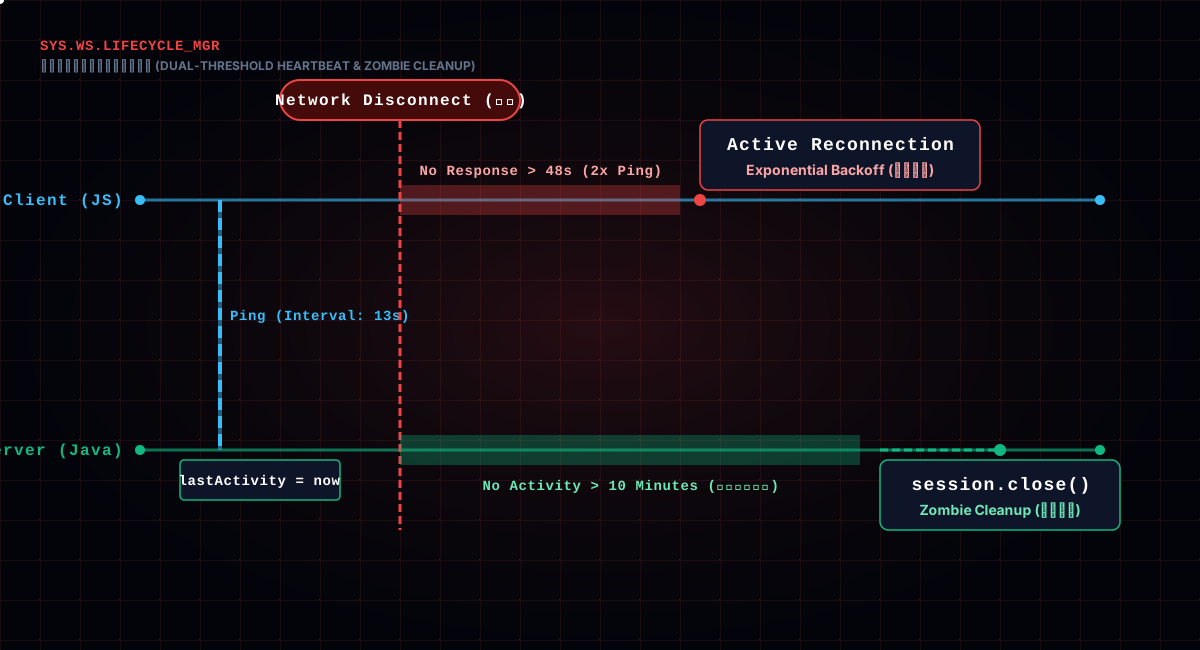
A WebSocket connection looks like a long-lived connection, but TCP long-connections don't guarantee "alive" — a phone switching networks, a proxy cutting the line, a router cleaning up, and the connection goes "half-dead": neither side knows the other is gone. So you have to probe liveness yourself.
The backend runs a background thread for heartbeat checks:
private static final long ACTIVITY_TIMEOUT = 10 * 60 * 1000; // 10-minute timeout
private static final long HEARTBEAT_INTERVAL = 13 * 1000;    // 13-second heartbeat

private void checkHeartbeats() {
    while (true) {
        try {
            Thread.sleep(HEARTBEAT_INTERVAL);
            long now = System.currentTimeMillis();
            lastActivityTime.entrySet().removeIf(entry -> {
                WebSocketSession session = entry.getKey();
                long inactiveTime = now - entry.getValue();
                if (inactiveTime > ACTIVITY_TIMEOUT) {
                    session.close();      // timed out, close it
                    return true;
                }
                return false;
            });
        } catch (InterruptedException e) {
            Thread.currentThread().interrupt();
            break;
        }
    }
}
Plain but effective: each session records its "last active time," the background thread scans every 13 seconds, and anyone quiet for over 10 minutes gets closed. Any message from the frontend (heartbeats included) refreshes that time, so as long as the frontend is alive, the session is never sentenced.
The subtle point: why 10 minutes and not shorter? Because the backend distinguishes "heartbeat response" from "activity" — the actual disconnect judgment is the frontend proactively reconnecting after missing heartbeat responses (covered next section); the backend's 10-minute timeout is just a backstop against zombie connections where "the frontend died but the connection didn't" holding resources forever. Each threshold minds its own lane: the frontend judges liveness at 24 seconds, the backend backstops at 10 minutes, and neither mistakenly kills the other's.
The heartbeat thread also has an easy-to-miss value: it does observability as a side effect. During the scan, lastActivityTime first logs a separate line for sessions idle over 5 minutes (half the timeout) — "user X idle for Y minutes" — so ops can spot abnormal connections early; only at 10 minutes does it actually close. The heartbeat keeps the connection alive and, on the side, hands you a health sheet of "who is AFK," so you don't have to add logging on the spot when troubleshooting. A lot of systems skip this proactive observability, but when something actually breaks, it's the thing that saves you.
The frontend ChatWebSocket class wraps heartbeat and reconnect into one complete mechanism. Worth opening up. First, the heartbeat:
this.heartbeatTimer = window.setInterval(() => {
  if (this.destroyed) { clearInterval(this.heartbeatTimer); return }

  if (!this.socket || this.socket.readyState !== WebSocket.OPEN) return

  // no heartbeat response for twice the interval → connection is probably dead
  if (this.lastHeartbeatResponse > 0 &&
      Date.now() - this.lastHeartbeatResponse > this.heartbeatInterval * 2 &&
      !this.connecting) {
    this.reconnect()
    return
  }

  this.socket.send(JSON.stringify({ type: 'HEARTBEAT', time }))
}, this.heartbeatInterval)
The frontend sends a heartbeat every 24 seconds; lastHeartbeatResponse records the last time a response came back. If 48 seconds (twice the interval) pass without a response, it judges the connection dead and triggers a reconnect. That "twice the interval" check is critical — a single dropped packet shouldn't trigger a reconnect; only a whole cycle without a response counts as truly dead, avoiding a reconnect storm during network jitter.
Reconnect uses exponential backoff:
if (this.reconnectAttempts < this.maxReconnectAttempts) {
  setTimeout(() => {
    this.reconnectAttempts++
    this.reconnectTimeout *= 2 // exponential backoff: 1s → 2s → 4s → 8s → 16s
    this.connect()
  }, this.reconnectTimeout)
}
At most 5 attempts, the wait doubling from 1 second each time. The point of exponential backoff: network recovery takes time. If you retry immediately after every failure, you'll just hammer the server's handshake endpoint, and the retry is itself likely to fail. Wait 1 second, then 2, then 4 — give it a recovery window, and give yourself some breathing room.
The heartbeat only solves "the connection is alive." A trickier problem appears: if the connection happens to drop, what happens to the message the user just sent? Dropping it outright is the worst outcome — the user clearly pressed send, and the message vanishes. That's the cardinal sin of a chat product.
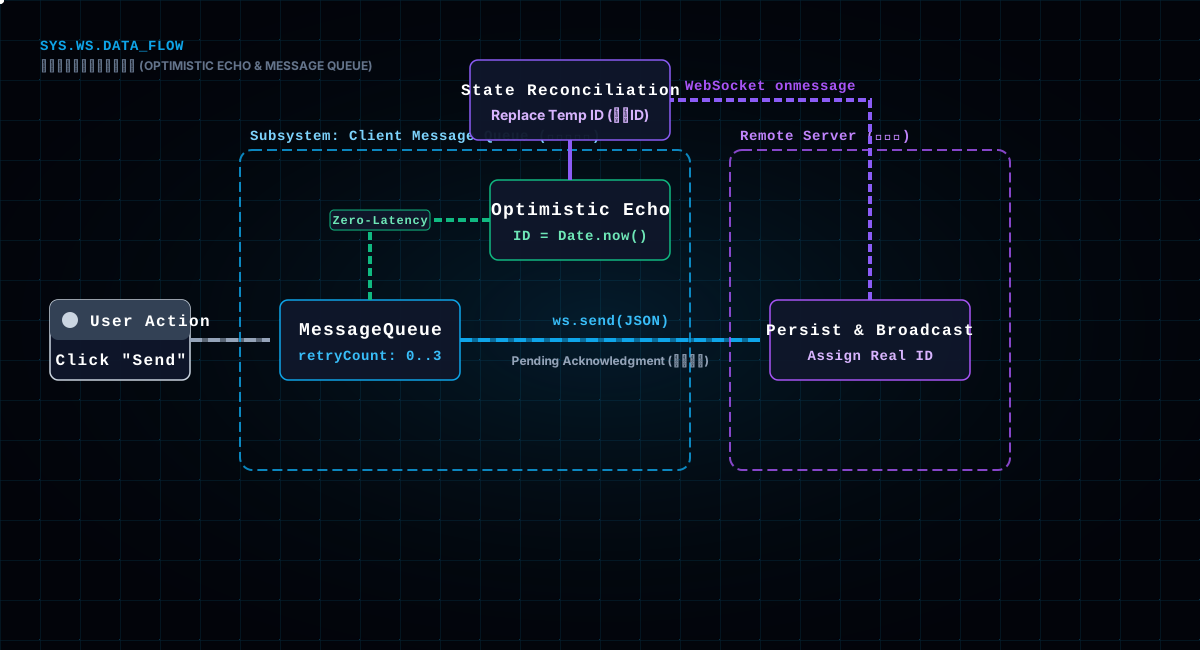
The frontend's answer is a message queue: enqueue before sending, actually transmit only when connected:
// add the message to the queue
this.messageQueue.push({ message: processedMessage, retryCount: 0, timestamp: Date.now() })
this.processMessageQueue()
processMessageQueue is a loop with retries: if the connection isn't ready, wait for reconnect and retry up to 3 times (2 seconds apart) before giving up; once connected, send immediately. And there's a cleverer detail — optimistic echo:
// on successful send, trigger a local message event immediately, don't wait for the server
if (item.message.type === 1 && item.message.content) {
  this.triggerEvent('message', {
    type: 'message',
    message: {
      ...item.message,
      id: Date.now().toString(),  // temporary ID
      sender: useLoginUserStore().loginUser
    }
  })
}
In other words: the moment the user presses send, the message instantly appears in their own conversation list with a local temporary ID; when the server's broadcast comes back, it's replaced with the server's real message. This experience optimization is crucial — if you waited for server confirmation, a slightly slow network would make the user feel it "stuck" or "never sent," while optimistic echo gives zero-latency feedback that sending succeeded. The cost is switching between the temporary ID and the server ID, plus deleting the optimistic echo in the extreme case where the message ultimately fails to send.
Taken together, "queue + retry + optimistic echo" is an honest effort to guarantee: if the user sent it, the message will almost certainly arrive; even under network fluctuation, it's late, not lost.
Now glance at the receiving end. ChatWebSocket keeps an event-subscription map eventHandlers, where on(type, handler) registers listeners and triggerEvent(type, data) fans the message out to every subscriber. Inside onmessage, the first thing it does is check whether it's a heartbeat response — if so, update lastHeartbeatResponse and return without dispatching further; otherwise throw the message to the message event. The benefit of this publish-subscribe model is decoupling: the chat page, the unread badge, and the sound alert each subscribe to their own, never interfering; adding a new message type doesn't touch the connection class, just a new handler.
A fine-grained design detail: when sending, it normalizes the message's id, messageId and pictureId to strings. Because JSON mixes numbers and strings casually, and the backend has to guess the type (Integer or Long or String), the frontend unifying to strings first avoids a pile of type-inference potholes.
Chat isn't only chat rooms — there's also a "chat list," conversations on the left, bubbles on the right. The list page needs to update unread counts and conversation ordering in real time, so it opens a separate /api/ws/chat-list connection using ChatListWebSocket, which is a singleton:
private static instance: ChatListWebSocket | null = null
private constructor() {}
public static getInstance(): ChatListWebSocket {
  if (!ChatListWebSocket.instance) {
    ChatListWebSocket.instance = new ChatListWebSocket()
  }
  return ChatListWebSocket.instance
}
Why a singleton? Because the chat list is global — no matter which page you're on, unread counts have to update in real time. If every page newed up a connection, you'd have a pile of duplicate WebSockets spinning idle, and the server would maintain a pile of duplicate sessions. The singleton guarantees exactly one chat-list connection for the whole site, and everyone who needs data goes through it.
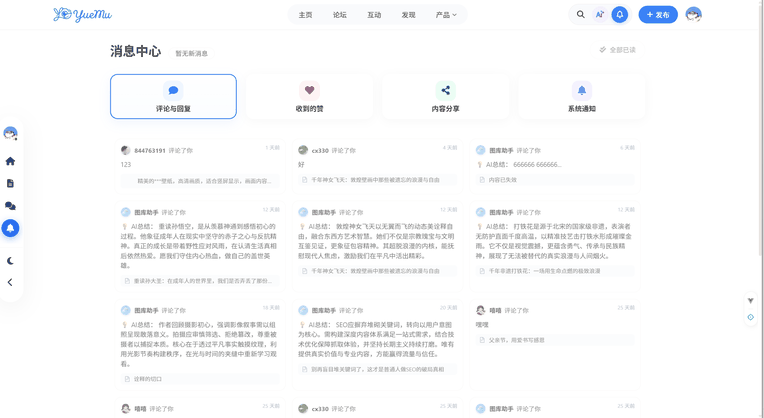 ▲ Fig: The message center — unread counts, notifications and conversations all refresh in real time through that one global WebSocket
The unread-count update has a race-handling detail, written plainly in a code comment:
public requestUnreadCounts(): void {
  // add a 500ms delay to avoid the race window of the backend's async DB/cache transaction commit
  setTimeout(() => {
    this.sendMessage({ type: 'REQUEST_UNREAD_COUNTS' })
  }, 500)
}
Right after sending a message, if you immediately request the unread count, the backend's message may not have committed its transaction yet, and the query comes back one short. That 500ms delay was bought with blood: without it, the unread count intermittently "off by one," looking like a bug but not reproducing every time — the most tormenting kind of problem.
Barrage and chat messages are two completely different rendering worlds. Chat messages are a DOM list; barrage is a canvas overlay — because tens or hundreds of barrages have to glide at once, and DOM would choke into a slideshow. Only canvas holds 60fps.
The core of barrage motion is two lines:
// speed = viewport width / duration, so crossing time is consistent across screens
speed: (viewportWidth.value + 400) / (barrageSpeed.value / 1000)

// each frame: position moves by time delta
barrage.currentX -= barrage.speed * deltaTime
animationFrameId = requestAnimationFrame(updateBarragePositions)
The first line is key: the barrage's "speed" isn't plucked from thin air — it's viewport width divided by duration. That way the same barrage takes the same time to cross the screen on a narrow phone and a wide desktop — the visual rhythm is consistent, no "flies fast on mobile, crawls on desktop." The +400 leaves room for the barrage's own width.
The second line is standard animation practice: requestAnimationFrame calls back every frame, position subtracts "speed × frame interval," corrected by deltaTime (the real frame interval). Why deltaTime instead of plain x -= speed? Because framerate isn't constant — when it drops to 30fps, without correction the barrage moves at half speed and looks stuttery. With deltaTime, no matter the framerate, the per-frame distance converts to the same time displacement, and the animation is uniform.
Canvas barrage has a few more detail chores. Lane assignment: split the screen vertically into lanes by barrage height, and new barrages prefer the emptiest lane, avoiding a wall of overlapping text. Collision detection: check whether a new barrage would hit one gliding in the same lane, and if so, switch lanes or nudge the speed. Recycling: once a barrage's x drifts past the left edge, remove it from the active list so the next frame doesn't draw it — without recycling, the list grows forever, each frame draws more and more, and the framerate sinks.
One thing every canvas barrage must respect: text-drawing cost. Each barrage calls fillText once per frame; dozens of barrages is dozens of draws. Keep all barrages on the same font config so the font isn't re-parsed every draw; hoisting the font string into a constant saves visibly noticeable drawing overhead. The skeleton is those two lines — the speed formula and the frame loop — and everything else is working on top of that skeleton.
Hidden inside this chat system is an AI assistant. Users @-mention @悦目小助手 in the public space and the AI replies asynchronously. An AI reply is an expensive operation (it calls an external model API), and only one AI can be replying at a time, or things get scrambled. So it runs on its own dedicated lane:
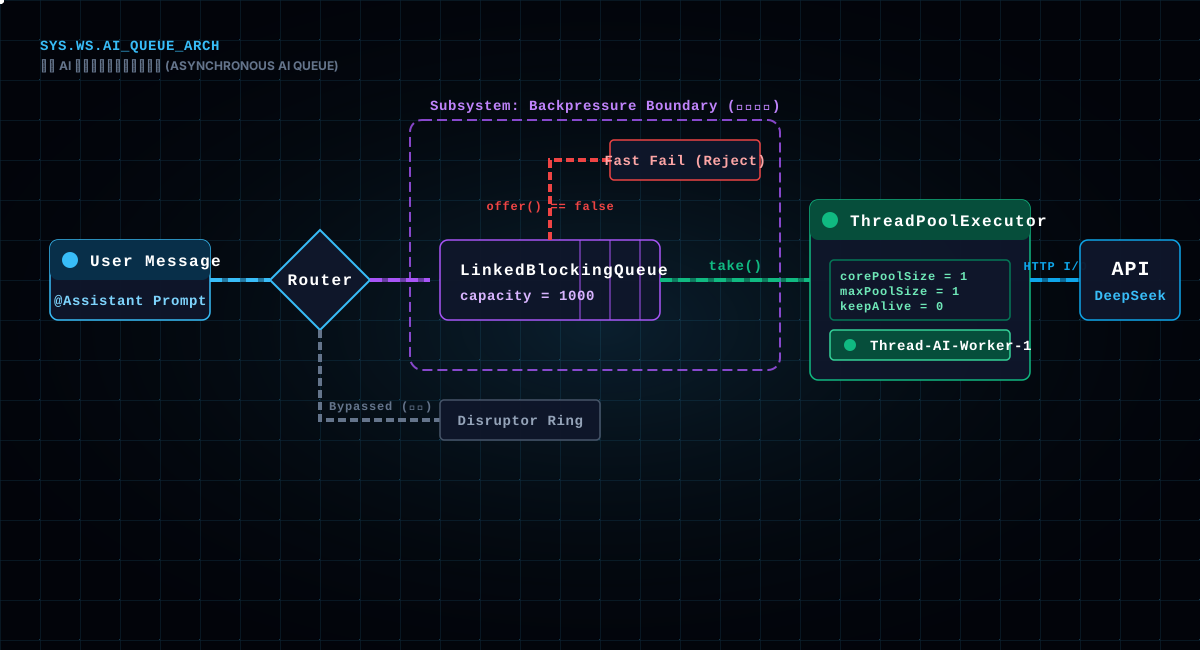
private final LinkedBlockingQueue<AIMessageTask> aiMessageQueue = new LinkedBlockingQueue<>(1000);
private final ThreadPoolExecutor aiMessageExecutor = new ThreadPoolExecutor(
        1, 1, 0L, TimeUnit.MILLISECONDS, new LinkedBlockingQueue<>(), ...);
A single-core thread pool plus a blocking queue of capacity 1000: AI questions enqueue first, then one thread processes them one by one, guaranteeing "only one AI thinking at a time"; when the queue is full, offer returns false and the assistant replies "sorry, I'm a bit busy" instead of piling up until memory explodes. This design is cut from the same cloth as Disruptor's backpressure — for requests you can't keep up with, refuse rather than crash the system.
Interestingly, AI messages don't go through Disruptor — they get their own queue. Why? Because an AI reply's "unit cost" is high (one external API call can take hundreds of milliseconds to seconds), and its real-time requirements are completely different from ordinary chat. Pulling it out on its own is so that one sluggish AI call can't clog the ordinary broadcast channel — ordinary messages need millisecond latency, the AI can wait, and the two shouldn't fight over the same thread.
The single thread also has a deeper meaning: it preserves order. AI replies are context-dependent; if two questions trigger two replies at once and the order scrambles, the conversation the user sees stops making sense. A single-threaded queue naturally guarantees "first asked, first answered," with no extra locks or sorting. While deepSeekService.generateAssistantResponse is running, the thread is occupied and later questions line up — for a chat product, users are more patient waiting for an AI reply than for an ordinary message, so this serialization is acceptable.
The full-queue handling deserves a mention too: when aiMessageQueue.offer returns false, the assistant directly replies "sorry, I'm a bit busy, please ask me again later." That isn't laziness — it's preventing an avalanche of "requests piling up → memory explosion → the whole chat service goes down." Better to refuse new requests than to let one AI feature take down the entire site.
This pipeline has hit enough potholes since launch to fill a page. The most representative ones:
Pothole 1: next() and publish() must be paired. When I first wrote the producer, an exception fired in the middle of the try block, publish never ran, and the slot stayed claimed. The ring buffer is fixed-size; one slot held forever means one fewer available, and once messages piled up, every producer froze on ringBuffer.next(). The symptom was "the system didn't crash, but messages completely stopped moving," and it took a long time to trace. So publish must go in finally — it's Disruptor's lifeline.
Pothole 2: event.clear() missing a field. Event objects are reused; if a field isn't cleared in clear(), the next event reusing that slot carries the previous event's data. We hit it once: a field wasn't set on some branches, and intermittently "the previous person's message ended up on the next person's head" — a horror scenario. Since then, whatever clear() clears, set must cover; I compare them field by field while writing code.
Pothole 3: The optimistic echo's temporary ID. Locally Date.now() serves as the temporary ID, replaced when the server's broadcast returns. The trouble is in that "replace" step: if the message comes back especially fast, the render adds the temporary one and then the server one — the same message shown twice. The fix: when a server message arrives, first look up the list by temporary ID; replace if found, only append if not. This kind of ID-mapping pothole only surfaces under high concurrency; single-machine testing never reveals it.
Pothole 4: The timing of heartbeat and reconnect. Originally the heartbeat interval was too short (5 seconds); a single network blip triggered a reconnect, and the reconnect itself failed the handshake, forming a "reconnect storm" that saturated the server's handshake threads. Later the interval was lengthened to 24 seconds, the "no response for twice the interval" check was added, and exponential backoff throttled the rate — only then did it settle. The lesson: heartbeat parameters aren't "the more frequent the better"; you have to account for the granularity of network jitter.
Pothole 5: Barrage framerate correction. Early on the barrage was x -= speed directly, and on low-framerate devices it drifted slower and slower until nearly frozen. After switching to speed * deltaTime, the speed is consistent at any framerate. This one taught me: canvas animation must always be based on time delta, not frame delta.
Pothole 6: The illusion of online counts. Early on, when broadcasting online users, the code serialized the entire User object from the session and sent it, and sensitive fields like phone numbers and emails leaked out through the online list. Later it switched to safeUser — picking only display fields like id, nickname and avatar, and assembling a new object before sending. The lesson: anything going outward needs its own "external view"; never serialize a database entity directly.
Pothole 7: Duplicate messages after reconnect. After a successful reconnect, the frontend requests history again, but the optimistic-echo local messages are still in the list, and the two pile up — "the same message shown twice." The fix is deduplicating history by message ID on reconnect, skipping what's already local. This kind of idempotency issue is nearly guaranteed in any system where "local state + server state" coexist.
Recall is the most-used and most-overlooked chat feature. This project's rules: you can only recall your own messages, and only within 60 seconds. The frontend sends a RECALL message with a messageId; the backend's handleRecallMessage handles it.
The core validation is a triple: does the message exist, is it yours, has 60 seconds passed — reject if any of the three fails. The third one especially; the 60-second window is a product decision: too short and a mistaken send can't be saved; too long and the other side has already read it, making a recall feel creepy.
After validation, the backend doesn't delete the message — it changes the content to "message recalled" and updates it. Why keep rather than delete? Because chat records need auditability; deleted means gone with no evidence. Then it broadcasts the recall notice to the whole room, and every online session that receives RECALL replaces the corresponding bubble with "message recalled."
Note that recall does not go through Disruptor — it executes synchronously in the WebSocket message-handling thread. Because recall is a low-frequency operation that doesn't need high throughput, and it reads, updates, then broadcasts, Disruptor or not makes no difference. This also shows: Disruptor is built for "high-concurrency broadcast," not every message needs to go in — choose by scenario.
When a chat window opens, it loads only the most recent 20 messages. To see older ones, the frontend sends a loadMore message with the current page number, and the backend's handleLoadMoreMessage fetches the next page.
The "20 per page + pagination" design deserves mention: the chat message table grows without bound; pulling everything at once is slow, memory-hungry, and the frontend render chokes. Twenty per page is a compromise — enough to fill the chat window's visible area, not so much that loading drags.
A numeric-conversion detail: page, pictureId, spaceId from the frontend can be numbers or strings, and the backend code has a pile of instanceof Integer / Long / String three-way conversions. It looks verbose, but it's a necessary defense in real projects — numeric types shift around in cross-language JSON serialization, and hard-coding one type eventually flips the car.
Pagination also returns a hasMore flag so the frontend knows whether it can keep scrolling up; at the bottom it shows "no earlier messages." This flag is the easiest to forget: without it, the frontend never knows whether to keep loading and will request forever.
The top of a chat room usually shows "xx online." Where does that number come from? On connection, and whenever someone joins or leaves, the backend broadcasts an onlineUsers message, and the frontend subscribes to that type to update the count and list.
For space chat, the logic is a bit more involved: a space has a member list, and the people online are only part of it. So broadcastOnlineUsers computes two numbers — online users (currently connected) and offline users (total members minus online). Offline users are derived like this:
List<User> allMembers = chatMessageService.getSpaceMembers(spaceId);
Set<User> offlineUsers = new HashSet<>();
for (User member : allMembers) {
    boolean isOnline = onlineUsers.stream()
            .anyMatch(u -> u.getId().equals(member.getId()));
    if (!isOnline) offlineUsers.add(member);
}
A performance concern worth mentioning: onlineUsers.stream().anyMatch linearly scans the online list for every member, making it O(n×m) with many members and many online. Small datasets are fine, but in principle you could first convert online users to a Set<Long> and use contains, dropping it to O(n+m). Real projects often ship "good enough" first and optimize these small spots later, but you should still know it's there.
Also, online users are sanitized before being sent — only display fields like id, nickname and avatar are picked out and reassembled into a new object, never the whole User entity. That's the "external view" from Pothole 6.
Looking back over the whole pipeline, it reduces to three words:
Lock-free. Disruptor replaces locks with a pre-allocated CAS ring buffer and replaces garbage collection with object reuse, pinning down both concurrency and GC at the foundation.
Serial. No matter how many connections send at once, the only thread that saves and broadcasts is that single Disruptor worker — a session is never written concurrently. It's the most central move of the whole design.
Heartbeat. The frontend judges liveness at 24 seconds, reconnects with exponential backoff, and the queue keeps messages from being lost; the backend scans every 13 seconds and backstops zombie connections at 10 minutes. Front and back, they take "connections break" — an inevitability — and make it something users barely notice.
There's one more point this architecture doesn't say out loud: it locks the complexity in a cage. The frontend handles heartbeat, reconnect, queue and optimistic echo; the backend handles four session maps, Disruptor, a heartbeat thread and the AI queue — no single piece is hard, but keeping them working together without fighting is. Disruptor locks the backend's most dangerous "concurrent session writes" into a single-threaded cage; the frontend catches the most dangerous "messages get lost" with a queue; everything else is patching around the cage's perimeter.
And a candid closing note: Disruptor, on its own, is a somewhat niche, slightly show-off component. But placed in the chat scenario, it solves exactly the most lethal problem — "concurrent session writes" — and solves it cleanly: not a "works" propped up by locks, but a "won't fail" chosen by architecture. That's probably what selection means: not hunting for the trendiest wheel, but for the answer that fits the problem best.
If your chat system ever flips over on concurrency, come back to this article and you'll likely find the matching section. And if you're writing a chat feature yourself, first ask yourself: my messages — is each thread sending on its own, or are they serialized before sending?